docssetupnode shell ssm
Node shell (SSM)
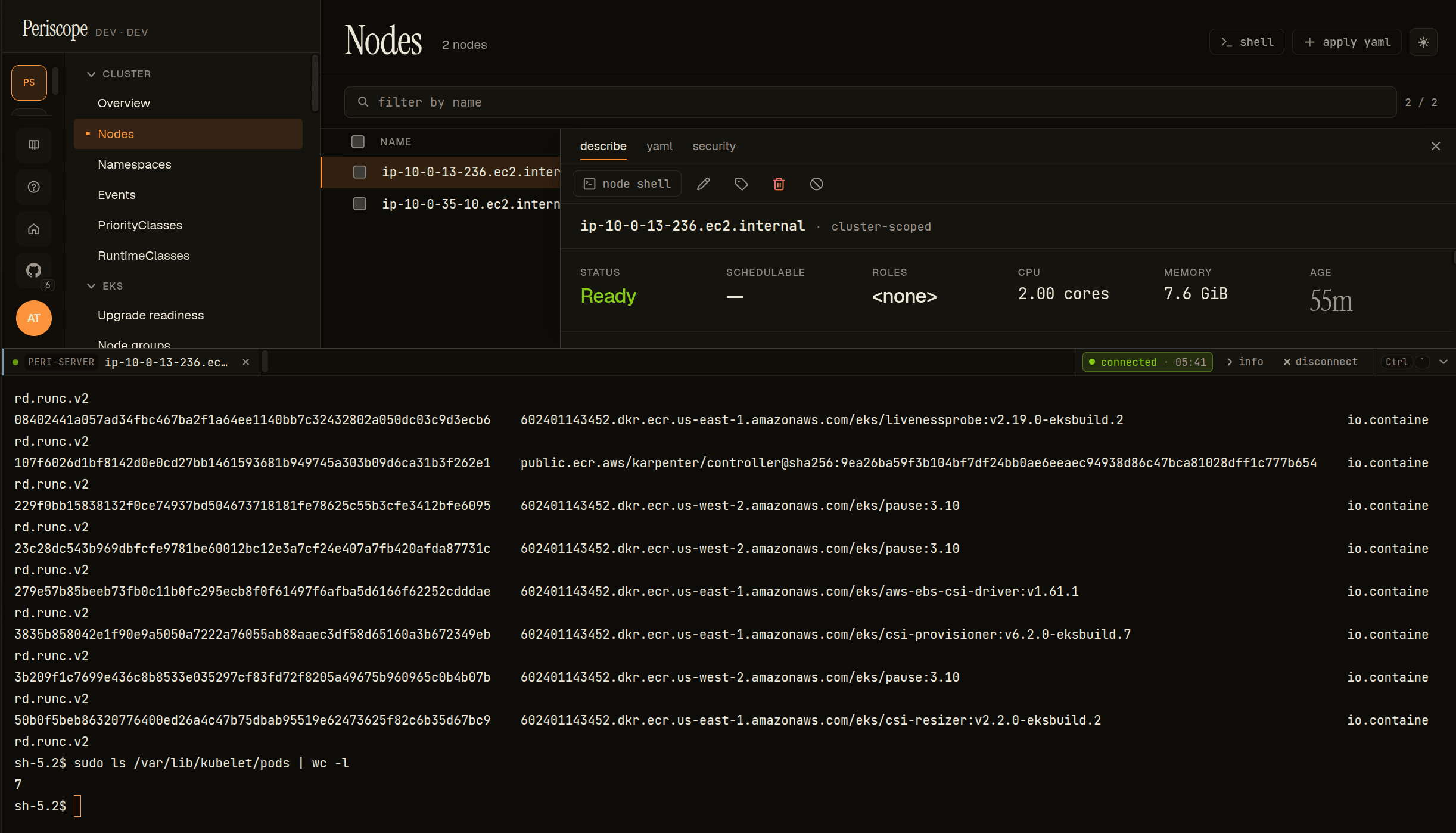
Periscope can open an in-browser shell onto the EC2 host behind a Kubernetes node — for debugging kubelet, journald, containerd, or EBS-mounted volumes — without leaving the dashboard and without an SSH key or a basti…
Periscope can open an in-browser shell onto the EC2 host behind a Kubernetes node — for debugging kubelet, journald, containerd, or EBS-mounted volumes — without leaving the dashboard and without an SSH key or a bastion. The Node shell button on the node detail page opens an AWS Systems Manager (SSM) Session Manager session, streamed to an xterm.js terminal.
The load-bearing property is per-user AWS impersonation: the session
is opened with the operator's own short-lived AWS credentials, minted
from their OIDC id_token via sts:AssumeRoleWithWebIdentity — never
Periscope's pod identity. An IAM trust policy, not Periscope config, is
the source-of-truth gate, and CloudTrail records the session under the
human's assumed-role identity. Even a fully compromised Periscope pod
cannot open a node shell, because it has no SSM permissions of its own.
This page is the operator setup guide. It assumes no prior experience
wiring AWS to OIDC. The design lands
issue #105. For the
user-facing tour — opening a shell, what to run on the host, and the
attribution model — see docs/usage/node-shell.md.
1. What this is, and why it's safe
A node shell is opened in three steps, all of which must succeed:
[user clicks "Node shell"]
   -> Periscope takes the user's OIDC id_token from their session
   -> sts:AssumeRoleWithWebIdentity(role=periscope-node-shell,
                                     token=<the id_token>)
        AWS validates the token against the IAM OIDC provider and the
        role's TRUST POLICY. If the claims don't satisfy it, this fails
        and no session is ever created.
   -> ssm:StartSession(target=i-0abc...)  using the user's creds
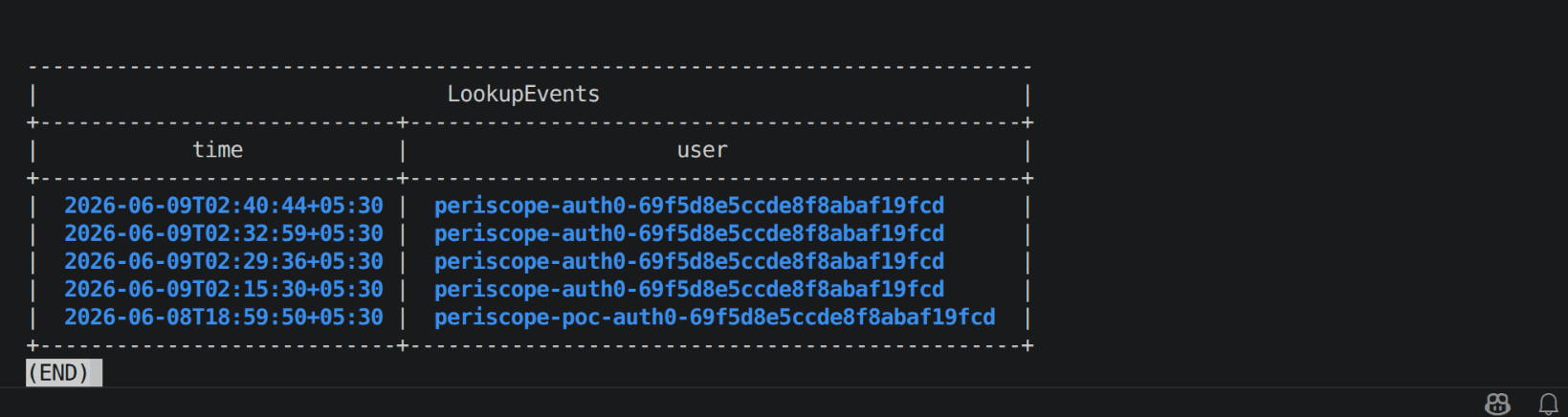
   -> CloudTrail records: assumed-role/periscope-node-shell/periscope-<oidc-sub>
Why this is more secure than a single shared role:
- The trust policy is the gate, not Periscope. Periscope's own pod role has zero SSM permissions. The only way to reach a node is to present a live id_token that AWS itself validates. Compromising Periscope does not grant node access.
- Every session is attributed to a human. Because each session uses a per-user assumed role, CloudTrail and the SSM session history record who opened it. A shared bot role would make every session look identical.
- Defense in depth. Three independent gates must all pass: the IAM
trust policy (AWS-side), Periscope's tier check (server-side), and the
nodeShell.enabledHelm flag. Any one failing denies the shell.
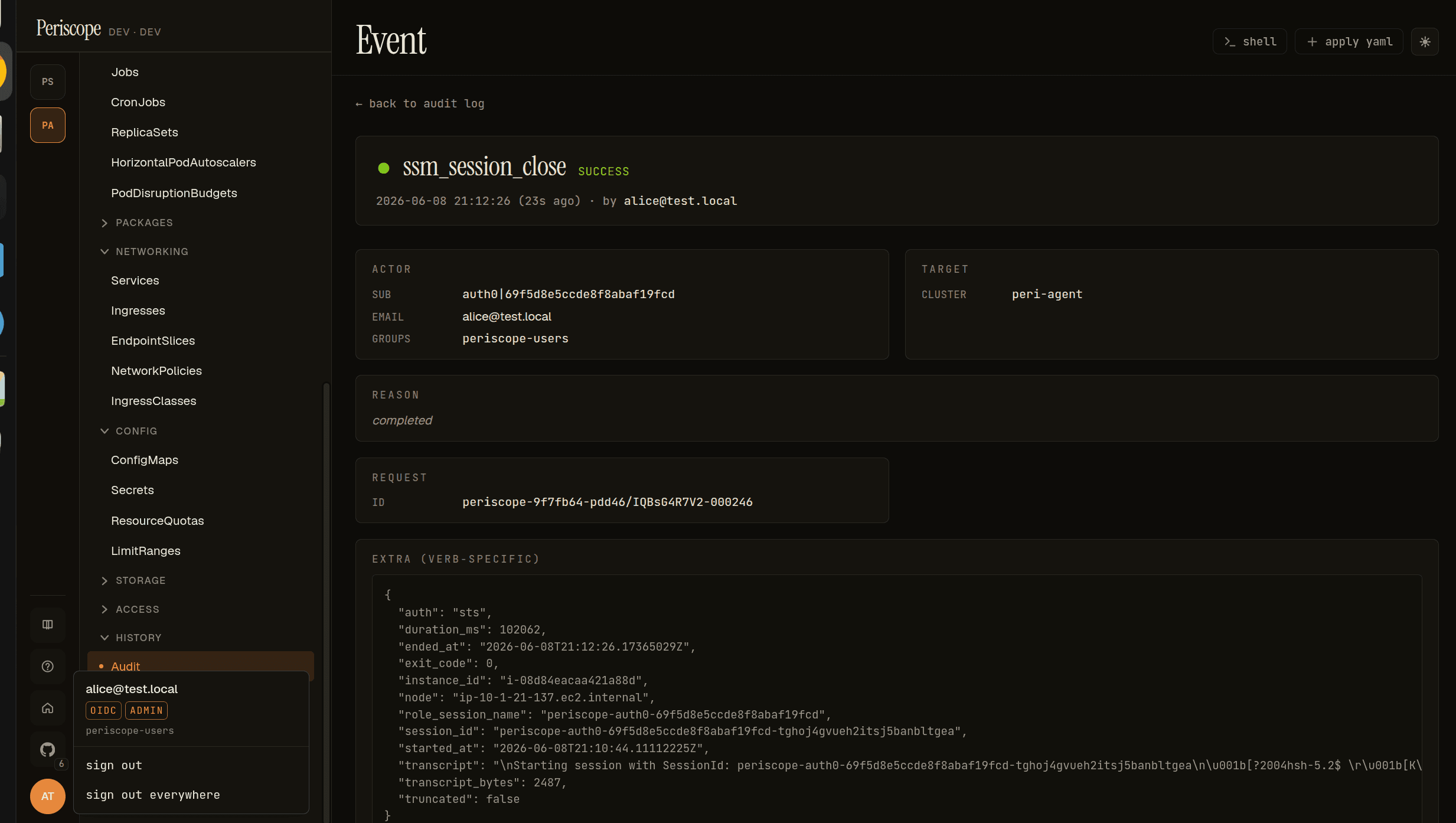
Attribution note. Inside the shell, whoami returns the generic
OS user ssm-user (SSM's default) — not your identity. That's
expected: attribution lives at the audit layer, not the prompt. The
per-user role-session-name carries your OIDC sub — the IdP user
id (e.g. auth0|69f5…, Okta 00u…), not an email or display
name — so CloudTrail and the SSM session history record the session as
assumed-role/periscope-node-shell/periscope-<sub> (the sub is
sanitized to SSM's session-name character set). Periscope's own audit
log records the same session_id (plus your email, when the IdP
supplies it), so the two logs join into one human-attributed trail.
2. Prerequisites
- An EKS (or self-managed) cluster whose nodes are EC2 instances with
the SSM agent running and
Online. EKS managed node groups and Bottlerocket/AL2023 AMIs ship the agent and register automatically; bare EC2 may need the agent installed and an instance profile withAmazonSSMManagedInstanceCore. - Periscope running in
auth.authorization.mode: tierwith OIDC login configured (the node shell is unavailable in dev/shared mode — it needs a real id_token). - The
session-manager-pluginis bundled in the Periscope server image; no operator action needed. - An OIDC IdP whose id_token Periscope already verifies at login.
Tested IdP matrix
| IdP | Status | Notes |
|---|---|---|
| Auth0 | tested | id_token aud = the Application's Client ID. Custom group claims are namespaced (e.g. https://yourapp/groups). |
| Okta | tested | id_token aud = the OIDC app's Client ID. groups claim is exposed directly. |
| Cognito | should work, verify | User-pool issuer https://cognito-idp.<region>.amazonaws.com/<pool-id>; aud = the app client id. |
| Generic OIDC | should work | Any provider AWS IAM can register as an OIDC identity provider. |
3. Register your IdP as an OIDC provider in AWS IAM
AssumeRoleWithWebIdentity requires AWS to trust your IdP's issuer.
This is a one-time, per-AWS-account step.
If you already federate this IdP into IAM (e.g. for IRSA with the same issuer, or an existing web-identity setup) — skip to step 4.
From scratch:
# <issuer> is your OIDC issuer WITH its trailing slash if it has one,
#   Auth0:   https://<tenant>.us.auth0.com/
#   Okta:    https://<org>.okta.com/oauth2/<server>
#   Cognito: https://cognito-idp.<region>.amazonaws.com/<pool-id>
# <client-id> is the OIDC application's client_id — this is the value
#   that appears in the id_token's `aud` claim (NOT the API audience).

aws iam create-open-id-connect-provider \
  --url "https://<tenant>.us.auth0.com/" \
  --client-id-list "<client-id>" \
--thumbprint-list "$(: 'see note below')"Thumbprint. For IdPs backed by a well-known public CA (Auth0,
Okta, Cognito), AWS no longer validates the thumbprint, but the API
still requires the field. The Terraform path below fetches it
automatically (tls_certificate data source). For the CLI, AWS's docs
show how to obtain it, or pass the known root-CA thumbprint.
Note the resulting provider ARN —
arn:aws:iam::<account>:oidc-provider/<issuer-host> — you'll reference
it in the trust policy.
4. Create the per-user role
Two policies on one role: a trust policy (who may assume it) and a permission policy (what they may do).
4a. Trust policy — the gate
{
  "Version": "2012-10-17",
  "Statement": [{
    "Effect": "Allow",
    "Principal": {
      "Federated": "arn:aws:iam::<account>:oidc-provider/<issuer-host>"
    },
    "Action": "sts:AssumeRoleWithWebIdentity",
    "Condition": {
      "StringEquals": {
        "<issuer-host>:aud": "<client-id>"
      }
    }
  }]
}
<issuer-host> is the issuer without the https:// scheme but
with its trailing slash if present, e.g.
<tenant>.us.auth0.com/.
⚠️ Do NOT gate the trust policy on a groups claim. This is the
single most common mistake, and it does not work. AssumeRoleWithWeb Identity trust policies reliably expose only standard claims (aud,
and sub) as condition keys — a custom, namespaced array claim like
https://yourapp/groups is not evaluated, so a condition on it
causes AccessDenied even for a user who is in the group.
Group-level authorization is enforced by Periscope's tier check, not
AWS. AWS authenticates who the user is (via aud, and optionally
sub); Periscope decides whether that user's tier may open a shell
(nodeShell.tiers). This is the correct division and is defense in
depth — see §8.
To restrict to specific people at the AWS layer too, add a sub
condition (this does work):
"Condition": {
  "StringEquals": {
    "<issuer-host>:aud": "<client-id>",
    "<issuer-host>:sub": ["auth0|abc123", "auth0|def456"]
  }
}
4b. Permission policy — what the role may do
{
  "Version": "2012-10-17",
  "Statement": [
    {
      "Sid": "StartSessionOnFleetInstances",
      "Effect": "Allow",
      "Action": "ssm:StartSession",
      "Resource": "arn:aws:ec2:<region>:<account>:instance/*",
      "Condition": {
        "StringEquals": {
          "ssm:resourceTag/eks:cluster-name": "<cluster-name>"
        }
      }
    },
    {
      "Sid": "StartSessionDocument",
      "Effect": "Allow",
      "Action": "ssm:StartSession",
      "Resource": "arn:aws:ssm:<region>:<account>:document/SSM-SessionManagerRunShell"
    },
    {
      "Sid": "ManageOwnSessions",
      "Effect": "Allow",
      "Action": ["ssm:TerminateSession", "ssm:ResumeSession"],
      "Resource": "arn:aws:ssm:*:*:session/${aws:userid}-*"
    },
    {
      "Sid": "Preflight",
      "Effect": "Allow",
      "Action": "ssm:DescribeInstanceInformation",
      "Resource": "*"
    }
  ]
}⚠️ ssm:StartSession authorizes against the SSM document too, not
only the instance — both must be allowed in the same call, which is why
the policy needs two StartSession statements, not one:
- Instances are scoped by the
ssm:resourceTag/eks:cluster-namecondition (EKS tags instances with this), restricting the role to one cluster's nodes. - The document (
SSM-SessionManagerRunShell) is an AWS-managed resource that carries noeks:cluster-nametag, so it gets its own unconditional statement.
Folding both resources into a single conditioned statement is the most
common mistake: the tag condition then applies to the document as well,
which fails (AccessDenied … on resource: …document/SSM-SessionManager RunShell) even though the instance is allowed. Keep them separate.
To allow all tagged instances in the account, drop the instance
condition (the document statement is unchanged either way).
ssm:DescribeInstanceInformation does not support resource-level
scoping, so it is *.
Create the role with the trust policy as its assume-role policy and
attach the permission policy. Note the role ARN —
arn:aws:iam::<account>:role/periscope-node-shell.
4c. Multi-account fleets
ssm:StartSession is account-local — you cannot open a session on an
instance in account B with a role in account A. So each AWS account
whose nodes you want to shell needs its own OIDC provider + role. The
same id_token federates into every account that trusts the issuer
(one login, no re-auth). Wire each cluster's role per cluster (§5).
A copy-paste Terraform module that creates the OIDC provider + role +
both policies lives in
hack/poc-ssm-data-channel/terraform
(set enable_oidc=true); it's the executable form of the JSON above.
5. Wire it into Periscope's Helm values
nodeShell:
  enabled: true
  # Single-account fleet: one global role covers every cluster's nodes.
  awsRoleArn: "arn:aws:iam::<account>:role/periscope-node-shell"
  # The id_token aud the trust policy expects = your OIDC client_id.
  oidcAudience: "<client-id>"
  region: "<region>"          # falls back to the cluster's region
  tiers: [admin]              # which Periscope tiers may open a shell
  idleSeconds: 600
  transcriptMaxBytes: 1048576
Multi-account: leave the global awsRoleArn empty and set it per
cluster in your clusters config — each cluster points at the role in
its account:
clusters:
  - name: prod-eu
    backend: agent
    nodeShell:
      awsRoleArn: "arn:aws:iam::<account-B>:role/periscope-node-shell"
      oidcAudience: "<client-id>"
region: "eu-west-1"The Periscope server needs network egress to the SSM endpoints
(ssm.<region>.amazonaws.com, ssmmessages.<region>.amazonaws.com)
for each account/region — normally the public endpoints, reachable by
default. SSM does not traverse the agent tunnel, so node shell
works for private/agent-backed clusters as long as the node's SSM
agent is Online and the server can reach SSM. (Fully air-gapped
accounts with private-only SSM endpoints unreachable from the server
are a known limitation for v1.)
6. Verify without the dashboard
Confirm the trust policy works using a real id_token, before touching Periscope. Obtain an id_token from your IdP (a normal OIDC login), then:
aws sts assume-role-with-web-identity \
  --role-arn "arn:aws:iam::<account>:role/periscope-node-shell" \
  --role-session-name "verify-$(whoami)" \
  --web-identity-token "file://id-token.txt" \
  --query 'AssumedRoleUser.Arn' --output text
A printed arn:aws:sts::...:assumed-role/periscope-node-shell/... means
the OIDC provider + trust policy are correct. An AccessDenied means
the token's aud/iss don't match the provider/trust policy — see §7.
To also confirm the SSM agent is reachable, export the returned credentials and run:
aws ssm describe-instance-information \
  --filters "Key=InstanceIds,Values=i-0abc..." \
  --query 'InstanceInformationList[0].PingStatus' --output text
# -> Online
Periscope's preflight (GET .../nodes/{name}/shell/preflight) runs
exactly these two checks before opening the WebSocket, so a clean
preflight means the real session will almost certainly succeed.
7. Troubleshooting
| Symptom | Cause | Fix |
|---|---|---|
AccessDenied on AssumeRole, valid-looking token | aud mismatch | The id_token's aud is the OIDC client_id, not the API audience/identifier. Set oidcAudience and the trust policy :aud to the client_id. |
AccessDenied on AssumeRole, aud is correct | trust policy gates on groups | Remove the groups condition — it can't be evaluated (§4a). Gate on aud (and sub); do group authz via nodeShell.tiers. |
AccessDenied on AssumeRole | issuer mismatch | The OIDC provider URL / trust-policy <issuer-host> must match the token's iss exactly, including the trailing slash. |
AccessDenied after IdP cert rotation | stale thumbprint | Update the OIDC provider's thumbprint (or re-run the Terraform). |
| Periscope says forbidden though AssumeRole works | tier gate | The user authenticated to AWS but their Periscope tier isn't in nodeShell.tiers. Adjust groupTiers / nodeShell.tiers. |
AccessDenied on StartSession, mentions document/... | document not allowed — either missing from the policy, or (more often) folded into the tag-conditioned instance statement so the eks:cluster-name condition denies it | Give the document its own unconditional StartSession statement, separate from the tag-conditioned instance one (§4b). |
Preflight: agent not Online | SSM agent missing/unhealthy | EKS managed nodes register automatically; bare EC2 needs the agent + AmazonSSMManagedInstanceCore instance profile + egress to SSM. |
E_REAUTH_REQUIRED in the SPA | id_token expired and couldn't refresh | Sign in again. Some IdPs don't rotate the id_token on refresh; Periscope can't silently renew it then. |
| Button not visible | feature/tier/providerID gate | Check nodeShell.enabled: true, your tier is in nodeShell.tiers, and the node has an aws:/// providerID (it's an EC2 instance). |
8. Limitations and threat model
Protects against:
- Cross-tier / unauthorized access — the trust policy (AWS-side) plus the tier check (Periscope-side) must both pass.
- Periscope pod compromise — the pod has no SSM permissions; node access requires a live, user-presented id_token AWS validates.
- Lost attribution — every session is tied to a human via the
per-user assumed role (CloudTrail) and the audit
session_id.
Does NOT protect against:
- A legitimately authorized operator — anyone whose tier allows the
shell, and who can pass the trust policy, has full host access (the
generic
ssm-user, with whatever sudo the node grants it). ScopenodeShell.tiersaccordingly. - SSM agent vulnerabilities or AWS-side SSM issues.
- Whatever the operator does once inside the shell — the transcript
(captured in the
ssm_session_closeaudit row, capped attranscriptMaxBytes) is the forensic record, not a preventive control.
Audit. Two rows per session — ssm_session_open and
ssm_session_close — with the assumed-role identity, instance, and (on
close) the full transcript. Cross-reference session_id with CloudTrail
for the AWS-side view. See audit and RFC 0003.