docssetuphelm releases
Helm release browser
Periscope ships a read-only Helm release browser as part of the core binary. It surfaces the helm releases installed on each managed cluster — list, detail (manifest + values), revision history, and diff between any t…
Periscope ships a read-only Helm release browser as part of the
core binary. It surfaces the helm releases installed on each managed
cluster — list, detail (manifest + values), revision history, and
diff between any two revisions — under the SPA's "Helm" sidebar
group and the API path /api/clusters/{cluster}/helm/....
There is no chart configuration to enable it; the routes are always registered. Visibility is governed entirely by the impersonated user's RBAC on the storage objects Helm uses (Secrets by default, ConfigMaps as a fallback).
This page covers the operational surface: what's there, what RBAC is required, the limits that bound the responses, and how cache behavior affects what you see in the UI.
What you see
Releases list
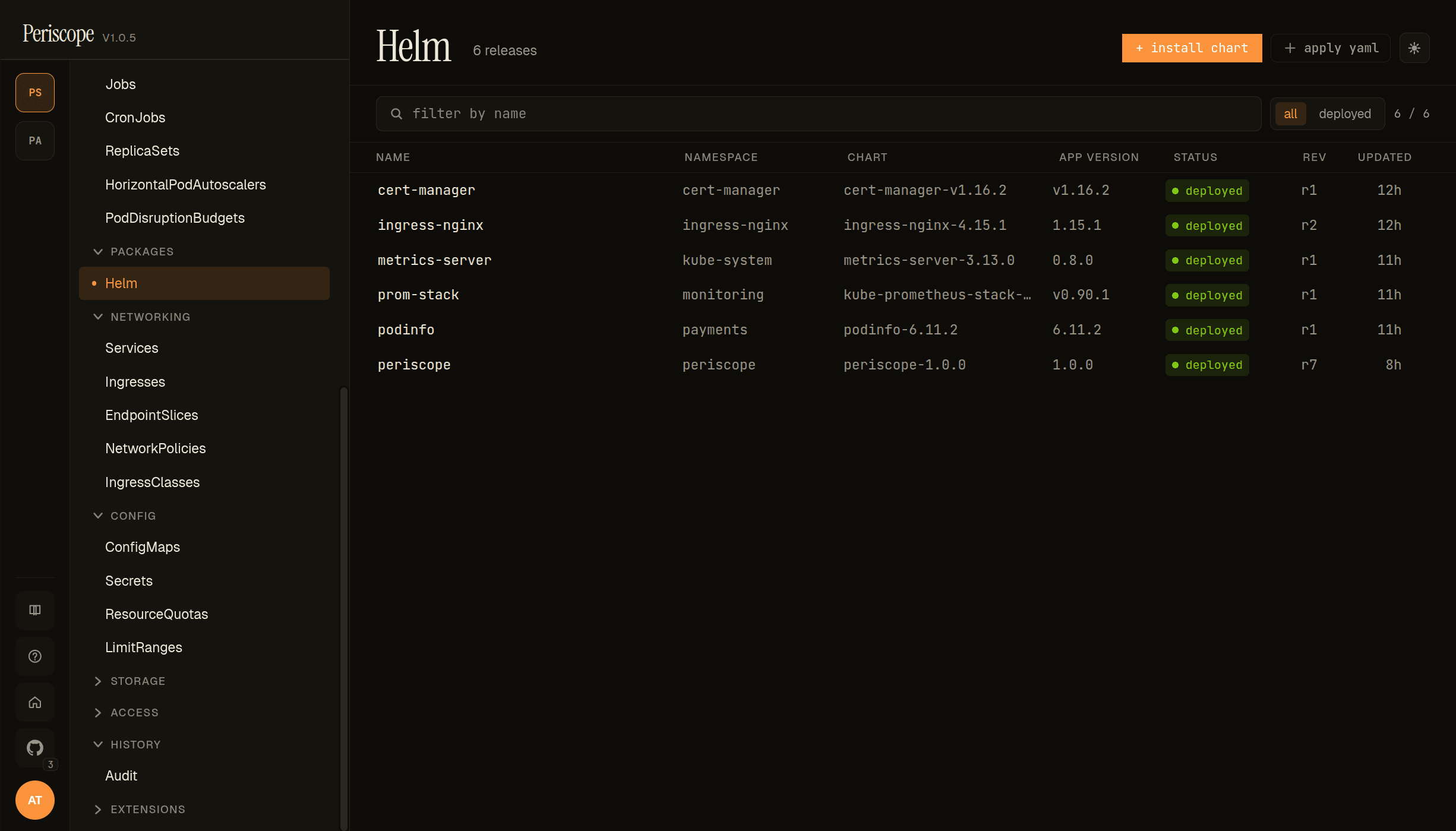
The list page shows every release on the cluster — name, namespace, chart and chart version, app version, status pill (deployed, superseded, failed), and current revision number. Clicking a row opens the detail pane.
Install dialog
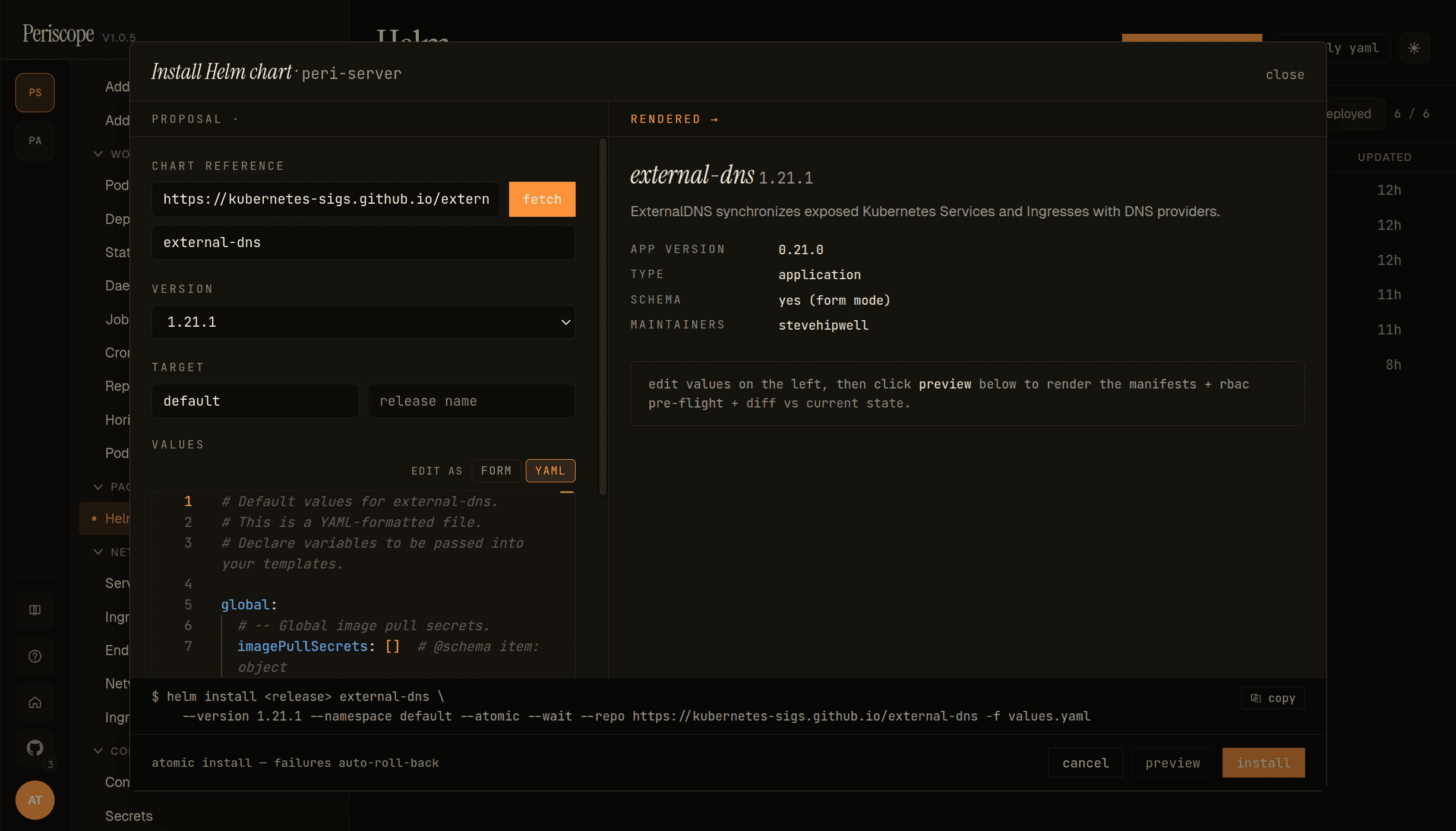
The + Install chart action opens a side-pane installer. Left column carries the chart reference (helm repo URL or OCI ref), version dropdown, target namespace + release name, and a values editor that toggles between YAML and FORM modes (form mode renders when the chart ships a values.schema.json). Right column carries the rendered preview — chart metadata (app version, type, schema availability, maintainers) at the top, and once you click preview the rendered manifest + RBAC pre-flight + diff vs current state below. Footer: the equivalent helm install ... command Periscope would run, copyable for ops who prefer to run it themselves; atomic install is on by default so failures auto-roll-back.
Upgrade dialog
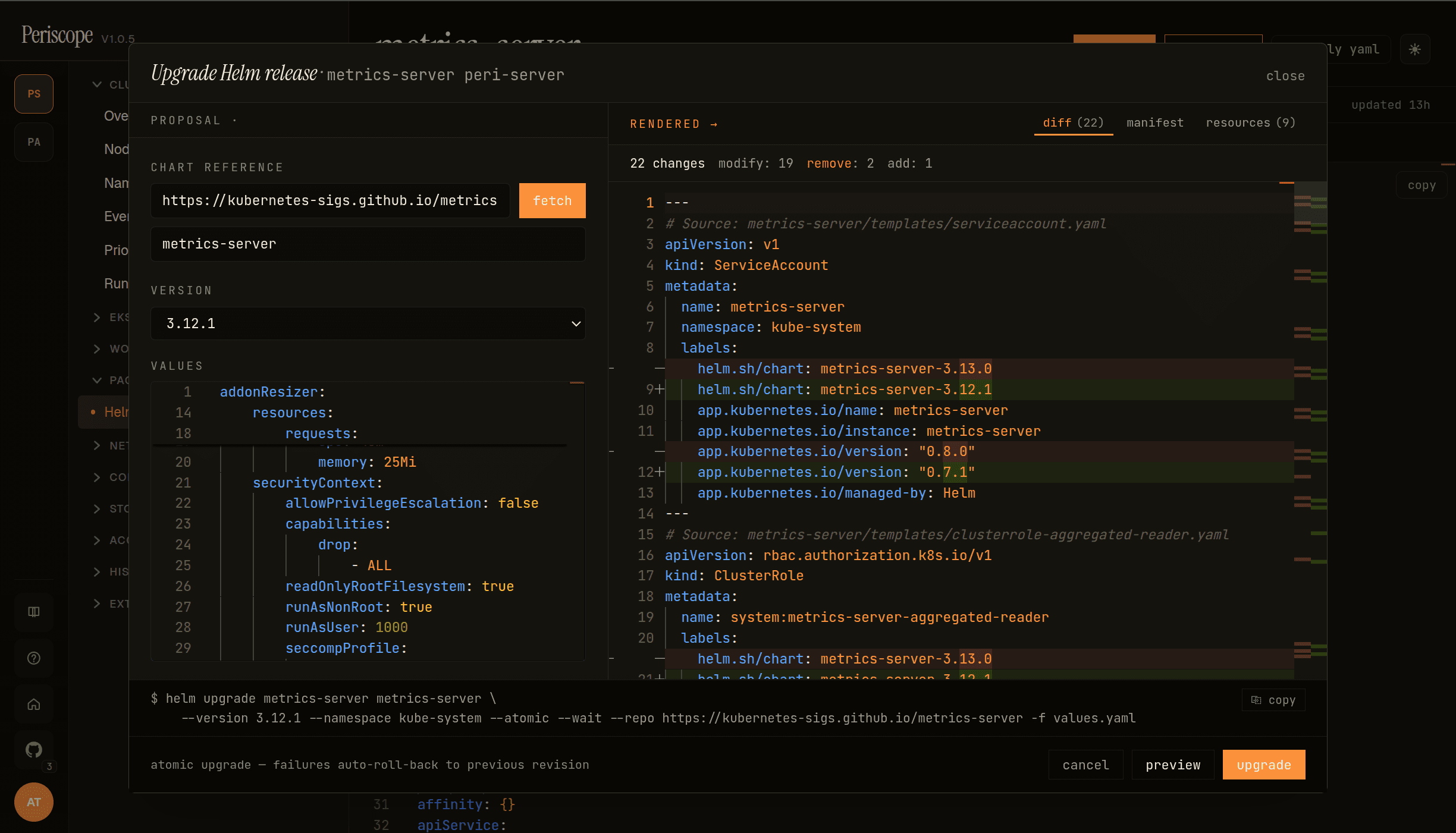
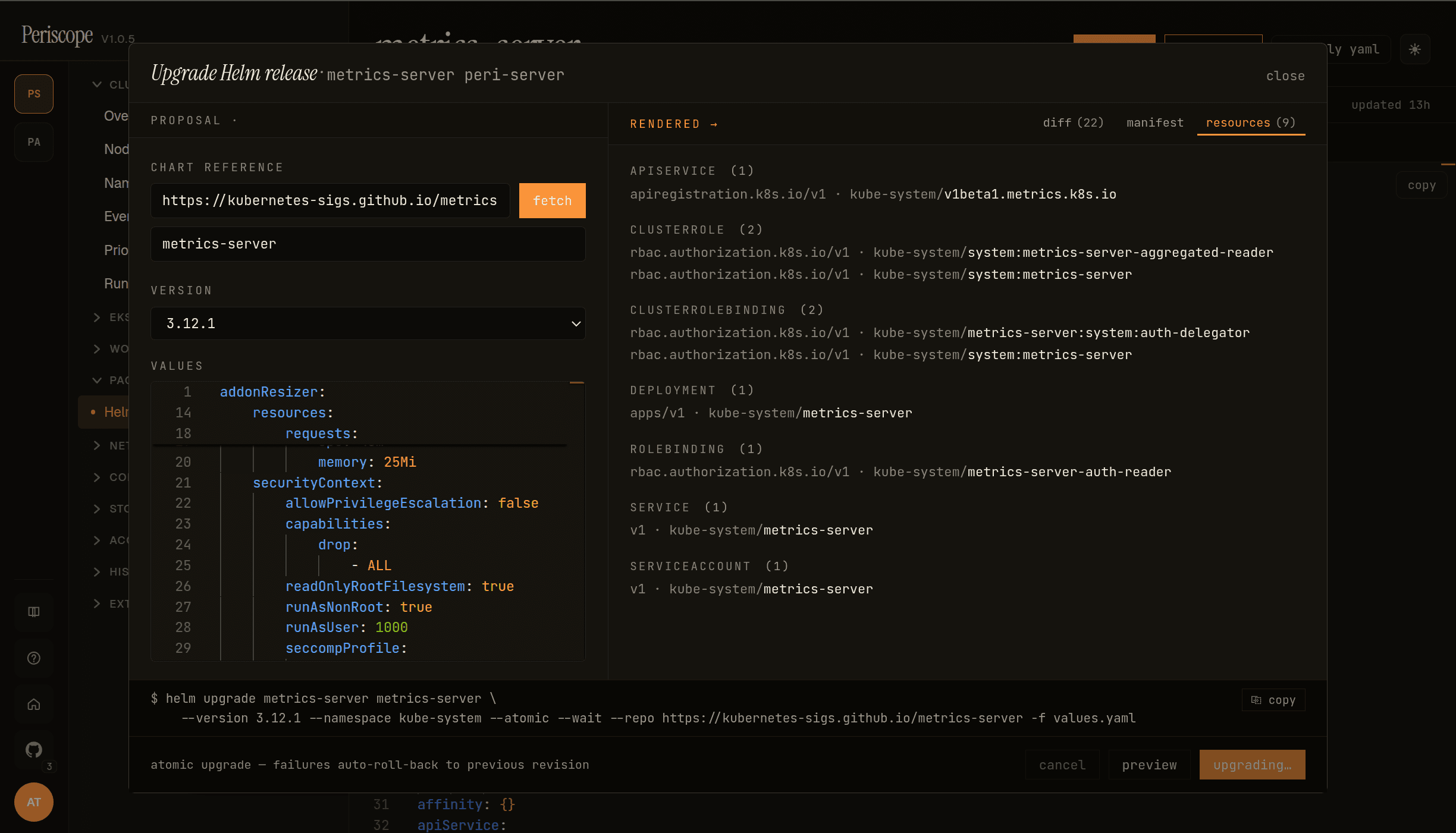
Click upgrade on a release to open the upgrade variant of the same dialog. Pre-filled with the release's current chart ref + values from the Periscope-written annotation, so the operator only changes the version dropdown + edits the values they need. The right pane carries the chart-action tabs:
-
diff — side-by-side YAML diff between the current rendered manifests and what the upgrade would produce. Header counts changes by kind (
modify: 19 · remove: 2 · add: 1in the screencap above). -
manifest — the proposed full rendered output (read-only Monaco viewer).
-
resources — flat list of every K8s object the upgrade touches, grouped by kind:
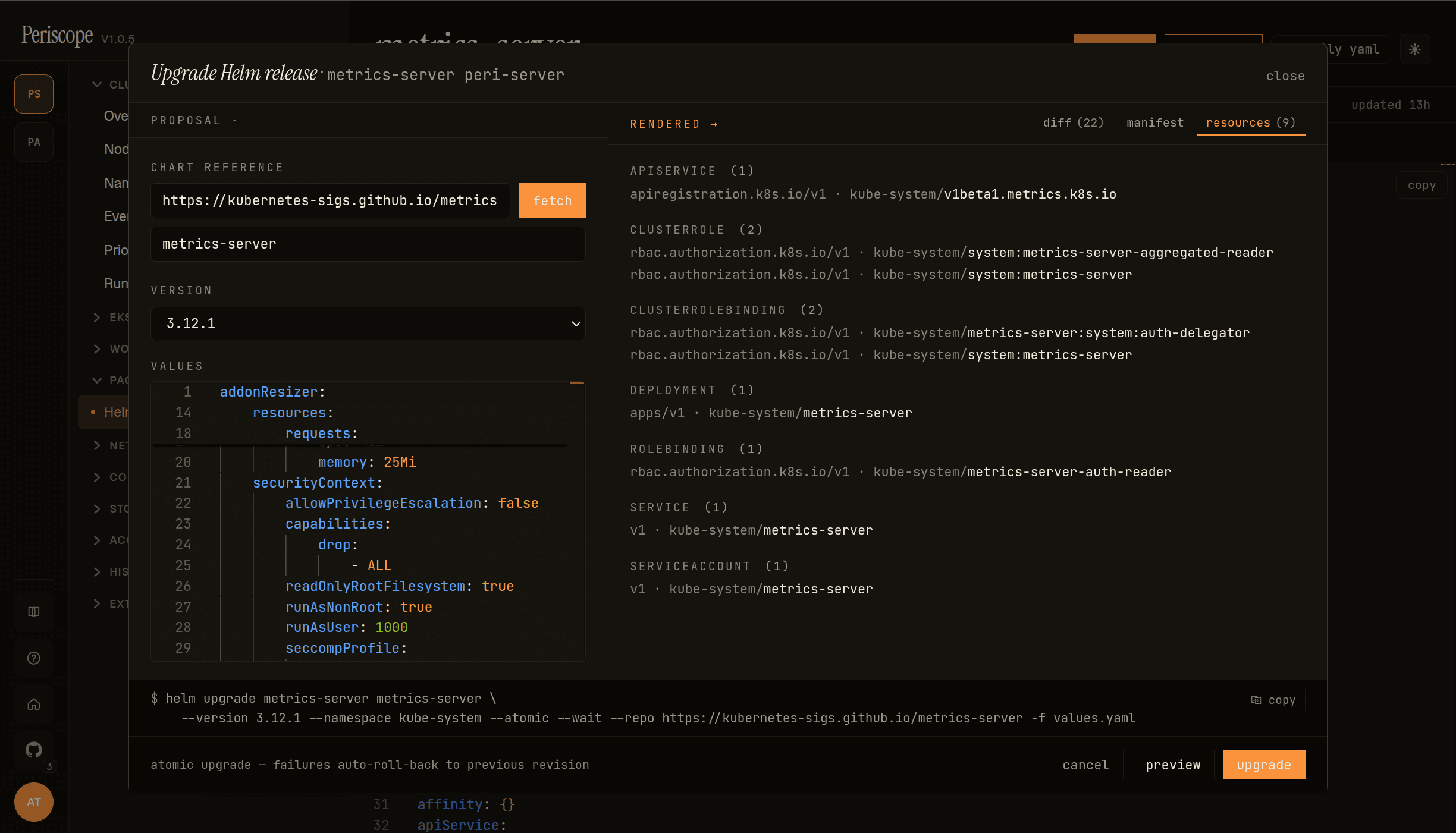
Upgrade dialog — resources tab grouping the 9 K8s objects metrics-server's upgrade touches Counts per kind on the section headers (
CLUSTERROLE (2),CLUSTERROLEBINDING (2), …); each row isapiVersion · namespace/name. Useful for spotting an upgrade that adds an unexpected resource (a new CRD, a new ClusterRole) before clicking upgrade.
Bottom strip carries the command preview — the literal helm upgrade … that Periscope would run, copyable for operators who prefer to run it themselves. atomic upgrade is on by default, called out under the strip: atomic upgrade — failures auto-roll-back to previous revision.
While the upgrade is in flight the action button reads upgrading… (disabled) and the dialog stays open so the operator sees the result without losing context:
Rollback
The release detail's history tab carries a per-revision rollback action, plus a compare selected affordance to diff any two revisions before deciding which one to roll back to:
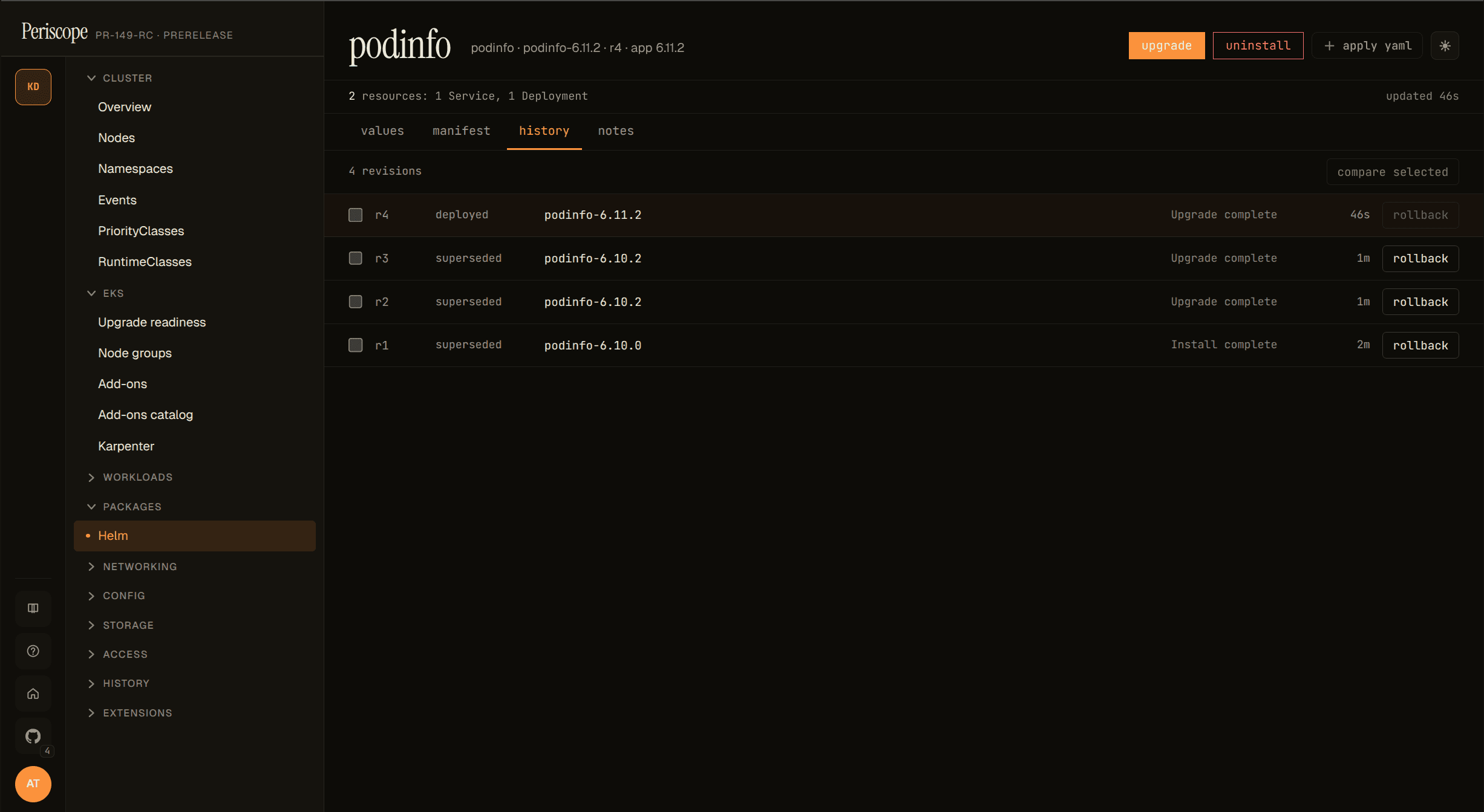
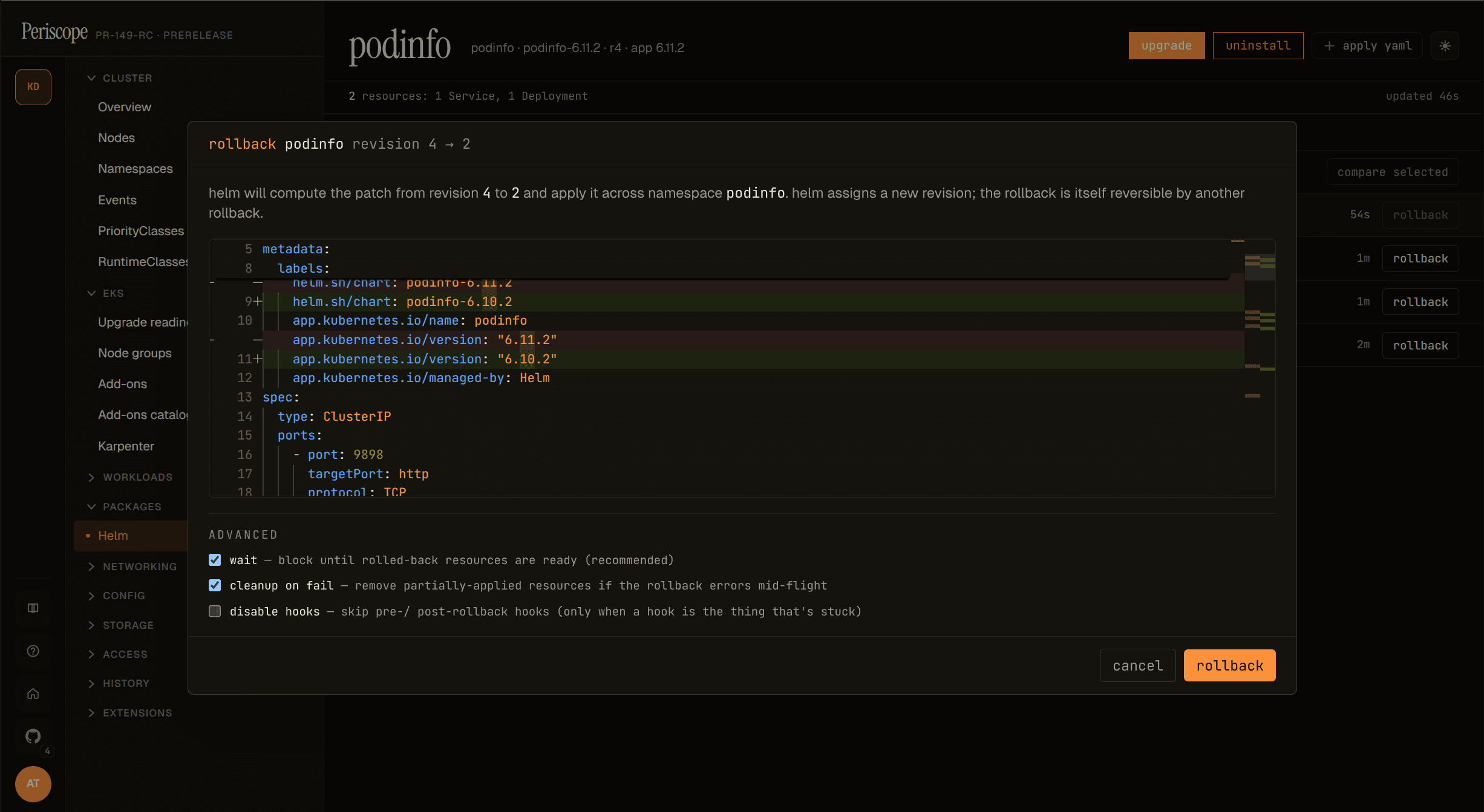
Clicking rollback opens a focused dialog scoped to the chosen revision pair. The body shows the side-by-side YAML diff that Helm would apply (current → target), so the operator sees exactly which fields change before committing. Advanced flags are exposed at the bottom: wait (default on — block until rolled-back resources are ready), cleanup on fail (default on — remove partially-applied resources if the rollback errors mid-flight), and disable hooks (off — skip pre-/post-rollback hooks, only useful when a hook itself is the thing that's stuck):
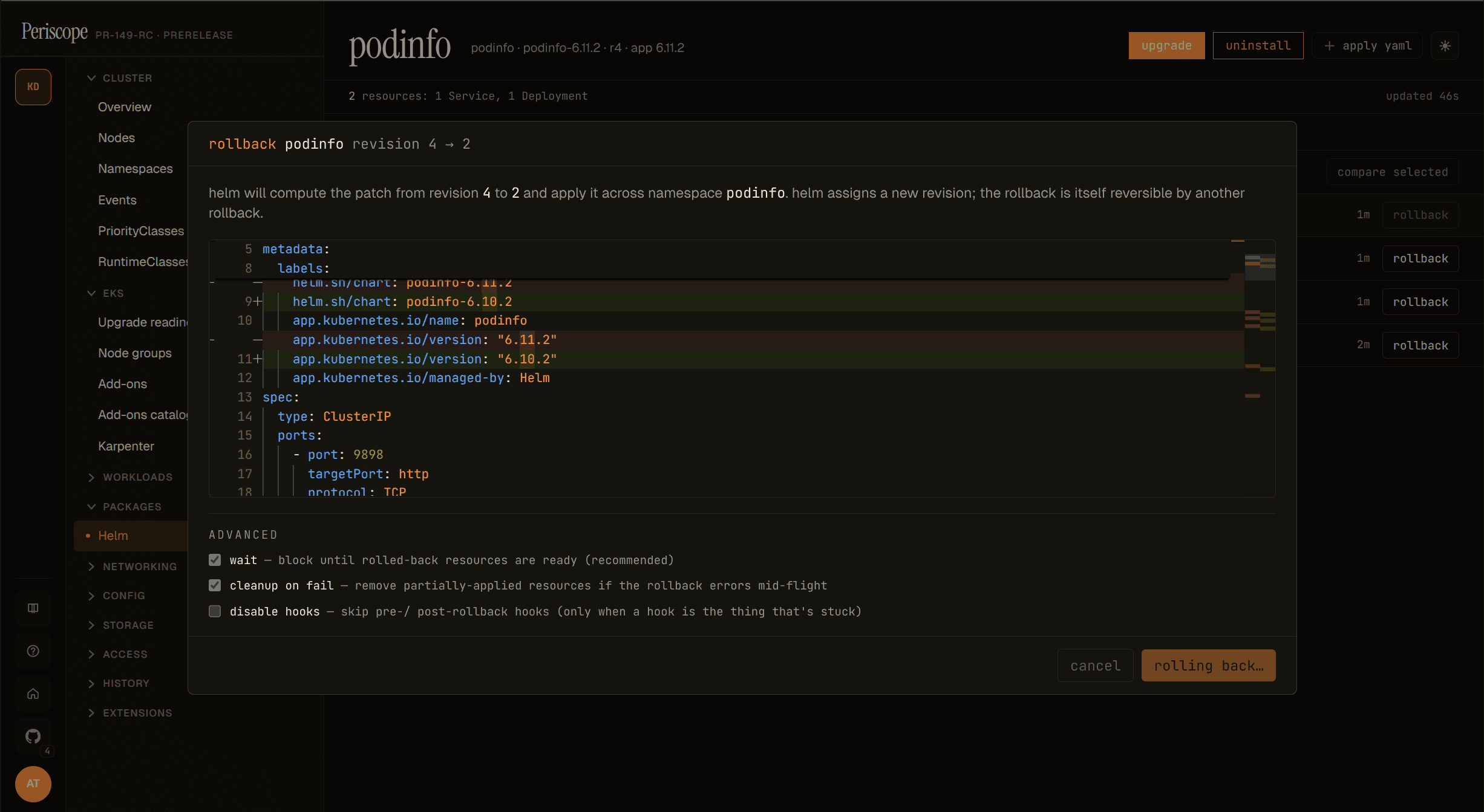
While the rollback is in flight the action button reads rolling back… (disabled), matching the upgrade dialog's mid-flight UX:
After the rollback succeeds, the history tab shows a fresh revision row with the description Rollback to N — Helm assigns the new highest revision number to the rollback itself, so the rollback is itself reversible by another rollback:
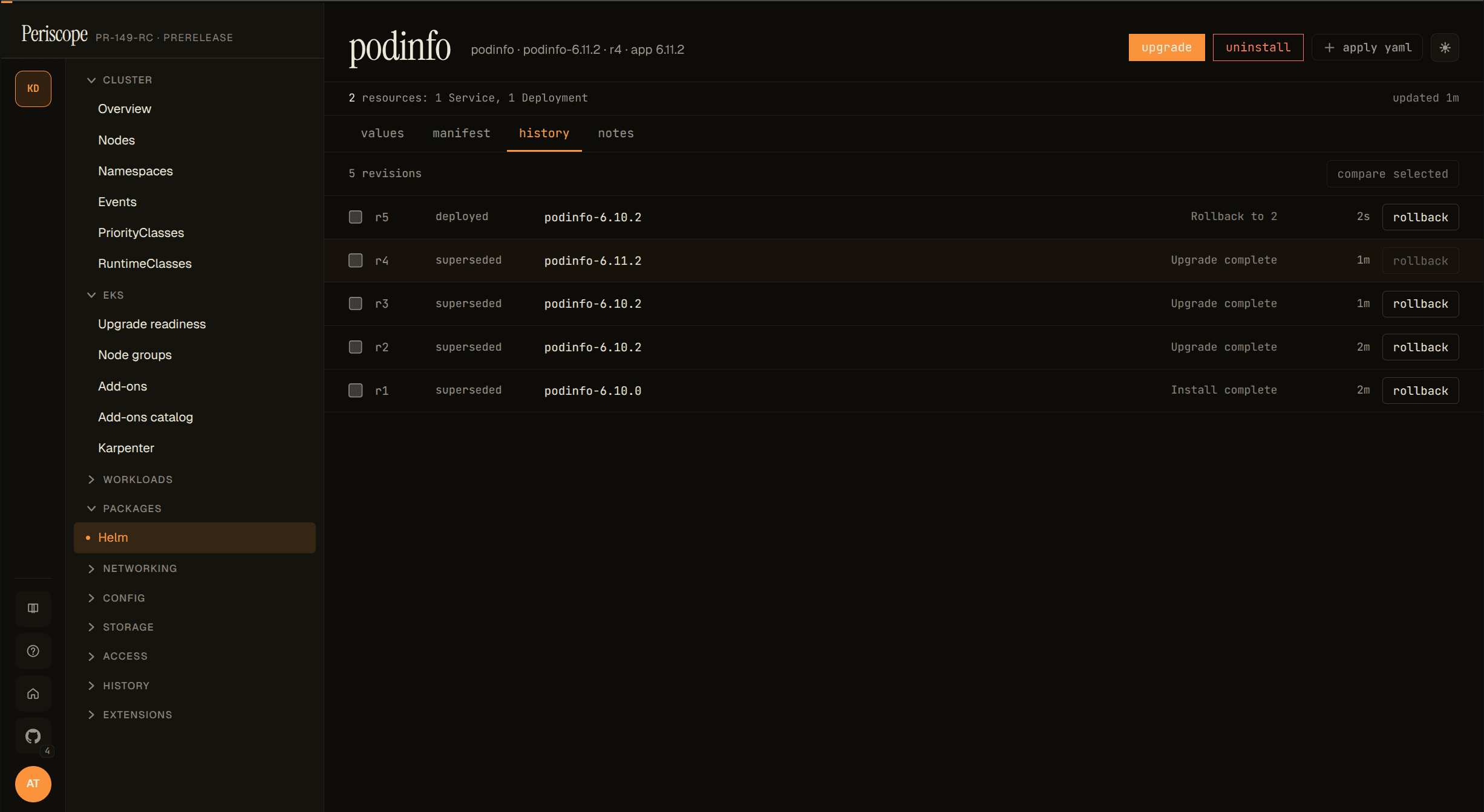
The action emits a helm_rollback audit row (one per release) with the from_revision / to_revision extras. Like all helm mutations the rollback runs under the requesting user's impersonated identity — a user without the verbs Helm needs (patch/delete/create on the rendered resource kinds) gets a clean apiserver 403 surfaced in the dialog before the rollback starts.
Release detail — values
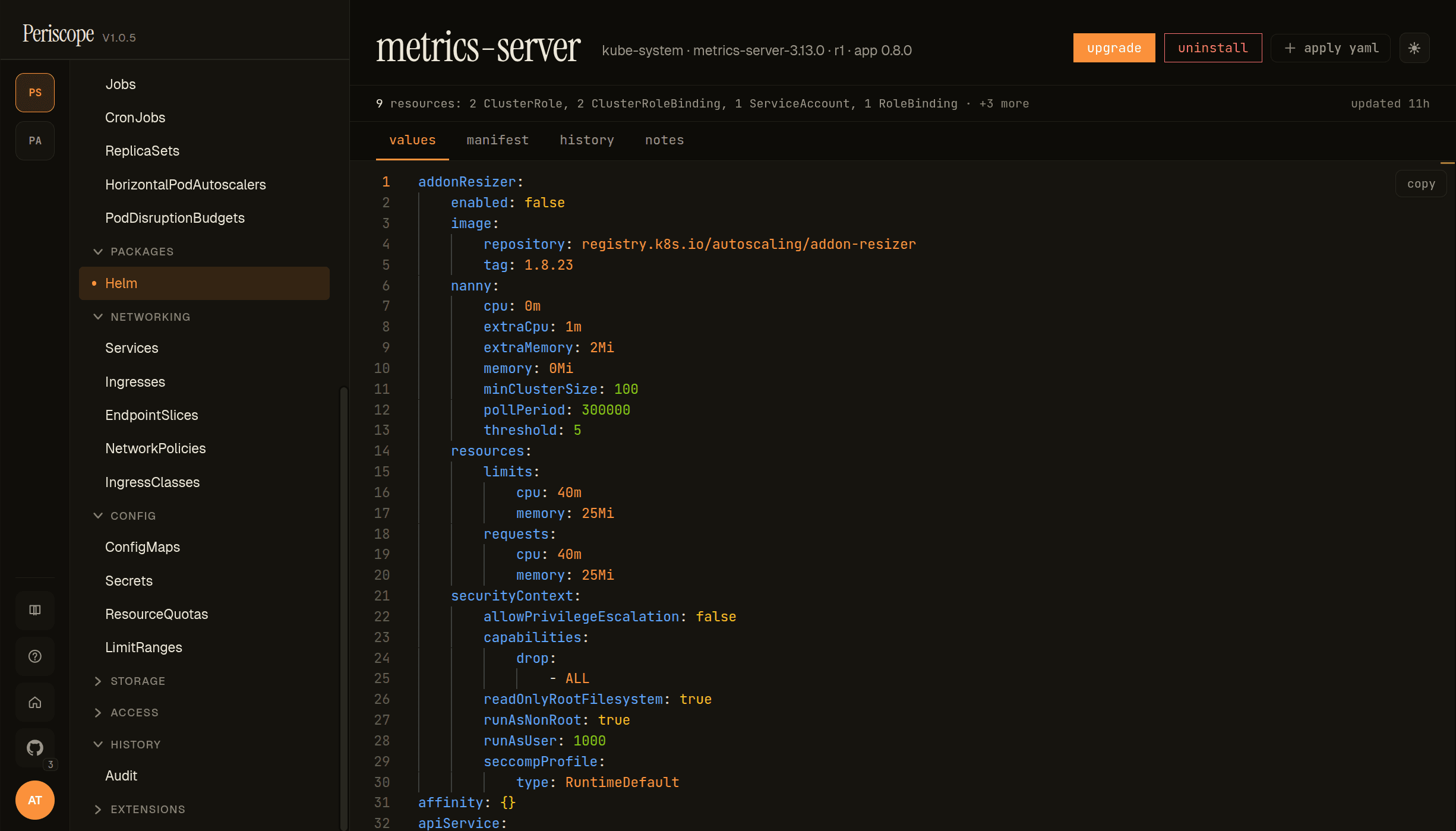
Each release detail has four tabs: values (the values yaml the release was installed with — pictured), manifest (every K8s object Helm produced from the chart + values), history (per-revision metadata with diff-between-any-two-revisions), and notes (the chart's NOTES.txt rendered output). The header strip carries upgrade and uninstall actions, plus a resource summary like 9 resources · 2 ClusterRole · 1 ClusterRoleBinding · … so an operator sees the chart's footprint at a glance.
Comparing revisions
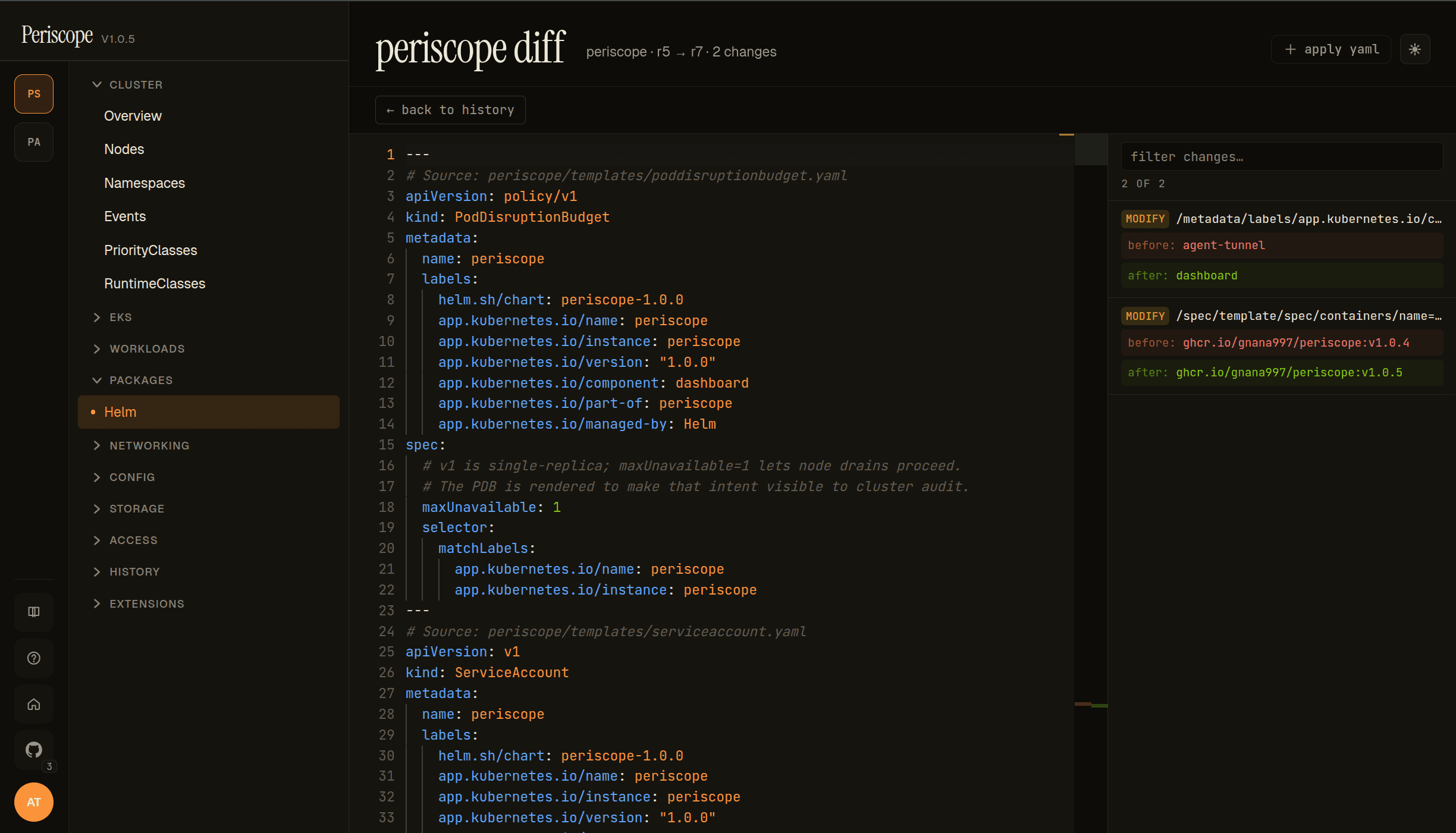
Clicking diff between any two revisions on the history tab opens the standalone diff page (/helm/releases/{ns}/{name}/diff?from=N&to=M). The page is a full-width viewer designed for revision archaeology — what changed, when, and why.
- Header —
periscope diff · {release} · r{from} → r{to} · N changes. Direction is always old → new; flip the URL params to invert. - Left pane — the full rendered manifest at the
torevision, with each doc preceded by a# Source: chart/templates/...yamlcomment so you can find which template a change came from. - Right pane (Filter changes) — every change as a row:
MODIFY/ADD/REMOVEchip, JSON Pointer path (/metadata/labels/app.kubernetes.io/component), and before / after values. Filterable by substring; useful when a release has dozens of edits but you're hunting one of them. - Per-row click — scrolls the left pane to the matching line and highlights the change inline.
The same /diff API the upgrade dialog's diff tab uses, but rendered as a full-page navigation target so an operator can deep-link to "what changed between r5 and r7" in an incident-review or PR comment.
Forbidden state
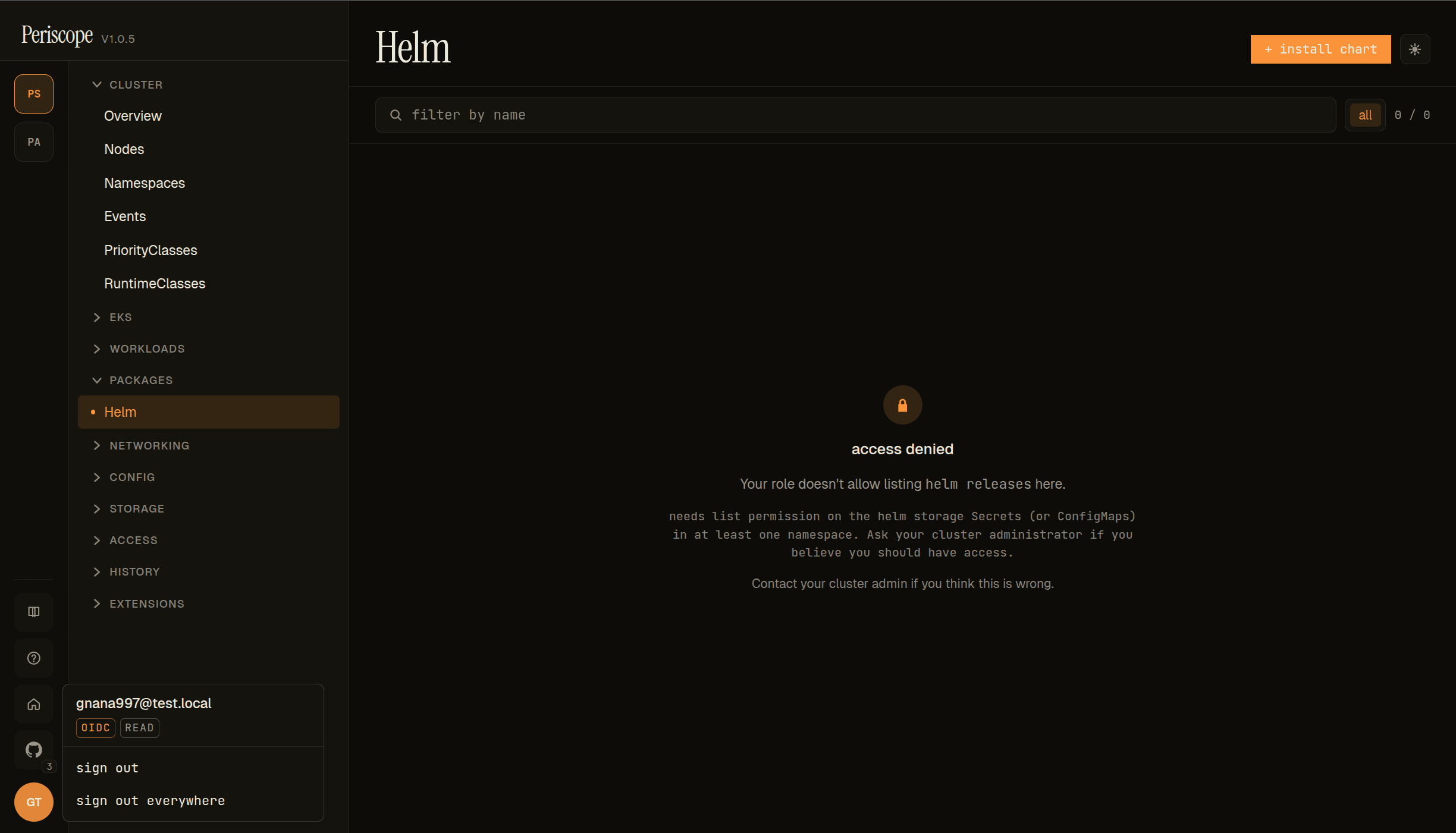
When the impersonated user's K8s identity lacks list on the Helm storage kind for the cluster (Secrets by default), the Helm page renders as a centered access-denied state instead of the list:
- Lock icon +
access deniedtitle. - Kind-specific copy —
Your role doesn't allow listing helm releases here. needs list permission on the helm storage Secrets (or ConfigMaps) in at least one namespace.Operator-actionable: names the verb + the kind + the namespace scope. Contact your cluster admin if you think this is wrong.— falls back to the standard forbidden-state copy.- The avatar popover (cluster rail, lower-left) confirms the tier — the screencap shows
OIDC+READbadges, so the user is on thereadtier and theviewClusterRole's deliberate Secret-read exclusion is what's blocking them.
To unblock read-tier users for Secret-driver releases, see cluster-rbac.md → Helm release browser RBAC.
1. Endpoints
| Method | Path | Purpose |
|---|---|---|
GET | /api/clusters/{cluster}/helm/releases | List releases on the cluster (current revision per release). |
GET | /api/clusters/{cluster}/helm/releases/{namespace}/{name} | Release detail: values, rendered manifest, parsed resources, metadata. |
GET | /api/clusters/{cluster}/helm/releases/{namespace}/{name}/history | Revision history (newest first). |
GET | /api/clusters/{cluster}/helm/releases/{namespace}/{name}/diff?from=N&to=M | Structured diff (values + manifest) between revisions N and M. |
All endpoints run under the requesting user's impersonated identity. A user who can't read the underlying storage objects gets a clean 403 from the apiserver, which Periscope forwards.
2. Storage driver auto-probe
Helm 3 stores releases in Secrets (the default driver) or ConfigMaps. Periscope auto-detects which driver the cluster uses:
- Try listing
Secretscluster-wide with the helmowner=helmlabel. If any are returned, lock to the secret driver. - Otherwise, try the same against
ConfigMaps. If any are returned, lock to the configmap driver. - Otherwise, default to the secret driver — downstream LIST calls will surface the real distinction (403 vs empty) cleanly.
The probe result is cached per-cluster for 5 minutes. The sql
driver is not supported (it's rare in practice and would require
managing a connection pool to an external DB the operator
configured).
3. RBAC requirements
The impersonated user needs:
| Driver | Verbs needed |
|---|---|
secret (default) | get, list on secrets in the release namespaces |
configmap | get, list on configmaps in the release namespaces |
For the auto-probe to succeed cluster-wide (so the SPA's "Releases"
list is populated across namespaces), list on the storage kind
should be cluster-scoped. A namespace-scoped binding works for
single-namespace use but the cluster-wide list returns empty in that
case.
The shipped tier ClusterRoles cover this:
read(view) — getssecrets:getandconfigmaps:get/list, enough for the configmap driver only. Helm releases stored as Secrets aren't readable from theviewClusterRole alone (Secret reads are intentionally privileged in the upstreamviewrole).triage,write,maintain,admin— all cover both drivers.
If you want read-tier users to also see secret-driver releases,
add a ClusterRoleBinding that grants them get/list on Secrets in
the relevant namespaces — see the
cluster-rbac.md helm browser appendix
for a copy-pasteable sample.
Mutations (install, upgrade, rollback, uninstall) additionally need
patch / create / delete on every kind the rendered chart
manifests touch. Periscope runs a SubjectAccessReview pre-flight
fan-out for the dialog's preview step and surfaces denials inline
before the action fires.
4. Response caps and truncation
Three constants bound the responses to keep payloads predictable under impersonation:
| Cap | Value | Where |
|---|---|---|
| Release list | 200 releases | cmd/periscope/helm_handler.go: helmListCap |
| Detail / diff payload | 5 MiB | cmd/periscope/helm_handler.go: helmDetailMaxBytes |
| History default | 10 revisions | internal/k8s/helm.go (override with ?limit=N) |
When the list cap binds, the response carries truncated: true and
the SPA shows a "showing first 200 of N" banner. The 200-cap reflects
realistic helm fleet sizes (most clusters run < 50 releases); past
that, a search-by-name UX is the right answer rather than scrolling
a thousand-row list.
The 5 MiB detail cap is generous (a real-world chart's manifest +
values rarely exceeds 200 KiB) but exists to defend against
accidentally-huge releases (a chart inlining a binary blob in
values.yaml, for example).
5. Caching
The list endpoint caches per (actor, cluster, impersonation groups) for 30 seconds. Subsequent navigations across the SPA's
Helm tab feel instant; a release just-installed by helm install
appears within ~30s of the install completing.
Detail, history, and diff endpoints are not cached — each request hits the apiserver. These pages are rarer-clicked and the freshness signal matters more (an operator looking at "what happened in revision 7" wants the live answer).
To force a list refresh, the SPA's Helm tab has a "refresh" button that bypasses the cache.
6. What's read, what's not
The browser surfaces:
- Release name, namespace, revision, status, chart name + version, app version, last-updated timestamp.
- Rendered manifest (parsed into a structured resource list per revision).
- Computed values (
helm get values --allequivalent — chart defaults merged with user overrides). - Release notes (
NOTES.txtoutput). - Revision history with status transitions.
- Side-by-side diff between any two revisions: values diff + manifest diff.
Mutations supported (v1.1):
- Install —
helm installwith atomic-on-default + RBAC pre-flight against the rendered resources. - Upgrade —
helm upgradewith the same atomic + pre-flight guarantees, prefilled from the live release's values. - Rollback — per-revision rollback with side-by-side diff and the standard wait / cleanup-on-fail / disable-hooks knobs.
- Uninstall —
helm uninstallwith confirmation.
Not supported:
- Chart catalog browsing.
- Repository management (helm repo add / update).
- The
sqlstorage driver.
For longer-term deploy strategy, your existing GitOps (ArgoCD, Flux) or pipeline tooling should remain the source of truth — the helm mutations in Periscope are operator-grade, not pipeline replacements.
7. Verifying
After install:
# 1. Route is registered (will 401 if you're not authenticated):
kubectl -n periscope port-forward svc/periscope 8080:8080
curl -i http://localhost:8080/api/clusters/<cluster>/helm/releases

# 2. The SPA shows the "Helm" group in the sidebar (under any
#    cluster). Clicking it lists releases.

# 3. RBAC sanity:
kubectl --context <cluster> auth can-i list secrets \
  --as=auth0\|alice \
  --as-group=periscope-tier:write
# yes
If the list is empty but you know there are releases on the cluster,
check (a) the user's impersonated groups have list on the storage
kind cluster-wide, (b) the auto-probe locked onto the right driver
(check pod logs for helm: driver auto-detected driver=...).
8. Related docs
docs/setup/cluster-rbac.md— RBAC modes, tier verbs, helm browser sample binding.docs/setup/audit.md— read-side observability for privileged actions (helm browser reads aren't audited; only privileged mutations are).internal/k8s/helm.go— the storage decoder and auto-probe.cmd/periscope/helm_handler.go— list/detail/history/diff handlers.cmd/periscope/helm_cache.go— the per-actor list cache.