skip to content
v1.1.6 · open source · apache-2.0

See into
your clusters.

The Kubernetes console for EKS shops that banned long-lived AWS creds. Single binary, embedded SPA, OIDC-native — every action signed by the human, audit-trail clean.

eks · irsa / pod identityaws access · cluster reconciled · reverse lookupoidc · auth0 / oktaaudit · every action signed
periscopehq.dev/fleet
Periscope fleet view — multi-cluster pane with healthy and degraded clusters
~30MB
single Go binary, embedded SPA
0
credentials persisted on disk
clusters · eks, kubeconfig, agent
100%
actions impersonated as the user
features

An operator-grade console,
without the vendor lock.

Every page is built around how operators actually debug — list, drill, describe, exec, fix. No tabs you have to reorder, no plugin marketplace, no SaaS pricing per node.

  • 01 / FLEET

    Multi-cluster, in one pane.

    Aggregates per-cluster status across every registered cluster in parallel — running under the user's impersonation, so a card error is per-card, not page-wide.

    prod-eu-west-1healthy
    prod-us-east-1degraded
    staging-edge-3healthy
    demo-kind-localunknown
  • 02 / WATCH STREAMS

    Live, without F5.

    SSE-backed list pages. Pods, events, configmaps, deployments, every registered kind. Last-Event-ID resume for proxy reconnects.

    /api/clusters/prod/podslive
    stream age14m 22s
    events received1,847
    resumed × Last-Event-ID3
  • 03 / POD EXEC

    A real shell, in the browser.

    Streams stdin/stdout over WS. Idle, heartbeat, and session caps configurable per cluster. Every exec.attempted rows the audit log before the connection opens.

    ~ $ls /
    bin  data  dev  etc  home
    ~ $
  • 04 / EKS INSIGHTS

    Upgrade readiness, on-page.

    AWS Insights + node group AMI drift + add-on freshness on a single dashboard. Not a separate console. Cached server-side; AWS only refreshes Insights daily anyway.

    Upgrade readiness5 passing · 0 errors
    Node groups1 healthy · 1 behind
    Add-ons5 update available
    EoSS countdown81d
  • 05 / AWS ACCESS

    Who's reaching AWS, and how.

    Cluster Access page reconciles Access Entries with the legacy aws-auth ConfigMap and unifies the SA → IAM Role index across IRSA and Pod Identity. Per-workload tab chips against an 18-action sensitive-permissions catalog. Reverse lookup answers which workloads can perform action X? in one query.

    migration health12 aws-auth · 4 dual · 23 entries
    payments-worker · proddual · pod-identity wins
    iam:PassRole *priv-escalation
    reverse: s3:DeleteBucket4 workloads
  • 06 / HELM

    Releases as first-class.

    Read across secret + configmap drivers. Diff before upgrade, rollback in one click, values rendered with Monaco.

    cert-managerv1.15.3 → v1.16.1
    ingress-nginxup to date
    metrics-serverv3.12.1 → v3.12.2
  • 07 / AGENT

    Zero inbound, by design.

    The agent dials out over a long-lived WebSocket. No public LB, no IAM role per cluster. Works on EKS, GKE, AKS, on-prem k3s, kind — anywhere with outbound HTTPS.

    tunnelconnected · 14m
    mTLSverified
    bootstrap tokenburn-on-attempt
  • 08 / AUDIT

    Every privileged action, rowed.

    Stdout JSON sink + SQLite backend with retention caps. *.attempted before the K8s call, *.succeeded / *.failed after.

    14:22:01pod.exec.attempted · ana@…
    14:22:01pod.exec.succeeded
    14:23:48helm.upgrade.failed
  • 09 / IMPERSONATION

    The dashboard isn't an admin.

    Every K8s call sets Impersonate-Userto the human's OIDC sub. The bridge identity is only the transport credential; per-call authz is the user's RBAC.

    SAR pre-flightenabled
    disabled UI explains itselfyes
    SA perms ≥ ceilinguser RBAC ≤ ceiling
  • 10 / APPLY YAML

    Monaco, dry-run, diff.

    Paste or edit YAML in the embedded Monaco. Server-side dry-run shows the rendered diff before any mutation. The kubectl-apply path you'd already trust.

    + replicas: 5
    - replicas: 3
    · resources.limits.cpu: 500munchanged
  • 11 / SECURITY

    Vulnerabilities, grouped to act on.

    Amazon Inspector v2 findings, joined to your pods and nodes, then grouped by package so 200 raw CVEs collapse to ~10 bumps with a suggested upgrade target per group. Filter to exploits or fixable only. Manual refresh emits one signed audit row. One Helm flag to enable.

    go/stdlib1.16.1 → 1.26.3 · 116 CVEs
    golang.org/x/crypto→ 0.45.0 · 7 CVEs
    github.com/crewjam/saml3 exploits
  • 12 / CLUSTER SHELL

    kubectl, in the browser.

    Per-session ephemeral pod on the target cluster, mounting a kubeconfig wired with your impersonate headers + tier-narrow resourceNames. Single audit row joins to the apiserver's own log via shared session-id. In-cluster and agent backends both.

    $kubectl auth whoami
    alice@corp[periscope-tier:admin]
    $
  • 13 / NODE SHELL

    A shell on the node. As you.

    SSM Session Manager onto the node's EC2 host — kubelet, journald, containerd — no SSH key, no bastion. Opened with the operator's own short-lived AWS creds (OIDC id_token → AssumeRoleWithWebIdentity); the Periscope pod holds zero SSM permissions. CloudTrail attributes every session to the operator's IdP subject (the OIDC sub), not a shared role.

    $whoami
    ssm-usergeneric OS user
    cloudtrail…/periscope-auth0|69f5…
  • 14 / KARPENTER

    NodePools, $/hr, drift.

    Auto-detected dashboard: NodePool weights, disruption budgets, and per-pool $/hr + spot savings scraped from the controller. Pending pods carry the per-pool incompatibility reason from the FailedScheduling event — no grepping karpenter-controller logs.

    default$1.84/hr · 71% spot
    drifted claims2
    pending pods3 · no instance type
    disruption budgetok
  • 15 / EKS ADD-ONS

    Add-ons, upgrade-aware.

    Installed add-ons with health, current vs latest version, the k8s compatibility window, and blocks next minor warnings. Catalog browse + install / upgrade / delete with a schema-aware config editor, under your impersonated identity.

    vpc-cniv1.19.2 · current
    corednsv1.11.1 → v1.11.4
    aws-ebs-csihealthy
    kube-proxyblocks 1.31
cluster overview

One page, top-to-bottom by intent.

The page operators land on after the fleet view. Capacity, workload counts, EKS posture, hot signals — read top-to-bottom in the order you'd debug them. Built from a single /dashboard endpoint cached per-actor for 30 seconds, plus a live event stream.

  • Identity banner: K8s version, EoSS chip, provider, ready/total nodes, allocatable CPU + memory.
  • EKS row: Upgrade readiness, Node groups, Add-ons — absent for non-EKS clusters.
  • Capacity row: CPU + memory rings, pod-phase distribution.
  • Needs attention: pods reporting kubectl's broken-state reasons, deep-linked.
  • Top consumers when metrics-server is reachable; absent state messaged inline.
periscope.your-corp.com/clusters/prod-eu-west-1
Periscope cluster overview — capacity, workloads, events, and EKS posture in a single page
workloads

The list page kubectl deserved.

Image and QoS columns out of the box. Stuck pods (CrashLoopBackOff, ImagePullBackOff, RunContainerError) tint red. Filter pills for phase. Click a row, get describe / yaml / events / logs / exec — the whole investigation in one drawer.

  • Live SSE updates; falls back to polling behind restrictive proxies.
  • QoS class colored (BestEffort tints yellow — informs the 'who gets killed first' question).
  • Restart counter colored by severity, not just rendered.
  • Multi-container pods get a +N badge so they don't hide.
periscope.your-corp.com/clusters/prod-eu-west-1/pods
Periscope pods list — live, with image and QoS columns and red-tinted error rows
exec

A shell that knows who you are.

The exec drawer opens at the bottom of the page — never full-screen, so you can keep watching the pods list above it. Sessions carry the connected timer, idle and cap timers, and an info tab that surfaces the user, target, and audit row before anything goes over the wire.

  • WebSocket transport; works through agent tunnel for managed clusters.
  • Per-cluster timer overrides (10m default, 30m for prod debugging).
  • Max sessions per user, configurable; pre-warms cold clusters on boot.
  • Disabled when the user's RBAC denies pods/exec — explained pre-flight, not on click.
exec · podinfo-6dc8f64f4-5t5d2
Periscope pod exec terminal — slide-up drawer with live shell session
cluster shell · v1.2

kubectl, in the browser.

Click shell on any cluster page. Periscope provisions a per-session ephemeral pod on that cluster, mounts a kubeconfig pre-wired with your impersonation identity, and attaches the same drawer the pod-exec terminal uses. Every command lands at apiserver as you under tier-narrow RBAC; the close envelope's session-id joins straight to the apiserver's own audit log.

  • Per-session pod with kubectl + helm + bash; deleted on session close.
  • Tier-narrow impersonator SA: resourceNames pin groups to your tier — cross-tier escalation is structurally impossible.
  • Works on in-cluster and agent backends; CA discovery via the standard kube-public/cluster-info ConfigMap on the agent path.
  • Cmd-Shift-E hotkey on every cluster page; opt-in per chart (default off).
shell · prod-eu-west-1
Periscope cluster shell — slide-up drawer with a live kubectl REPL impersonating the operator
karpenter

Where the autoscaler actually went wrong.

A curated read-only Karpenter dashboard that joins three sources kubectl can not: NodePool weights and disruption knobs, NodeClaims grouped by pool with the Drifted condition surfaced as a badge, and pending pods with the per-NodePool incompatibility breakdown extracted from the FailedScheduling event. Operators stop greping karpenter-controller logs to find out why a pod is not being scheduled.

  • Per-NodePool $/hr + spot savings, scraped via apiserver service-proxy under impersonation.
  • Drifted/Initialized/Launched conditions surfaced inline; pools with any drift auto-expand.
  • Pending pods with rejection reasons (no GPU, insufficient capacity, taint mismatch) parsed inline.
  • Resizable detail pane with describe/yaml/events; auto-detects via the karpenter.sh/v1 CRD probe.
periscope.your-corp.com/clusters/prod-eu-west-1/karpenter
Periscope karpenter dashboard — NodePools with $/hr, NodeClaims grouped by pool, pending pods with reasons
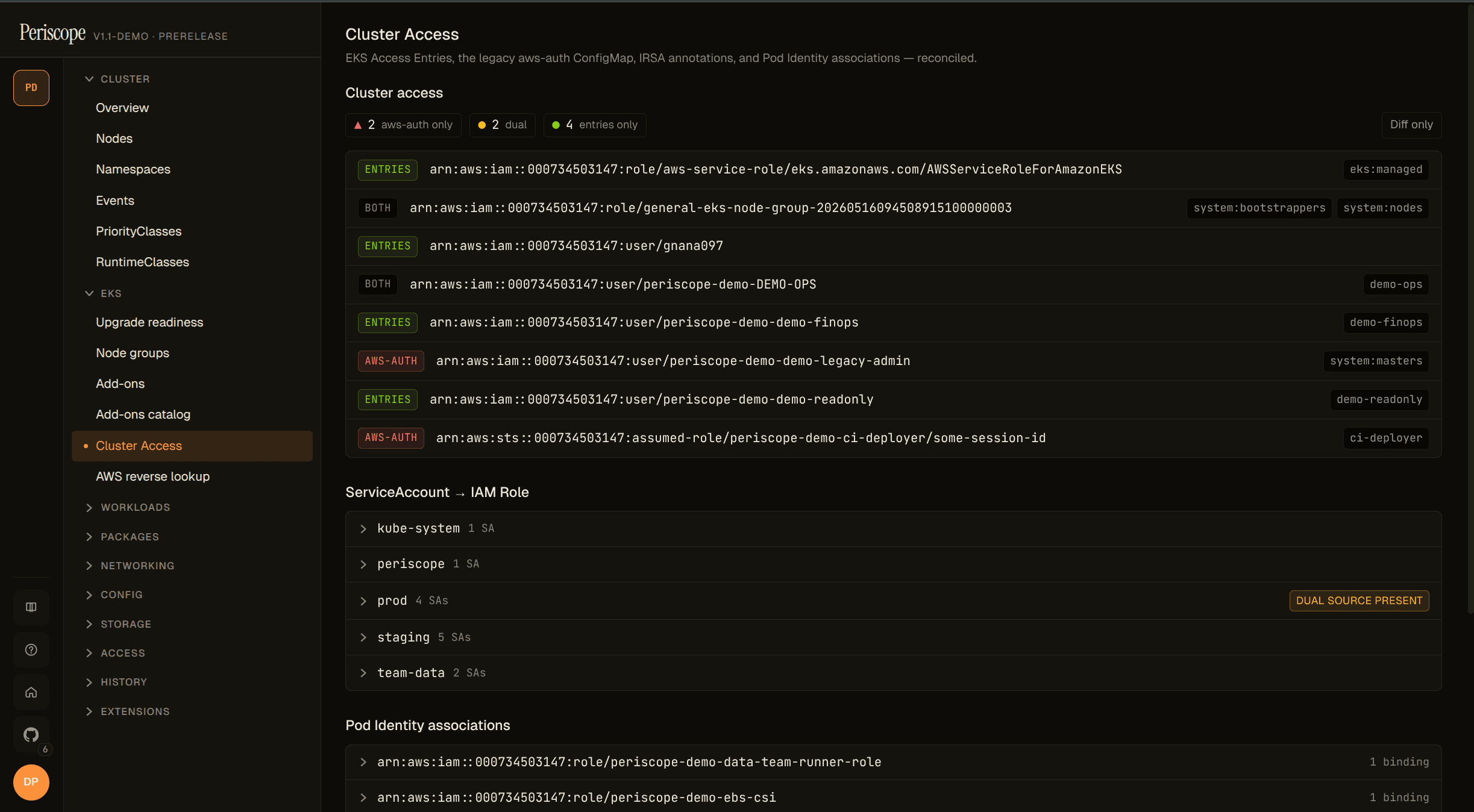
aws access · v1.1

Identity, reconciled.

Four EKS authentication primitives — Access Entries, the legacy aws-auth ConfigMap, IRSA annotations, Pod Identity associations — reconciled in one view, with the migration-health chip rolling up aws-auth-only / entries-only / both counts. The SA → Role index flags dual-source bindings (Pod Identity wins; the IRSA annotation is shadowed dead config) and stale orphans (role deleted). Open any pod and the AWS Access tab resolves the identity chain server-side — every policy parsed, grouped by AWS service, chipped against an 18-action sensitive catalog. Reverse lookup answers 'which workloads can perform s3:DeleteBucket?' in one query.

  • Migration health: who's still on aws-auth, who's dual-bound, who's fully migrated.
  • Per-workload identity chain: IRSA + Pod Identity reconciled, with role-existence flags and orphan detection.
  • Sensitive-permissions chips: 17 actions + literal * across 6 categories (privilege-escalation, data, cross-account, destructive, cluster, wildcard).
  • Reverse lookup: one query against every IAM policy attached to every SA-bound role in the cluster.
  • Locked-feature pane explains exactly which IAM permission is missing — no 403s on first click.
periscope.your-corp.com/clusters/prod-eu-west-1/cluster-access
Periscope Cluster Access page — Access Entries reconciled against aws-auth, unified SA → IAM Role index, Pod Identity view by role, with the migration-health chip on the header
security

200 CVEs, ~10 bumps.

Amazon Inspector v2 findings, joined to your pods and nodes, then grouped by package server-side so the wall of CVEs collapses to a list of upgrades. Each group header carries the suggested fix version that closes every finding in the group. Filter chips slice by severity, exploitable, or fixable. One Helm flag to enable; reads serve from a per-cluster local cache after a ~30s cold-path hydrate.

  • Grouped by package, sorted by triage priority (exploits → severity → CVSS → EPSS).
  • Suggested fix version per group — upgrade go/stdlib 1.16.1 → 1.26.3, close 116 CVEs.
  • Same wire shape feeds the SPA and the future MCP / AI-agent tool layer (v1.2).
  • Refresh is entity-scoped and audited; reads aren't (CloudTrail covers the Inspector side).
periscope.your-corp.com/clusters/prod-eu-west-1/pods
Periscope security tab — package-grouped CVE findings with filter chips for severity, exploits, and fixable
architecture

One pod. No persisted creds.

Periscope ships as a single Go binary with the SPA embedded via embed.FS. No frontend deployment, no central database, no kubeconfigs cached on disk. Audit rows in SQLite are the only durable state.

Periscope request architectureBrowserReact · Vite · MonacoHTTPS · SSE · WSperiscope · single Go binary▸ HTTP router · :8080/api/auth · /api/clusters · /api/fleet · /api/audit · /api/agents · /▸ Per-cluster handlerImpersonate-User: <human's OIDC sub> ▸ Backend factorybuilds rest.Config per request · routes by cluster registry entryEKSIRSA / Pod IdentityKubeconfigfile-loadedIn-cluster SAkubelet-mountedAgentWS tunnel · zero inbound→ target Kubernetes clusters · EKS · GKE · AKS · k3s · kindload-bearing
single binary · per-request impersonation · 4 backend types · zero kubeconfigs cached on disk
STATELESS

Stateless w.r.t. credentials.

OIDC sessions are in-memory only. Restart drops sessions; users sign back in. Multi-replica session sharing is a v1.x concern — explicit, not hidden.

IMPERSONATION

The dashboard isn't admin.

No handler talks to apiserver "as Periscope." Every K8s call carries the user's OIDC sub. The bridge identity is the transport — per-call authz is the human's RBAC.

PRE-FLIGHT

Audit before action.

Privileged handlers emit *.attempted before the K8s call and *.succeeded / *.failed after. A denied action still leaves a row.

where it fits

three honest comparisons — pick the one that matches your team.

01

periscope

EKS-native, audit-clean.

for orgs that banned long-lived aws creds and need an audit row for every action. multi-cluster fleet view in oss. apache-2.0.

  • keyless · pod identity / irsa
  • aws access · cluster access page + reverse lookup
  • audit · every action signed
  • multi-cluster · no $/cluster gate
  • cve · per-pod via inspector v2
02

radar by skyhook

Polished general K8s console.

yc-backed kubeconfig-based console with a nice topology graph, opencost integration, and an mcp server today. cloud tier at $99/cluster/mo.

  • topology · resource + traffic graph
  • opencost · cost rollups
  • mcp · ai-agent integration
03

lens · k9s

Local-first, single-user.

desktop or terminal. no install on the cluster, no shared session, no audit trail. perfect for solo work, not for a team that needs an answer to who-changed-what.

  • desktop · single-user
  • per-context · kubeconfig auth
  • free · no cluster install

all three are good. periscope is the one for the audited multi-cluster eks shop where every action needs a name on it.

install

Helm chart, signed, five minutes.

Published to ghcr.io as an OCI artifact and signed with cosign. Verify the signature, write a values file, install. The dashboard is at http://localhost:8080/ after a port-forward.

What you'll need

  • A Kubernetes cluster (1.27+).
  • helm 3.x or 4.x.
  • An OIDC tenant — Auth0 or Okta both have docs.
  • For EKS: AWS CLI for Pod Identity / IRSA.
read full deploy guide
# 1. Write a values file with auth + cluster registry
$EDITOR my-values.yaml

# 2. Apply your OIDC client secret
kubectl create namespace periscope
kubectl -n periscope create secret generic periscope-oidc \
  --from-literal=OIDC_CLIENT_SECRET='<the-secret>'

# 3. Install
helm install periscope \
  oci://ghcr.io/gnana997/charts/periscope \
  --version 1.1.6 \
  --namespace periscope \
  --values my-values.yaml

# 4. Reach it
kubectl -n periscope port-forward svc/periscope 8080:8080
open http://localhost:8080/

Get a periscope on it.

Five minutes from helm install to a fleet view. Bring your own IdP, your own clusters, your own RBAC.