docssetupagent onboarding
Connect a Kubernetes cluster via the Periscope agent
Register a managed K8s cluster with Periscope via the agent backend — for on-prem k3s, customer-managed EKS, or any cluster without inbound network. Three deployment topologies, ~15 minutes.
This guide walks an operator through registering a new managed cluster with Periscope using the agent backend. Three deployment topologies are supported and documented as separate sections — pick the one that matches the load-balancer shape you're already running.
If you're new to Periscope, read docs/setup/deploy.md
first — that covers installing the central server. This page picks
up after the server is running and you want to add another cluster
to its fleet view.
Why an agent at all? The agent dials out from the managed
cluster to the central server over a long-lived WebSocket — no
inbound network access needed, no IAM role per cluster, works on
any K8s with outbound HTTPS (EKS, GKE, AKS, on-prem k3s, kind).
See #41 for
the design rationale and
docs/architecture/agent-tunnel.md
for the runtime design.
What works on agent-managed clusters? Everything that works on
direct backends (eks / kubeconfig / in-cluster) works on
backend: agent too: list / detail / watch / YAML edit / apply /
delete / can-i / pod exec / log streaming / audit forwarding.
Exec was the last gap and shipped in v1.0.0
(#42 +
#43). See
RFC 0004 for the
integration details.
What you see (UI-driven onboarding)
The fastest path is the SPA'''s + onboard cluster button on the fleet view. Two-step flow:
1. Name the new cluster
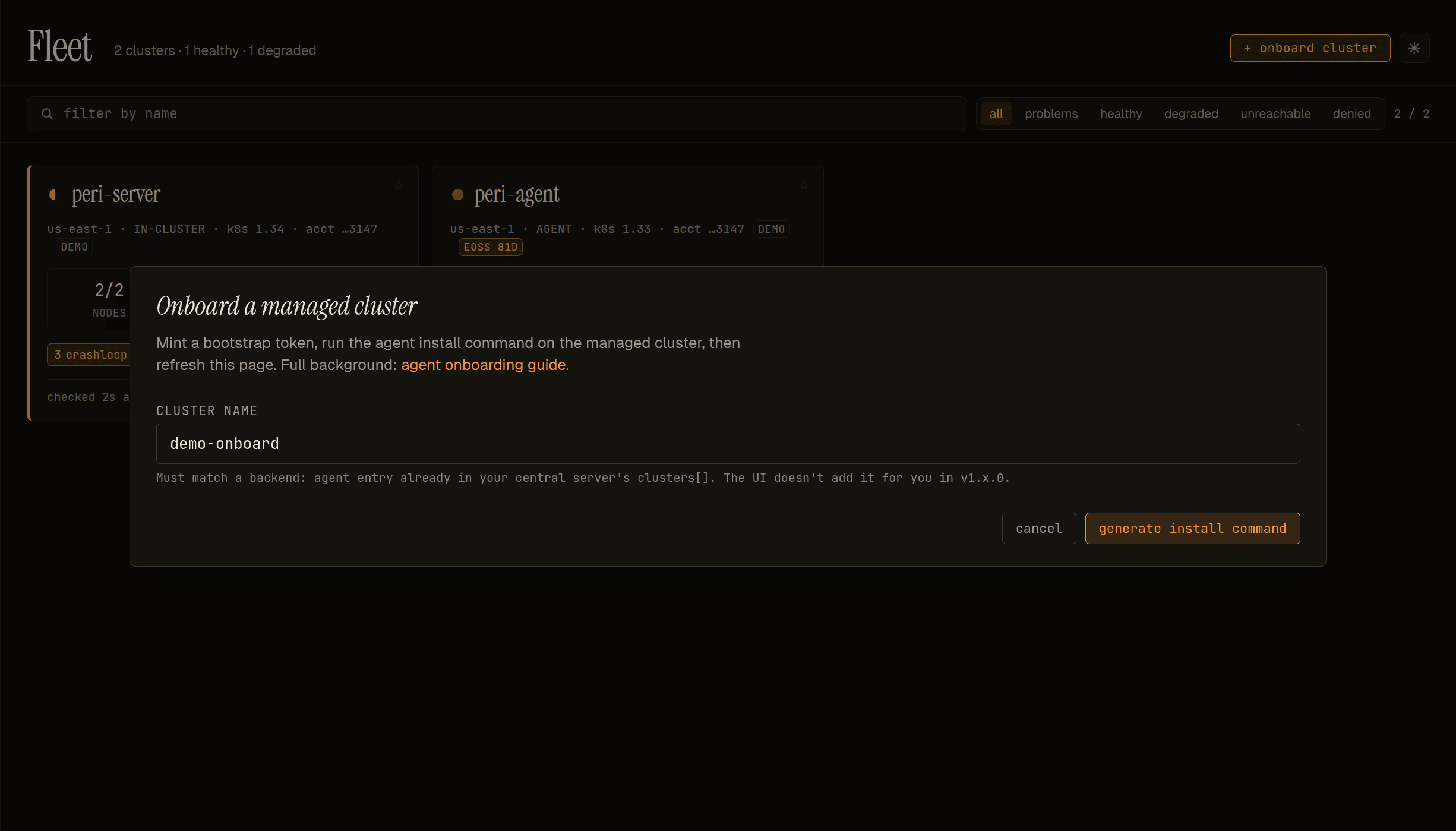
The name must match a backend agent entry already in your central server'''s clusters[]. The UI does not add the registry entry for you in v1.x — the explicit clusters[] config remains the source of truth so it'''s reviewable + version-controlled. Mismatched name = registration rejected.
2. Copy the install command
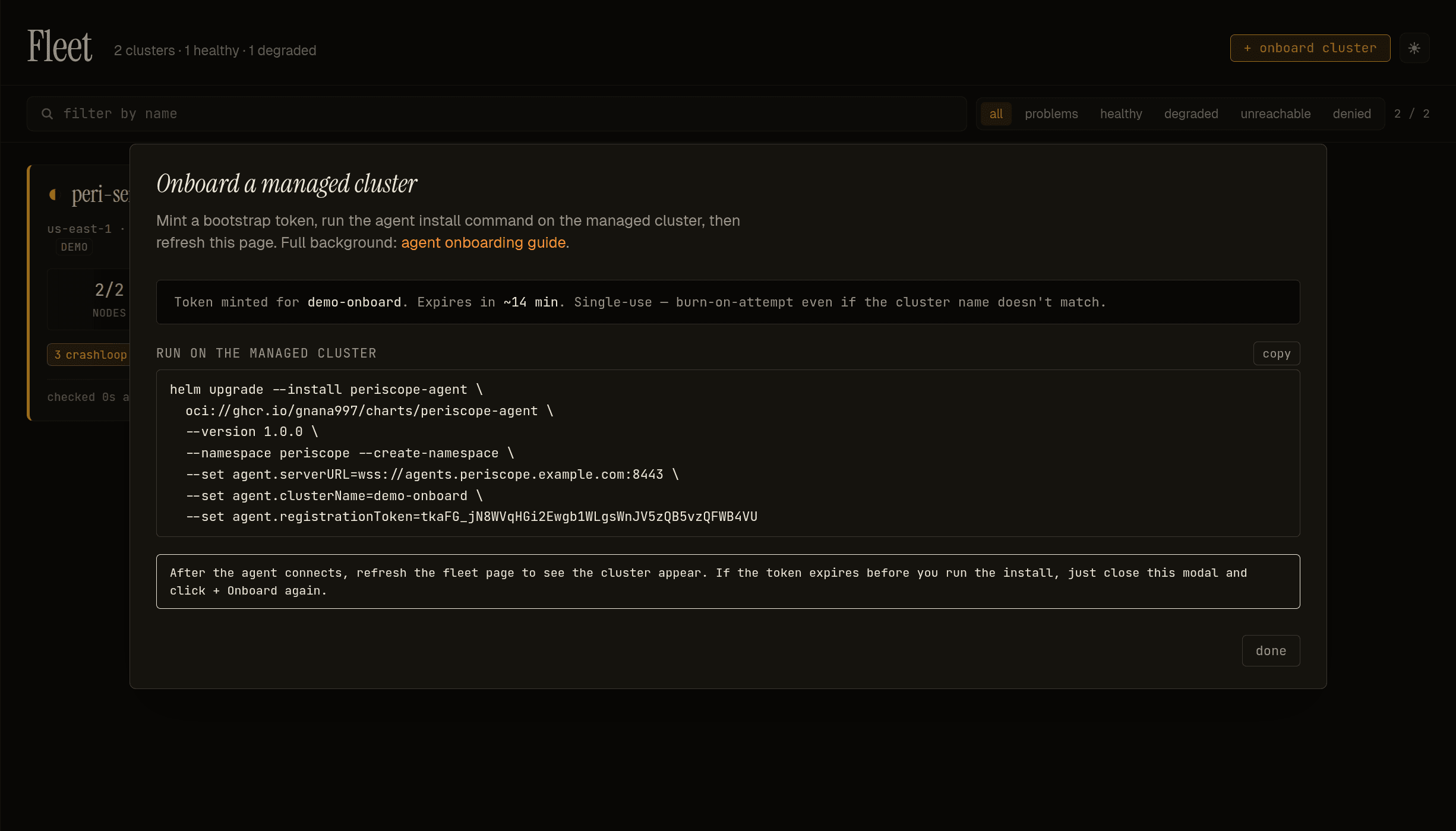
The dialog mints a single-use bootstrap token with a ~15-minute TTL (the timer counts down in the header strip), pre-formats the full helm upgrade --install periscope-agent ... command with serverURL, clusterName, and registrationToken set, and waits for you to copy + run it on the managed cluster. The token is burn-on-attempt — invalid cluster name or expired token both consume the token, so you'''ll need a fresh one.
After the agent connects, refresh the fleet page and the new cluster'''s card flips from unknown to healthy.
The CLI / config-driven flow below is the equivalent without the SPA — useful for GitOps-managed clusters where the helm install lives in a chart-of-charts you commit to a repo.
Prerequisites (apply to every topology)
On the central cluster (where the periscope server runs):
- Periscope ≥ v1.0.0 installed via the periscope chart
- Server values include
agent.enabled: trueand a realagent.tunnelSANsmatching whatever DNS name agents will dial
On the managed cluster (the one you want to add to the fleet):
- Outbound HTTPS to the central server's tunnel hostname
- A namespace to install the agent into (default
periscope)
Pick a topology
| Topology | When | Setup overhead | Agent values needed |
|---|---|---|---|
| A — single LB, public cert | You can put a public cert (ACM, Let's Encrypt) on the central server's main HTTP endpoint AND that endpoint can also do TLS passthrough for the mTLS tunnel. Practical for nginx-ingress with NLB and SNI routing, or for self-managed setups. | Low | serverURL only |
| B — split LBs (ALB + NLB) | The recommended AWS production shape. ALB (HTTP-terminating, public ACM cert) for the SPA and JSON APIs; NLB (TLS-passthrough) for the mTLS tunnel. | Medium — two DNS names, two LBs | serverURL + registrationURL |
| C — single LB, self-signed | One LB, NLB-with-passthrough, no public cert (corp network, dev). | Medium — one extra hash to compute | serverURL + serverCAHash |
The chart accepts serverURL alone (Topology A), serverURL +
registrationURL (Topology B), or serverURL + serverCAHash
(Topology C). Mixing B + C (split LBs and the registration
endpoint is self-signed) is also supported — set all three.
The cluster registration steps are the same for all three; only the agent install command differs in step 3. Sections below cover each topology.
Step-by-step (common to all topologies)
1. Pre-register the cluster name
The agent's mTLS CN must match an entry in the central server's cluster registry. Add the cluster to your server's values.yaml:
clusters:
  - name: prod-eu
    backend: agent
    environment: prod
Then helm upgrade the central server. The cluster card appears
in the fleet view immediately as unreachable (no agent is
connected yet).
The cluster name is load-bearing: it becomes the mTLS cert CN, the tunnel session key, and the registry key. Must match the DNS- 1123 shape (lowercase, digits, dashes; 1-63 chars). The schema validators on both charts enforce this — typos surface at install time, not at runtime.
2. Mint a bootstrap token
From an admin-tier session, click + onboard cluster in the fleet view header, OR via curl:
curl -sX POST https://periscope.example.com/api/agents/tokens \
  -H "Cookie: periscope_session=<your-session-cookie>" \
  -H "Content-Type: application/json" \
  -d '{"cluster":"prod-eu"}'
# → { "token":"abc123...", "cluster":"prod-eu", "expiresAt":"..." }
The token is single-use and 15-minute TTL. If the agent install fails or you wait too long, mint a fresh one.
Cluster-name binding is enforced: a token minted for prod-eu
can only register prod-eu. A wrong-cluster guess burns the
token.
3. Install the agent
This step varies by topology. Pick the section below that matches your central server's LB shape.
4. Verify (same for all topologies)
On the managed cluster:
kubectl -n periscope logs -l app.kubernetes.io/name=periscope-agent -f
# Expect:
#   periscope-agent starting ...
#   first boot: registering with central server ...
#   agent registration complete; state persisted ...
#   agent identity ready ...
#   opening tunnel ...
#   tunnel.client_connected ...
In the central server's fleet view, the cluster card should flip from unreachable to healthy within a few seconds.
5. Bootstrap-token cleanup (optional)
kubectl -n periscope delete secret periscope-agent-bootstrapSingle-use spent — the agent persisted its long-lived mTLS cert
into periscope-agent-state on first boot.
Topology A — single LB, public cert
You have one load balancer fronting both the HTTP API and the tunnel. The LB does TLS passthrough for both, and the central server presents a public cert (ACM, Let's Encrypt) that any agent can validate against system roots.
This is the simplest shape but requires either nginx-ingress with SNI routing, or a single NLB with separate ports (443 for HTTP, 8443 for tunnel) where TLS terminates at the pod for both.
kubectl config use-context <managed-cluster>

helm upgrade --install periscope-agent \
  oci://ghcr.io/gnana997/charts/periscope-agent \
  --version <X.Y.Z> \
  --namespace periscope --create-namespace \
  --set agent.serverURL=wss://periscope.example.com:8443 \
  --set agent.clusterName=prod-eu \
  --set agent.registrationToken=<paste-token-from-step-2>
The agent derives the registration URL from serverURL (translates
wss:// → https://). Standard CA-chain validation against system
roots handles the registration TLS dial.
Topology B — split LBs (ALB + NLB)
The AWS-shaped production deployment. Two load balancers, two DNS names:
- ALB at
https://periscope.example.com(port 443) → forwards to pod port 8080 (main HTTP API). Uses an ACM-issued public cert. TLS terminates at the ALB. - NLB at
agents.periscope.example.com(port 8443) → TLS passthrough to pod port 8443 (mTLS tunnel). The pod presents a self-signed cert minted from the per-deployment CA (not ACM — AWS won't sign for an mTLS endpoint that has to use the chart's own CA).
Why split: ALB can't pass through client certs (it terminates TLS), so the tunnel can't sit behind an ALB. But the human-facing API benefits from ACM (no cert distribution to browsers). So you split.
kubectl config use-context <managed-cluster>

helm upgrade --install periscope-agent \
  oci://ghcr.io/gnana997/charts/periscope-agent \
  --version <X.Y.Z> \
  --namespace periscope --create-namespace \
  --set agent.serverURL=wss://agents.periscope.example.com:8443 \
  --set agent.registrationURL=https://periscope.example.com \
  --set agent.clusterName=prod-eu \
  --set agent.registrationToken=<paste-token-from-step-2>
The agent uses registrationURL for the unauth registration POST
(reaches the ALB → main HTTP, public-cert TLS validates against
system roots) and serverURL for the mTLS tunnel (reaches the NLB
→ pod's mTLS listener, the agent already has the server CA bundle
from the registration response).
Topology C — single LB, self-signed
You have one load balancer (NLB-with-passthrough) but no public cert — corp network with a private CA, dev environment, or just not yet wired Let's Encrypt / ACM.
The agent can't validate the central server's self-signed cert via system roots, so use SPKI hash pinning (kubeadm's pattern) to bootstrap trust without distributing the full CA bundle.
Compute the SPKI hash on the central server
The hash is computed over the server cert's SubjectPublicKeyInfo — SPKI not cert means key rotation that preserves the SPKI doesn't break the pin (RFC 7469).
kubectl -n periscope exec deploy/periscope -- \
  cat /etc/periscope-server/tls.crt | \
  openssl x509 -pubkey | \
  openssl rsa -pubin -outform DER 2>/dev/null | \
  sha256sum | awk '{print "sha256:"$1}'
# → sha256:abcd1234...
Install the agent with the hash
kubectl config use-context <managed-cluster>

helm upgrade --install periscope-agent \
  oci://ghcr.io/gnana997/charts/periscope-agent \
  --version <X.Y.Z> \
  --namespace periscope --create-namespace \
  --set agent.serverURL=wss://periscope.example.com:8443 \
  --set agent.serverCAHash=sha256:abcd1234... \
  --set agent.clusterName=prod-eu \
  --set agent.registrationToken=<paste-token-from-step-2>
The agent does an InsecureSkipVerify TLS dial on the registration
endpoint, computes the SPKI hash of the cert it receives, and
refuses to proceed if it doesn't match the configured hash. After
the registration succeeds, the agent has the server's full CA
bundle and uses standard chain validation for the long-lived
tunnel — the pin is only for the bootstrap dial.
If the configured hash is wrong, the agent's log surfaces the actual computed hash for comparison so you can verify and re-roll with the correct value.
Troubleshooting
Cross-cutting issues (production gotchas, scanner false-positives, local-dev TLS) live in troubleshooting.md. This section covers agent-registration and tunnel-specific failure modes.
Turn on debug logging on the agent
When something goes wrong between agent registration and the cluster going healthy, the fastest path to a root cause is to enable per- request logs on the agent:
helm upgrade periscope-agent oci://ghcr.io/gnana997/charts/periscope-agent \
  -n periscope --reuse-values --set agent.logLevel=debug
kubectl -n periscope rollout status deploy/periscope-agent
kubectl -n periscope logs -l app.kubernetes.io/name=periscope-agent -f | jq .
You'll see one proxy.request_in and one proxy.request_out per
request flowing through the agent, plus a proxy.apiserver_error
(at WARN level — visible even at the default info log level)
whenever the apiserver returns 4xx/5xx.
Each line carries a request_id matching the X-Request-Id the
central server's middleware sets on every API call — grep the same id
in the server's audit DB and stdout slog for end-to-end correlation.
Reset to default once you're done:
helm upgrade periscope-agent oci://ghcr.io/gnana997/charts/periscope-agent \
  -n periscope --reuse-values --set agent.logLevel=""
tls: failed to verify certificate: x509: certificate signed by unknown authority
The agent is dialing a self-signed registration endpoint without a trust anchor. Either:
- Switch to Topology B (point
registrationURLat a public-cert ALB), or - Switch to Topology C (compute the SPKI hash and set
serverCAHash).
remote error: tls: certificate required
The agent is hitting an mTLS-required endpoint (the tunnel listener
on :8443) for what should have been an unauth registration POST.
This is the symptom of the original #48
bug. Switch to Topology B by setting registrationURL to your
ALB hostname.
SPKI pin mismatch: server presented sha256:X, expected sha256:Y
You're on Topology C and the configured serverCAHash doesn't
match the server's actual cert. The log line shows you what the
server presented; verify it against the value openssl ... | sha256sum
prints on the central cluster, then re-roll with the correct hash.
registration rejected (HTTP 401)
The bootstrap token failed validation. The server returns a uniform error for security; check the server logs to distinguish the four real failure modes:
kubectl -n periscope logs deploy/periscope --tail=20 | grep tunnel.registerCommon causes:
- Token expired (15-min TTL elapsed) → mint a fresh one
- Token already used (re-running
helm installwith the same value) → mint a fresh one - Cluster name mismatch between
--set agent.clusterName=and the value in the token mint request → re-mint with the correct name
Agent connects, then the tunnel drops every few seconds
Check the central server logs:
tunnel.session_error err="websocket: close 1006 (abnormal closure)"Most common cause: server cert SAN mismatch — agent dials
wss://agents.example.com:8443 but the server cert SAN is
localhost. Fix:
helm upgrade periscope --set-string 'agent.tunnelSANs=agents.example.com\,localhost'on the central cluster, then restart the periscope pod (the server cert is minted at startup).
Cluster card stays "unreachable" — no agent in the registry
curl -s https://periscope.example.com/api/clusters \
  -H "Cookie: periscope_session=..." | jq .
If the cluster name isn't in the list, you forgot to helm upgrade
the central server after adding to clusters[]. Re-do step 1.
helm template fails with agent.serverURL is required
Schema-required field missing. Add --set agent.serverURL=....
mTLS handshake fails with bad certificate
The agent's persisted cert doesn't chain to the server's current CA. Either:
- The server's CA Secret was deleted and regenerated (every previously-issued agent cert is now invalid)
- The agent was registered against a different server
Fix: delete the agent's state Secret on the managed cluster, mint a fresh token, re-install:
kubectl -n periscope delete secret periscope-agent-state
# then redo steps 2 + 3
Cross-account / cross-cloud
The agent doesn't care which AWS account, cloud, or network its managed cluster lives in — only that the agent pod can reach the central server's tunnel hostname over outbound HTTPS. No IAM trust policies to set up, no peering, no VPN.
For each cluster, repeat steps 1–5, choosing the topology that matches your LB shape. The same Periscope server can host clusters from different accounts / clouds / regions in one fleet view.
Security notes
- The bootstrap token authorises registration for one cluster name, not anything else. A leaked token can register that one cluster (and burn itself); it cannot impersonate other clusters or access any data.
- The persisted mTLS cert is the long-lived agent identity. Keep
the state Secret protected (the chart's RBAC limits access, but
anyone with
secrets/geton the agent's namespace can pull it). - Agent cluster RBAC is scoped to
get/list/watch/impersonateby default. Apply/delete handlers depend on the user's impersonated identity; the agent itself never gains write access beyond what itsClusterRolegrants. Tighten the chart'sclusterRoletemplate if your security model wants stricter defaults. - SPKI pin (Topology C) is a public hash — leakage is a no-impact event by itself. The pin is useless without the matching server cert. Treat it like a Git commit SHA, not like a secret.
- For a deeper threat-model walkthrough see issue #41.
What's next
The Periscope SPA includes a + Onboard cluster button on the fleet page that walks through the token mint + install command flow. Phase 2 (live polling, runtime registry mutations, re-mint/decommission) is a post-1.0 follow-up on the v1.x train.
See also
examples/agent/— sample values files and a referenceregister-and-install.shscriptdocs/architecture/agent-tunnel.md— design walkthrough (PKI, mTLS, transport substitution, failure modes)- RFC 0003 — audit shape (every
action taken via an agent-backed cluster lands in the central
audit store, with
cluster: <name>set on the row) - Issue #41 — agent-vs-central-IAM design discussion
- Issue #42 — v1.0 multi-cluster epic
- Issue #48 — the ALB+NLB bootstrap chicken-and-egg this guide's Topology B fixes