docssetupcluster rbac
Per-cluster RBAC for Periscope — shared, tier, raw modes
Periscope's K8s authorization is operator-selectable. Pick a mode (shared / tier / raw), apply per-cluster RBAC from the Helm chart, and the dashboard impersonates each user under their real OIDC identity.
Periscope's K8s authorization is operator-selectable. Pick a mode in
auth.yaml: authorization.mode, set up a tiny amount of per-cluster
RBAC, and you're done.
| Mode | What users get | Operator effort |
|---|---|---|
shared (default) | Identical permissions for everyone — whatever the pod role is bound to. | One Access Entry per cluster. |
tier | Five built-in tiers (read/triage/write/maintain/admin) mapped from your existing IdP groups. | Apply 7 shipped manifests per cluster + ~5 lines of config. |
raw | Pass-through impersonation: each user's actual IdP groups, prefixed. | Full RBAC YAML per cluster (CLI tool ships in PR-B.2). |
This guide walks each mode end-to-end.
Reviewing Periscope for adoption? For the security-team
view — every ClusterRole and ClusterRoleBinding the default
install creates, the CIS / AWS Guardrails findings each will
trigger, and how to opt out — see
docs/security/rbac-posture.md.
What you see
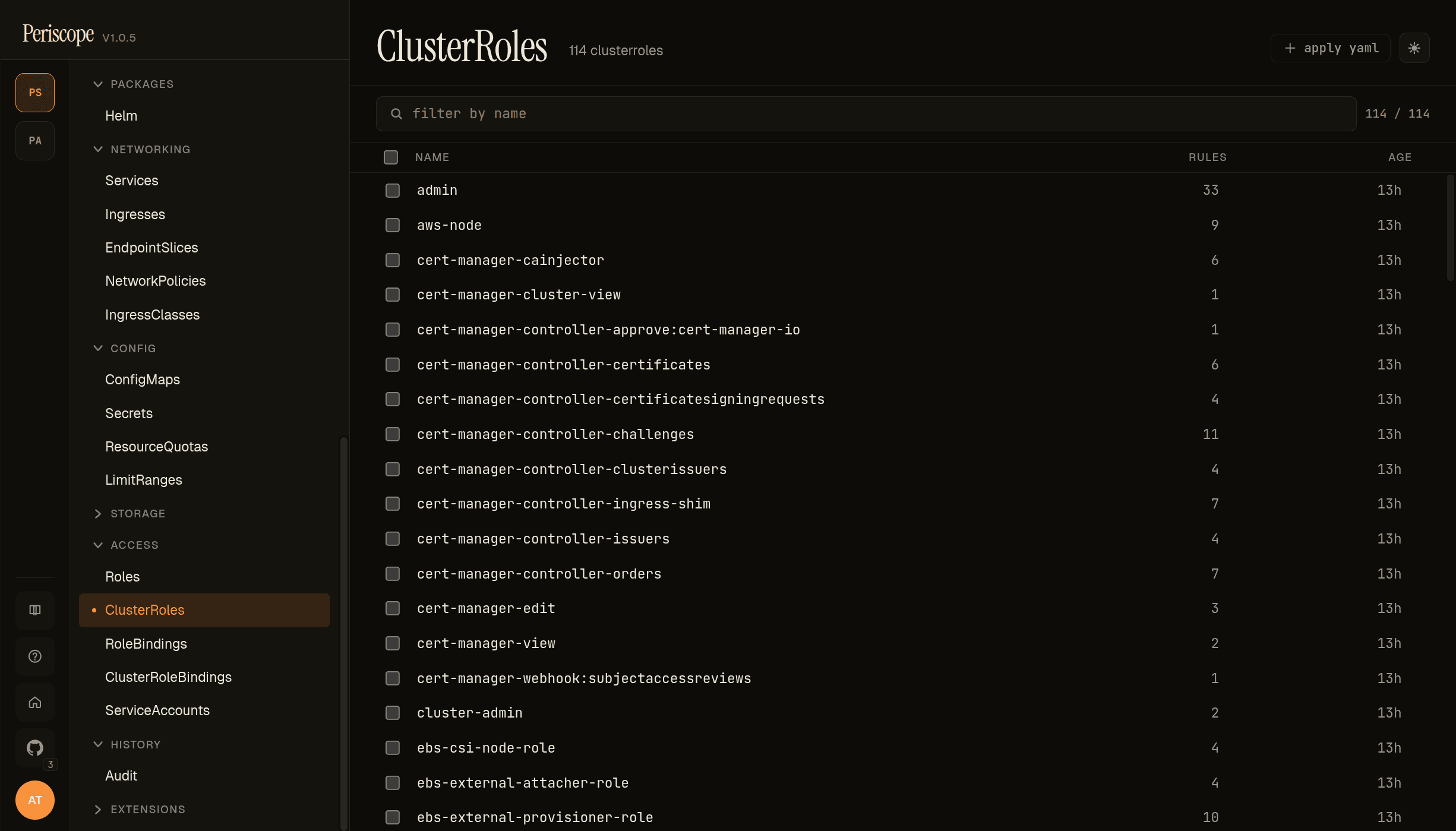
The Access group in the sidebar carries the cluster'''s RBAC inventory: Roles, ClusterRoles, RoleBindings, ClusterRoleBindings, ServiceAccounts. Each list page shows name, rule count (or subjects/roleref), and age. Detail panes expand the rules / bindings into kubectl-describe-equivalent views.
Periscope ships every binding required for the impersonation chain to work — the screencap above shows the cluster-admin, admin, edit, view standard ClusterRoles plus the chart-rendered tier ClusterRoles (periscope-triage, periscope-write, periscope-maintain) that map your IdP groups to K8s permissions.
Background: how impersonation works
In tier and raw modes, Periscope's pod authenticates to each cluster
with only the impersonate verb. Every user request rides
Impersonate-User and Impersonate-Group HTTP headers, and the apiserver
re-evaluates RBAC under the impersonated identity. K8s audit log
records:
user.username   = auth0|alice                       # the OIDC sub
user.groups     = ["periscope-tier:write"]          # the resolved tier (or :raw groups)
impersonatedBy.username = system:node:periscope-bridge   # Periscope's principal
Two non-negotiables:
- Periscope's pod role gets ONLY
impersonateon each cluster. No other K8s perms. This is defense-in-depth: a compromised Periscope can act as ANY user, but cannot itself read secrets, exec into pods, or anything else without an impersonation step. - Impersonated groups are always prefixed (
periscope-tier:orperiscope:). RBAC bindings reference the prefixed names. An attacker who compromises Periscope cannot impersonate intosystem:mastersor any other un-prefixed privileged group — bindings on those won't match.
Mode 1: shared (default)
No impersonation. Every user has whatever K8s permissions Periscope's pod role has. Best for:
- Solo / small teams (everyone is admin)
- POC and demo deployments
- Lab clusters where RBAC friction isn't worth it
- Migration period: install in
sharedfirst, move totieronce you outgrow it
Setup
-
Access Entry on each cluster, mapping Periscope's pod principal to a K8s group:
aws eks create-access-entry \ --cluster-name prod-eu-west-1 \ --principal-arn arn:aws:iam::222222222222:role/periscope-base \ --kubernetes-groups periscope-bridge \ --type STANDARD -
Bind the bridge group to whatever K8s ClusterRole you want everyone to have:
apiVersion: rbac.authorization.k8s.io/v1 kind: ClusterRoleBinding metadata: name: periscope-shared-cluster-admin roleRef: apiGroup: rbac.authorization.k8s.io kind: ClusterRole name: cluster-admin # or `view`, `edit`, etc. — your call subjects: - kind: Group name: periscope-bridge apiGroup: rbac.authorization.k8s.io -
In
values.yaml:auth: authorization: mode: shared
That's it. Every authenticated Periscope user can do whatever the bound ClusterRole allows.
Caveat — audit attribution
In shared mode, the K8s audit log shows user.username = system:node:periscope-bridge — the pod's principal, not the user. The
application audit log (auth.login, etc.) still attributes by OIDC
sub, but if "who deleted that pod?" reaches K8s, you can't tell from
the K8s side alone. This is the cost of zero-RBAC-config; if attribution
matters, use tier or raw.
See also — audit visibility in the dashboard. Periscope itself
records every privileged action through its own audit pipeline,
attributed by OIDC sub regardless of K8s impersonation mode. The
read-side endpoint (/api/audit) has its own RBAC: by default users
see only their own actions. To grant security or SRE teams full
visibility, set auth.authorization.auditAdminGroups. The full
resolution order across all three authz modes — including why raw
mode requires the explicit grant and shared mode falls back to
allowedGroups — is documented in
docs/setup/audit.md. The audit-admin story is decoupled
from K8s admin on purpose: security teams who can read history
shouldn't need to mutate prod.
Single-cluster shorthand (in-cluster backend)
When auth.authorization.mode: shared AND any clusters[].backend: in-cluster, you don't need the Access Entry / external bridge binding above. The chart auto-renders a periscope-shared ClusterRoleBinding pointing the periscope ServiceAccount at the ClusterRole you name in clusterRBAC.sharedRoleName (default view).
auth:
  authorization:
mode: shared # default
clusterRBAC:
sharedRoleName: view # default — read-only, safe. Use `edit` for write access.
clusters:
- name: local
backend: in-clusterChoose the role that matches "everyone hitting the dashboard":
sharedRoleName | Reads | Writes | Use case |
|---|---|---|---|
view (default) | yes | no | Production "look-only" dashboards |
edit | yes | namespaced | Most dev / staging / lab clusters |
cluster-admin | yes | all (incl. RBAC) | Local kind / single-operator demos. Note: trips CIS 5.1.1 / AWS Guardrails. |
"" | n/a | n/a | Suppress the auto-binding; manage RBAC out-of-band. |
Before [#142] this auto-binding didn't exist, and shared + in-cluster left the SA with zero RBAC — every list call returned 403 and the SPA's overview page crashed on .length of null. The fix is the chart change; this section is the new contract.
Mode 2: tier (recommended once you've outgrown shared)
Five built-in tiers; map your existing IdP groups to one of them.
Tier definitions
| Tier | K8s mapping | What it does |
|---|---|---|
read | view (built-in) | Read everything except secrets. |
triage | shipped periscope-triage | Read + debug verbs (exec, logs, port-forward, restart pods, scale workloads). No spec edits. |
write | edit (built-in) | Modify all namespaced resources except RBAC. |
maintain | shipped periscope-maintain | admin (namespaced incl. RoleBindings) + cluster-scoped reads. No cluster-level RBAC create. |
admin | cluster-admin (built-in) | Everything. |
The triage and maintain ClusterRoles ship in the chart with
sensible default verb sets; verb sets evolve in v1.x as we learn from
real use. kubectl edit clusterrole periscope-triage to tighten or
broaden per cluster.
Setup
-
Access Entry on each cluster, same as shared mode (bridge group). The pod principal needs only the
impersonateverb on each cluster — the chart'scluster-rbac.yamltemplate gives it exactly that. -
Apply the tier RBAC to each managed cluster. Render from the chart with your values, then
kubectl apply:helm template periscope ./deploy/helm/periscope \ --values my-values.yaml \ --set clusterRBAC.enabled=true \ --show-only templates/cluster-rbac.yaml \ | kubectl --context prod-eu-west-1 apply -f - # Repeat per managed cluster (or wrap in a loop / GitOps).This applies 7 manifests:
ClusterRole/periscope-impersonator— the impersonate verbClusterRoleBinding/periscope-impersonator→ bridge groupClusterRoleBinding/periscope-tier-read→viewClusterRoleBinding/periscope-tier-write→editClusterRoleBinding/periscope-tier-admin→cluster-adminClusterRole/periscope-triage+ClusterRoleBinding/periscope-tier-triageClusterRole/periscope-maintain+ClusterRoleBinding/periscope-tier-maintain
→admintier is opt-in as of v1.1 (#84). TheClusterRoleBinding/periscope-tier-admin → cluster-adminline in the list above renders only when you setclusterRBAC.adminTier.enabled: truein values. AWS Guardrails and CIS Kubernetes Benchmark 5.1.1 flag thecluster-adminbinding's YAML alone (the scanners cannot see the gating chain), so default-off keeps the default install clean.- To preserve v1.0.x behaviour on upgrade: set
clusterRBAC.adminTier.enabled: true. - To run the admin tier against a tighter custom role: set
clusterRBAC.adminTier.clusterRoleName: <my-role>. - If
auth.authorization.groupTiersmaps any group toadminbutadminTier.enabledis false,helm templatefails with the migration recipe — silent 403s are not allowed to slip through.
-
Map IdP groups to tiers in
values.yaml:auth: authorization: mode: tier groupTiers: SRE-Platform: admin SRE-OnCall: triage Backend-TeamLeads: maintain Engineering-All: write Contractors: read defaultTier: "" # "" = users in no listed group are deniedYou don't need to create new IdP groups for this — reuse whatever exists. If your Okta org has an "SRE-Platform" group, map it. The group string in
groupTierskeys is exactly what your IdP emits in thegroupsClaimtoken claim.When a user is in multiple matching groups, the highest-privilege tier wins (admin > maintain > write > triage > read).
-
(Optional) Tighten the custom ClusterRoles if the shipped defaults don't match your cluster's needs:
kubectl --context prod-eu-west-1 edit clusterrole periscope-triageDrift between shipped roles (chart
appVersion) and the cluster is the operator's responsibility. The chart's NOTES.txt prints the shipped-role version onhelm installso you can pin and re-apply on chart upgrade.
Verifying tier mode works
# After login, /api/auth/whoami should report your tier:
curl -b cookies.txt https://periscope.your-corp.com/api/auth/whoami
# {"subject":"auth0|...","email":"...","groups":[...],
#  "mode":"tier","tier":"admin","expiresAt":...}
In the SPA, the user-menu popover shows a tier badge (admin,
triage, etc.) so users can see at a glance what they can do.
K8s audit log on the target cluster:
user.username = auth0|alice
user.groups = ["periscope-tier:admin"]
impersonatedBy.username = system:node:periscope-bridge
That last line is the per-user attribution payoff: every K8s action traceable to a real human.
Mode 3: raw (full flexibility, full operator effort)
Periscope passes the user's actual IdP groups through (prefixed). You write all RBAC bindings against those prefixed group names. Use when you need:
- Per-namespace differentiation (admin in dev namespace, viewer in prod)
- Per-CRD scoping (Postgres team admins their
pgclusters/*, readonly elsewhere) - Org-specific roles that don't fit the 5 tiers
Setup
-
Access Entry: same as the other modes — bridge group on each cluster.
-
Apply the impersonator binding (same as tier mode's step 2, minus the tier ClusterRoleBindings — those are unused in raw mode):
apiVersion: rbac.authorization.k8s.io/v1 kind: ClusterRole metadata: name: periscope-impersonator rules: - apiGroups: [""] resources: ["users", "groups"] verbs: ["impersonate"] --- apiVersion: rbac.authorization.k8s.io/v1 kind: ClusterRoleBinding metadata: name: periscope-impersonator roleRef: apiGroup: rbac.authorization.k8s.io kind: ClusterRole name: periscope-impersonator subjects: - kind: Group name: periscope-bridge apiGroup: rbac.authorization.k8s.io -
Configure raw mode in
values.yaml:auth: authorization: mode: raw groupPrefix: "periscope:" # default -
Write RBAC bindings referencing
periscope:<group-name>for each IdP group you want to grant something:# SRE-Platform → cluster-admin everywhere --- apiVersion: rbac.authorization.k8s.io/v1 kind: ClusterRoleBinding metadata: name: periscope-sre-platform roleRef: apiGroup: rbac.authorization.k8s.io kind: ClusterRole name: cluster-admin subjects: - kind: Group name: periscope:SRE-Platform apiGroup: rbac.authorization.k8s.io # Backend-Devs → admin in payment, checkout, ledger namespaces only --- apiVersion: rbac.authorization.k8s.io/v1 kind: RoleBinding metadata: name: periscope-backend-devs namespace: payments roleRef: apiGroup: rbac.authorization.k8s.io kind: ClusterRole name: admin subjects: - kind: Group name: periscope:Backend-Devs apiGroup: rbac.authorization.k8s.io # ... repeat for checkout, ledger -
(Coming in PR-B.2) The
periscope-rbacCLI tool generates these bindings from a declarative intent file. Until then, hand-write or templatize.
Choosing between the modes
Start here:
  Are you a small team (<5 users) where everyone is effectively admin?
    YES → shared mode. You're done.
    NO  → continue.

  Do your permission needs fit "viewer / debugger / developer / lead / admin"?
    YES → tier mode. Map IdP groups, apply 7 manifests per cluster, go.
    NO  → raw mode. Wait for PR-B.2's CLI tool, or hand-write RBAC YAML.
You can flip modes any time by editing values.yaml and
helm upgrade-ing. Migrating from tier to raw requires rewriting
your bindings to use periscope:<group> instead of periscope-tier:<tier>,
but the rest of the deployment is unchanged.
Common pitfalls
Cross-cutting Periscope-pod issues live in troubleshooting.md. This section covers tier-mode RBAC mistakes specifically.
-
Tier mode user gets 403 on everything. Either
defaultTier: ""is denying them (they're in no listed group), or the chart'scluster-rbac.yamlwas never applied to the cluster they're hitting. Checkkubectl --context <cluster> get clusterrolebinding | grep periscope-tier. -
K8s audit log doesn't show impersonation. You're in
sharedmode, or your chart'sclusterRBAC.enabledis false. Enable both. -
403 specifically on
pods/execin triage tier. Make sure the shippedperiscope-triageClusterRole haspods/exec → create(it does by default; verify nothing edited it out). -
Group prefix mismatch. RBAC binding references
periscope:engineersbut Periscope is sendingperiscope-tier:write. You're in tier mode but wrote a raw-style binding. Either flip mode or rewrite the binding. -
Drift after chart upgrade. Chart bumped
periscope-triageto add a verb; your cluster still has the old version. Re-render and apply:helm template ... --show-only templates/cluster-rbac.yaml | kubectl apply -f -.
Helm release browser RBAC
Periscope ships a read-only Helm release browser
(docs/setup/helm-releases.md). Releases live
in K8s storage objects — Secrets by default, ConfigMaps as a
fallback — under the impersonated user's identity. To see releases
in the SPA, the user's resolved K8s identity needs get and list
on whichever storage kind the cluster uses, scoped to the namespaces
where releases live (or cluster-wide for the auto-probe to populate
the SPA's "all releases" list).
The shipped tier ClusterRoles cover the common cases:
| Tier | Secret-driver releases | ConfigMap-driver releases |
|---|---|---|
read (view) | ❌ — view excludes Secret reads | ✅ — view covers ConfigMaps |
triage (custom) | ❌ — no secrets verbs | ✅ — covers ConfigMaps |
write (edit) | ✅ | ✅ |
maintain (custom) | ✅ | ✅ |
admin (cluster-admin) | ✅ | ✅ |
If you want read-tier users to see secret-driver releases (the common case — Helm 3 defaults to Secrets), apply this binding to each managed cluster:
---
apiVersion: rbac.authorization.k8s.io/v1
kind: ClusterRole
metadata:
  name: periscope-helm-browser
rules:
  - apiGroups: [""]
    resources: ["secrets"]
    resourceNames: []                # bound by label selector via the API at read time
    verbs: ["get", "list"]
---
apiVersion: rbac.authorization.k8s.io/v1
kind: ClusterRoleBinding
metadata:
  name: periscope-helm-browser-read
roleRef:
  apiGroup: rbac.authorization.k8s.io
  kind: ClusterRole
  name: periscope-helm-browser
subjects:
  - kind: Group
    name: periscope-tier:read
    apiGroup: rbac.authorization.k8s.io
What this looks like for a read-tier user:
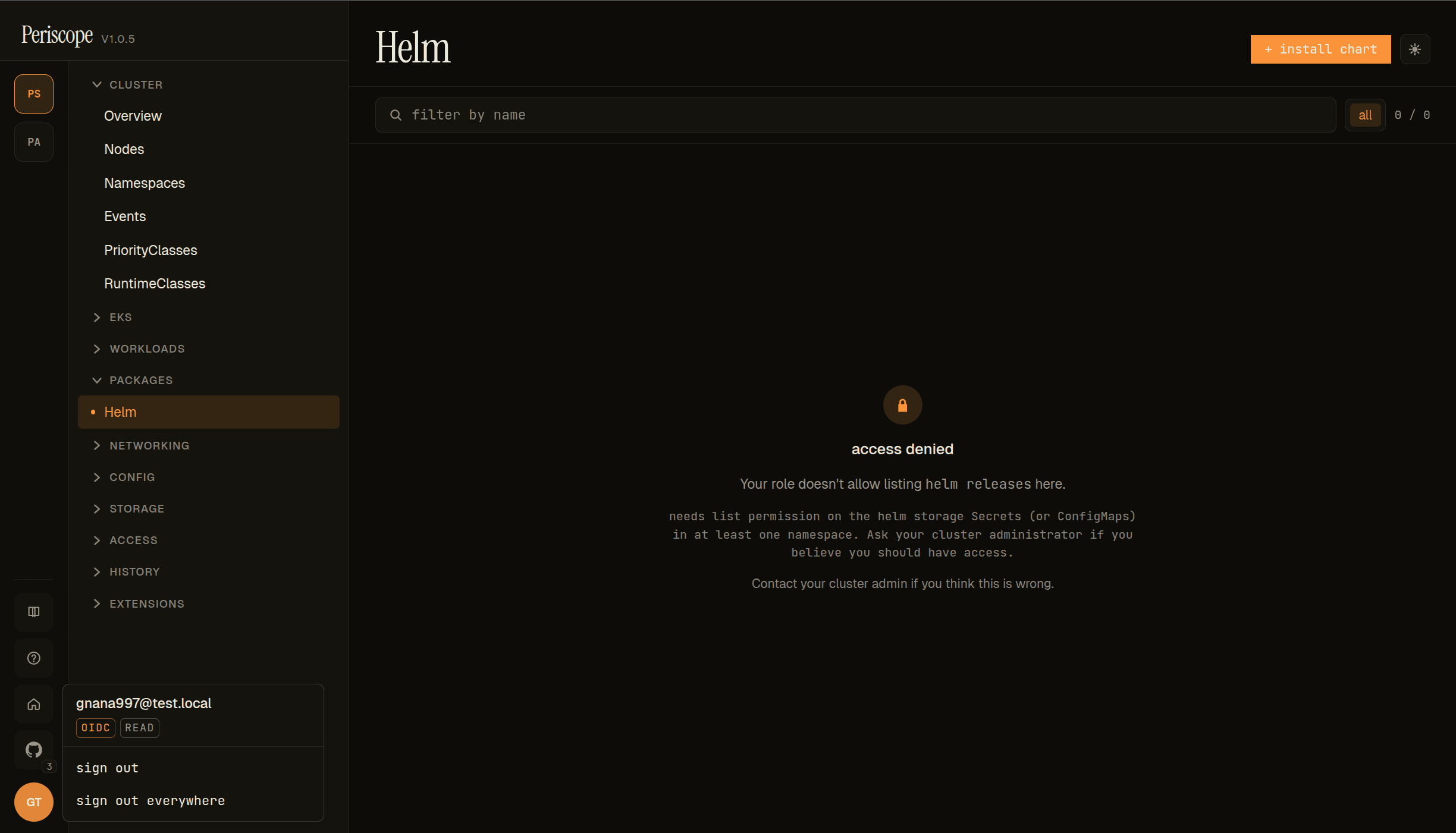
Same [email protected] account from the auth0 verify step, but in this Auth0 tenant the user is mapped to the read tier (popover shows OIDC + READ badges instead of ADMIN). The Helm page renders the standard forbidden state with kind-specific copy: Your role doesn't allow listing helm releases here. needs list permission on the helm storage Secrets (or ConfigMaps) in at least one namespace. Page-level (not row-level) — the list never even loads.
This is the view-tier excludes Secret reads row of the table above, surfaced visually. To unblock this user, apply the periscope-helm-browser-read binding below.
This is opt-in because granting secrets: list cluster-wide is a
significant escalation from view's defaults — view deliberately
excludes Secret reads to keep "read-only" from leaking credentials.
Only add the binding if your team's threat model accepts that
read-tier users will see Helm release storage payloads (which
include the chart's rendered manifest and merged values, but not
arbitrary cluster secrets).
For tighter scoping, narrow the binding to a RoleBinding in
specific namespaces — the helm browser then shows only the releases
in those namespaces for that tier.
Appendix: tier ClusterRole verbs
The chart's templates/cluster-rbac.yaml ships the triage and
maintain ClusterRoles inline. The other three tiers (read,
write, admin) bind to the K8s built-ins view, edit, and
cluster-admin — refer to the upstream K8s docs for those.
This appendix documents what's in the shipped custom roles so you can audit or customize them without reading template YAML. If the chart bumps these roles, this appendix should be updated alongside.
periscope-triage
Reads (mirrors view):
| API group | Resources |
|---|---|
"" (core) | bindings, configmaps, endpoints, events, limitranges, namespaces (+/status), persistentvolumeclaims (+/status), pods (+/log, /status), replicationcontrollers (+/scale, /status), resourcequotas (+/status), serviceaccounts, services (+/status) |
apps | controllerrevisions, daemonsets (+/status), deployments (+/scale, /status), replicasets (+/scale, /status), statefulsets (+/scale, /status) |
batch | cronjobs (+/status), jobs (+/status) |
networking.k8s.io | ingresses (+/status), networkpolicies |
autoscaling | horizontalpodautoscalers (+/status) |
policy | poddisruptionbudgets (+/status) |
discovery.k8s.io | endpointslices |
Verbs: get, list, watch.
Debug verbs (the triage-specific gap-filler):
| Resource | Verb | Purpose |
|---|---|---|
pods/exec | create | Open Shell |
pods/portforward | create | Port-forward UI |
pods/eviction | create | Evict a stuck pod |
pods | delete | Restart pod (controller recreates) |
apps/deployments/scale, apps/statefulsets/scale, apps/replicasets/scale | update, patch | Scale workloads |
apps/deployments, apps/statefulsets, apps/daemonsets | patch | Rollout restart (annotation bump) |
What's NOT in triage: spec edits (no pods: patch for the spec
itself, no full deployments: update), Secret reads, RBAC, anything
cluster-scoped except via the inherited view rules. Triage is
"diagnose + nudge", not "redeploy".
periscope-maintain
Reads: * on * for get, list, watch (everything
readable). Cluster-scoped reads explicitly: nodes (+/status),
namespaces, persistentvolumes, storage classes, CSI drivers/nodes,
volume attachments, priority classes.
Mutate (namespaced):
| API group | Resources | Verbs |
|---|---|---|
"" (core) | configmaps, events, persistentvolumeclaims, pods (+/exec, /log, /portforward), replicationcontrollers (+/scale), secrets, serviceaccounts, services | * |
apps | * | * |
batch | * | * |
networking.k8s.io | * | * |
autoscaling | * | * |
policy | * | * |
rbac.authorization.k8s.io | roles, rolebindings | * |
What's intentionally NOT in maintain: clusterroles,
clusterrolebindings, anything CRD-related (apply per cluster if
needed), workload identity APIs. Granting cluster-level RBAC mutate
is the line between maintain and admin.
Customization
Both roles are operator-tunable. After applying:
kubectl --context <cluster> edit clusterrole periscope-triageDrift between the shipped role (chart appVersion) and the cluster
is the operator's responsibility. The chart's NOTES.txt prints the
shipped-role version on each helm install / helm upgrade so you
can pin and re-apply when the chart bumps a verb.
Mode: in-cluster (single-cluster install)
When Periscope is deployed into the same cluster it manages (the most common single-cluster install pattern — kind, minikube, single-cluster prod), register that cluster with backend: in-cluster:
# my-values.yaml
clusters:
  - name: in-cluster
    backend: in-cluster
The pod uses its own ServiceAccount token (mounted at /var/run/secrets/kubernetes.io/serviceaccount/) as the underlying credentials, then layers per-user impersonation on top via Impersonate-User / Impersonate-Group headers — same model as eks and kubeconfig, just with a different credential source.
Auto-rendered RBAC
The chart's cluster-rbac.yaml auto-detects in-cluster mode and renders the impersonator binding with the chart's SA as a subject. No separate kubectl apply step needed — helm install does the whole thing.
The rendered ClusterRoleBinding looks like:
kind: ClusterRoleBinding
metadata:
  name: periscope-impersonator
subjects:
  - kind: Group                  # for tier-mode managed clusters (if enabled)
    name: periscope-bridge
  - kind: ServiceAccount         # auto-added when an in-cluster cluster is in the registry
    name: <release-name>-periscope
    namespace: <release-namespace>
What the SA can and can't do
The SA only ever holds the impersonate verb on users / groups. It cannot read or modify any resource directly. Every actual API call goes through impersonation, so the apiserver evaluates RBAC against the impersonated user (e.g. alice@corp in tier mode mapped to periscope-tier:admin).
Net: the chart-rendered SA is a thin "proxy" with no standalone power. All real authorization is per-user, per the existing tier / shared / raw modes.
Combining with managed clusters
In-cluster and the other backends compose. A common production setup:
clusters:
  # The cluster periscope itself runs in
  - name: periscope-host
    backend: in-cluster
  # Managed EKS clusters reached via Pod Identity
  - name: prod-eu-west-1
    backend: eks
    region: eu-west-1
    arn: arn:aws:eks:eu-west-1:111111111111:cluster/prod-eu-west-1
  - name: stg-us-east-1
    backend: eks
    region: us-east-1
    arn: arn:aws:eks:us-east-1:111111111111:cluster/stg-us-east-1
Each cluster is independent. The same OIDC user identity flows to all of them via impersonation; per-cluster RBAC determines what the user can actually do where.
Mode: agent (managed cluster via tunnel)
Available since v1.0.0. Pre-existing eks / kubeconfig / in-cluster
modes still work alongside; agent is just a fourth backend: value.
The agent backend inverts the network direction: a tiny
periscope-agent pod runs on the managed cluster and dials out
to the central Periscope server. The agent's own ServiceAccount
identity (not Pod Identity, not IRSA) is what the local apiserver
sees; per-user RBAC enforcement still happens via the same
Impersonate-User / Impersonate-Group headers, just forwarded
through the tunnel.
Operator-facing setup (token mint, helm install, troubleshooting)
lives in docs/setup/agent-onboarding.md;
the design walkthrough is in
docs/architecture/agent-tunnel.md.
What the agent's RBAC looks like by default (rendered by the
periscope-agent chart's
clusterrole.yaml):
apiVersion: rbac.authorization.k8s.io/v1
kind: ClusterRole
metadata:
  name: periscope-agent
rules:
  # Read everything — the bulk of dashboard traffic.
  - apiGroups: ["*"]
    resources: ["*"]
    verbs: ["get", "list", "watch"]

  # Impersonation — the load-bearing permission. Lets the central
  # server's per-user authz model reach this cluster's apiserver.
  - apiGroups: [""]
    resources: ["users", "groups", "serviceaccounts"]
    verbs: ["impersonate"]
  - apiGroups: ["authentication.k8s.io"]
    resources: ["userextras/scopes"]
    verbs: ["impersonate"]
Important: the agent's RBAC is the ceiling for what's physically
possible on this cluster. Impersonation does not bypass cluster
RBAC — the apiserver still evaluates the impersonated user's
permissions, but the actual transport (the agent) needs the
underlying verbs allowed too. So if you want users to be able to
apply, delete, or exec on this cluster, the agent's
ClusterRole has to grant those verbs.
The chart-shipped default is read + impersonate only. To enable
write paths, set clusterRole.enabled: false and bind your own
ClusterRole that includes create, update, patch, delete,
pods/exec etc.
Tier subjects (periscope-bridge, periscope-tier-admin, etc.)
are not relevant on the agent's local cluster — those bindings live
on the cluster Periscope is running in (the central one), where the
server validates the human's tier before forwarding the
impersonation header. The agent just relays bytes.
What the agent does not do:
- It doesn't connect to AWS, GCP, or any cloud control plane. No
IAM trust, no
eks:GetToken, no Pod Identity association. - It doesn't see user passwords, OIDC tokens, or session cookies. Those terminate at the central server.
- It doesn't have permission to modify its own RBAC. The chart's
ServiceAccount is locked to
get/updateon a single named state Secret in its own namespace. - It doesn't write to audit. All audit emission is server-side.
For the failure-mode catalogue (cert expired, agent disconnected,
deregistered cluster, server CA rotated) see
docs/architecture/agent-tunnel.md 10.
AWS Inspector v2 (optional, v1.1+)
Opt-in. Adds CVE chips on the Nodes / Pods / Workloads pages,
backed by Amazon Inspector v2's ListFindings / ListCoverage APIs.
Default Helm value is inspector.enabled: false so v1.0.x → v1.1
upgrades don't trip AccessDenied alarms before the IAM is in place.
The Inspector v2 + EC2 permissions go on the periscope-server's Pod Identity or IRSA role — NOT on a per-cluster cluster-role. Inspector's API surface is account-scoped: a single grant on the server's principal covers every EKS cluster the operator is reading.
{
  "Version": "2012-10-17",
  "Statement": [{
    "Effect": "Allow",
    "Action": [
      "inspector2:ListFindings",
      "inspector2:ListCoverage",
      "inspector2:GetFindings",
      "inspector2:BatchGetFindingDetails",
      "inspector2:ListCoverageStatistics",
      "inspector2:BatchGetAccountStatus",
      "inspector2:DescribeOrganizationConfiguration"
    ],
    "Resource": "*"
  }]
}
ec2:DescribeInstances is also required so Periscope can read the
eks:nodegroup-name and karpenter.sh/nodepool tags that classify
each instance as managed-nodegroup / karpenter-nodeclaim /
unmanaged. EKS-backed deployments already grant this for the
existing fleet / node UI; double-check it's present:
{
  "Version": "2012-10-17",
  "Statement": [{
    "Effect": "Allow",
    "Action": [
      "ec2:DescribeInstances",
      "ec2:DescribeInstanceTypes",
      "ec2:DescribeImages",
      "ec2:DescribeTags"
    ],
    "Resource": "*"
  }]
}
After granting and setting inspector.enabled: true in your Helm
values (see values.md),
restart the periscope pod. CVE data hydrates lazily on first
activation per cluster (~10-30s scan); the local in-memory cache
serves subsequent reads in under a millisecond and refreshes every
6h.
Audit note: Inspector reads are internal metadata fetches, not user actions — they do not emit audit rows. AWS CloudTrail records the underlying API calls against the periscope-server's role.
K8s RBAC for in-cluster backend (auto-rendered)
When inspector.enabled: true AND at least one entry in clusters[]
uses backend: in-cluster, the chart auto-renders a
periscope-inspector ClusterRole + ClusterRoleBinding that grant
the periscope-server's ServiceAccount cluster-scope
get / list / watch on three resources:
| Resource | Why |
|---|---|
nodes (+ /status) | Inspector hydrate (internal/cve/hydrate.go) lists nodes to extract EC2 instance IDs from Spec.ProviderID and classify each instance as managed-nodegroup / Karpenter NodeClaim / unmanaged. |
pods | Image-digest watch keeps the per-pod severity-chip cache fresh — without it the chips render stale or empty until a manual refresh. |
customresourcedefinitions (apiextensions.k8s.io) | Karpenter detection lists CRDs at cluster scope to discover whether karpenter.sh resources are installed; otherwise periscope logs a 403 on every cluster activation. |
These reads are used by background workers (no human in the loop),
so they go through the pod's SA directly — not through the
impersonated user identity that user-driven UI reads use. The
existing periscope-impersonator ClusterRole only grants impersonate
verbs, which is why the chart needs to add this extra grant when the
in-cluster backend is in play.
Agent-backed clusters do not need this — the
periscope-agent chart
already grants get / list / watch on * resources to the agent's
own SA, so background reads through the tunnel are covered there.
The auto-rendered ClusterRole on the server side is only emitted
when at least one cluster in .Values.clusters has
backend: in-cluster.
Operators who manage RBAC out-of-band (e.g. a separate Terraform
module) can override by either keeping inspector.enabled: false and
applying equivalent RBAC themselves, or by deleting the rendered
template post-helm template.
To inspect what would be applied:
helm template periscope deploy/helm/periscope \
  --values my-values.yaml \
  --show-only templates/inspector-rbac.yaml
AWS Access — Cluster Access page, per-workload tab, reverse lookup (v1.1+)
The Cluster Access page (under EKS → Cluster Access in the
sidebar), the per-workload AWS Access tab on Pod / SA /
Deployment / StatefulSet / DaemonSet detail panes, and the
top-level Reverse lookup page together make up the v1.1 AWS
Access surface. They reconcile EKS Access Entries with the
legacy kube-system/aws-auth ConfigMap, build a unified
ServiceAccount → IAM Role index spanning both Pod Identity
associations and IRSA annotations
(eks.amazonaws.com/role-arn), and resolve every IAM policy
attached to a role into sensitive-permission chips.
The surfaces are always-on for EKS-backed clusters — no enabled
flag — but soft-fail to a locked-feature pane carrying the exact
missing permission when the IAM grants below are absent.
The IAM permissions go on the periscope-server's Pod Identity or IRSA role — same principal as the Inspector v2 grants above. All actions are read-only.
{
  "Version": "2012-10-17",
  "Statement": [{
    "Effect": "Allow",
    "Action": [
      "eks:ListAccessEntries",
      "eks:DescribeAccessEntry",
      "eks:ListAssociatedAccessPolicies",
      "eks:ListPodIdentityAssociations",
      "eks:DescribePodIdentityAssociation",
      "iam:GetRole",
      "iam:ListRolePolicies",
      "iam:GetRolePolicy",
      "iam:ListAttachedRolePolicies",
      "iam:GetPolicy",
      "iam:GetPolicyVersion"
    ],
    "Resource": "*"
  }]
}
iam:GetRole is used to verify whether each IAM role bound to a
ServiceAccount still exists (deleted-role detection). The SPA renders
missing roles in red with a "role not found" caption; without this
permission Periscope cannot distinguish "deleted" from "verification
denied" and conservatively renders both as not-found.
The five iam:*Role*Polic* actions back the v1.1 IAM policy
resolution engine (#187) — the per-Pod "AWS Access" tab and the
per-cluster reverse-lookup form. Each AWS managed policy attached
to a role costs two SDK calls (iam:GetPolicy to resolve the
DefaultVersionId, then iam:GetPolicyVersion for the document);
the engine's per-role policy cache (default 30-min TTL) amortizes
the cost across requests. Inline policies cost one
iam:GetRolePolicy call each.
If you scope Periscope's role to specific resource ARNs rather than
Resource: "*", note that the five IAM actions need to cover both:
arn:aws:iam::ACCOUNT:role/*for the role-side actions (iam:GetRole,iam:ListRolePolicies,iam:GetRolePolicy,iam:ListAttachedRolePolicies)arn:aws:iam::ACCOUNT:policy/*ANDarn:aws:iam::aws:policy/*for the policy-side actions (iam:GetPolicy,iam:GetPolicyVersion). The second ARN matches AWS-managed policies which are partitioned to theawsaccount.
The eks: actions are EKS-cluster-scoped — Periscope automatically
calls them against the EKS cluster a request is for. If your
deployment scopes Periscope's role with a per-cluster
Resource: "arn:aws:eks:REGION:ACCOUNT:cluster/NAME" list rather
than Resource: "*", ensure every entry in clusters[] is included.
Audit
Each AWS API call emits one audit row with verb aws_identity_read
(identity surface) or aws_iam_read (IAM-engine + AWS Access
surface, v1.1+) and extra.op distinguishing the operation:
| Verb | op | AWS / K8s call |
|---|---|---|
aws_identity_read | list_access_entries | eks:ListAccessEntries |
aws_identity_read | describe_access_entry | eks:DescribeAccessEntry (one per principal) |
aws_identity_read | list_associated_policies | eks:ListAssociatedAccessPolicies (one per principal) |
aws_identity_read | list_pod_identity | eks:ListPodIdentityAssociations + per-association DescribePodIdentityAssociation |
aws_identity_read | read_aws_auth | K8s get configmaps kube-system/aws-auth |
aws_identity_read | ensure_sa_roles | the unified SA→Role index rebuild (combines several calls) |
aws_iam_read | role_permissions | engine RolePermissions rollup (#187) |
aws_iam_read | reverse_lookup | engine ReverseLookup rollup (#187) |
aws_iam_read | workload_permissions | composed forward-view rollup (#188) |
aws_iam_read | capabilities / capabilities:cache_hit | per-feature paywall probe (#188) |
aws_iam_read | list_role_policies, get_role_policy, … | per-SDK-call IAM reads |
Operator audit-feed filters keyed on aws_identity_read should add
aws_iam_read to capture IAM-engine activity.
Granularity is intentional — a forensic reviewer can attribute every
SDK call to the requesting user. Operators who find this too chatty
can filter on op in the audit feed.
AWS Access surface (#188) — IAM probe
The capabilities endpoint that drives the locked-feature paywall pane
calls iam:SimulatePrincipalPolicy against periscope-server's own
caller identity (resolved via sts:GetCallerIdentity on the first
probe and cached process-wide) to populate the exact Missing[]
array for MISSING_IAM_PERMS. The probe is configurable via the
env var:
PERISCOPE_AWS_ACCESS_IAM_PROBE=true   # default
PERISCOPE_AWS_ACCESS_IAM_PROBE=false  # skip the probe
When enabled (default), add the following to periscope-server's IAM role:
"iam:SimulatePrincipalPolicy"sts:GetCallerIdentity does not need to be listed — AWS grants it
to every authenticated principal by default.
When the probe is disabled or iam:SimulatePrincipalPolicy itself
is denied, the capabilities response falls back to optimistically
available: true with a note explaining the limitation; the
first call to the workload-permissions or reverse-lookup endpoint
surfaces any missing IAM perm as a 403 with the operator's existing
error chip. See docs/usage/aws-access.md
for the operator-facing UX.
K8s RBAC for the SA informer
The Cluster Access page maintains a long-lived ServiceAccount
informer for each EKS-backed cluster to keep the SA→Role index
current. The
informer runs against the server's shared identity (not the
requesting user's impersonation), so it needs cluster-scope
get / list / watch on serviceaccounts. The behaviour:
in-clusterbackend. Operators who manage RBAC out-of-band must grant this verb to the periscope-server SA via a ClusterRole- ClusterRoleBinding. The chart does not auto-render this today;
see
internal/awseks/identity/watch_hook.gofor the exact API call.
- ClusterRoleBinding. The chart does not auto-render this today;
see
agentbackend. Covered by the agent's existing cluster-wide read grant (same provision that backs Inspector v2's watch).eksbackend. The periscope-server's AWS IAM role maps via Access Entries / aws-auth to a K8s user; that user needs theserviceaccounts:get,list,watchverbs cluster-wide. In tier mode theperiscope-impersonatorflow grants this transitively.
Reads of kube-system/aws-auth go through the user's K8s
impersonation, so per-user denials surface naturally — operators
without get configmaps on kube-system will see an empty diff
and an explanatory chip rather than 403s sprinkled across the page.