docssetupaudit
Audit log
Periscope records every privileged action — pod exec, secret reveal, bulk YAML download, resource apply / delete / scale / label edit, cronjob trigger — as a structured audit.Event. Events flow through an in-process E…
Periscope records every privileged action — pod exec, secret reveal, bulk YAML download,
resource apply / delete / scale / label edit, cronjob trigger — as a
structured audit.Event. Events flow through an in-process Emitter to
one or more sinks.
This page covers both halves of the feature:
- Operational — how to enable persistence, choose storage, size the PVC, tune retention.
- RBAC — who can read the persisted history via
GET /api/audit, and how to grant that access in each authz mode.
For the formal contract — the closed verb taxonomy, the wire-stable event schema, the SQLite schema, retention semantics, semver coverage, and the security model around tamper resistance — see RFC 0003.
What you see
Audit log list
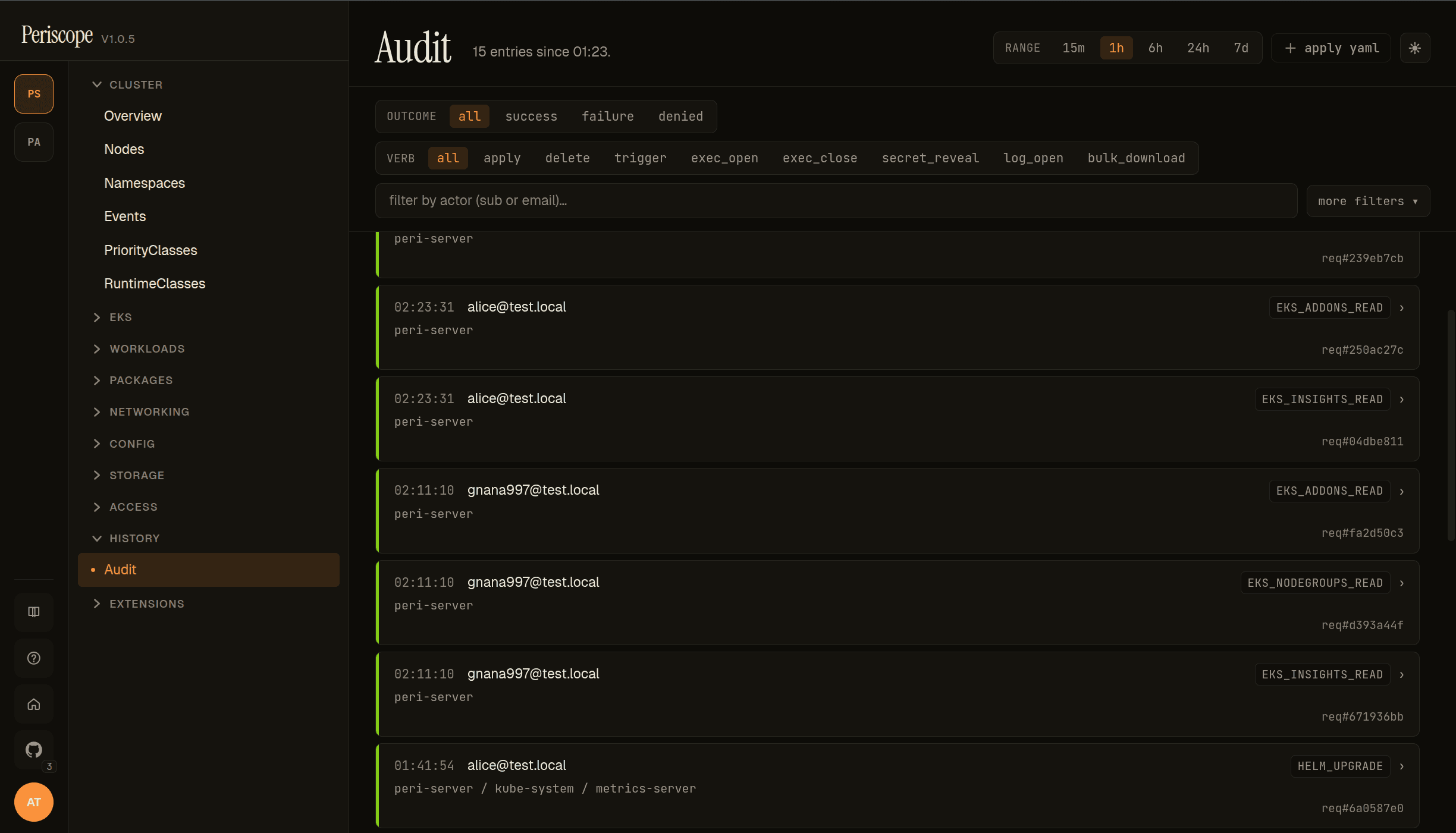
Each row carries the timestamp, actor (email + OIDC subject on hover), cluster · namespace · resource path, the verb in monospace (HELM_CHART_FETCH, SECRET_REVEAL, APPLY, EXEC_OPEN, EXEC_CLOSE, ...), and the request ID for cross-referencing with server logs. Filter strip on top: time range (15m / 1h / 6h / 24h / 7d), outcome (all / success / failure / denied), verb quick-filters (apply, delete, trigger, exec_open, exec_close, secret_reveal, log_open, bulk_download + more), and a filter by actor search.
The density sparkline above the row list shows event count per bucket so an operator can spot bursts at a glance. Clicking a row opens the event detail.
Event detail
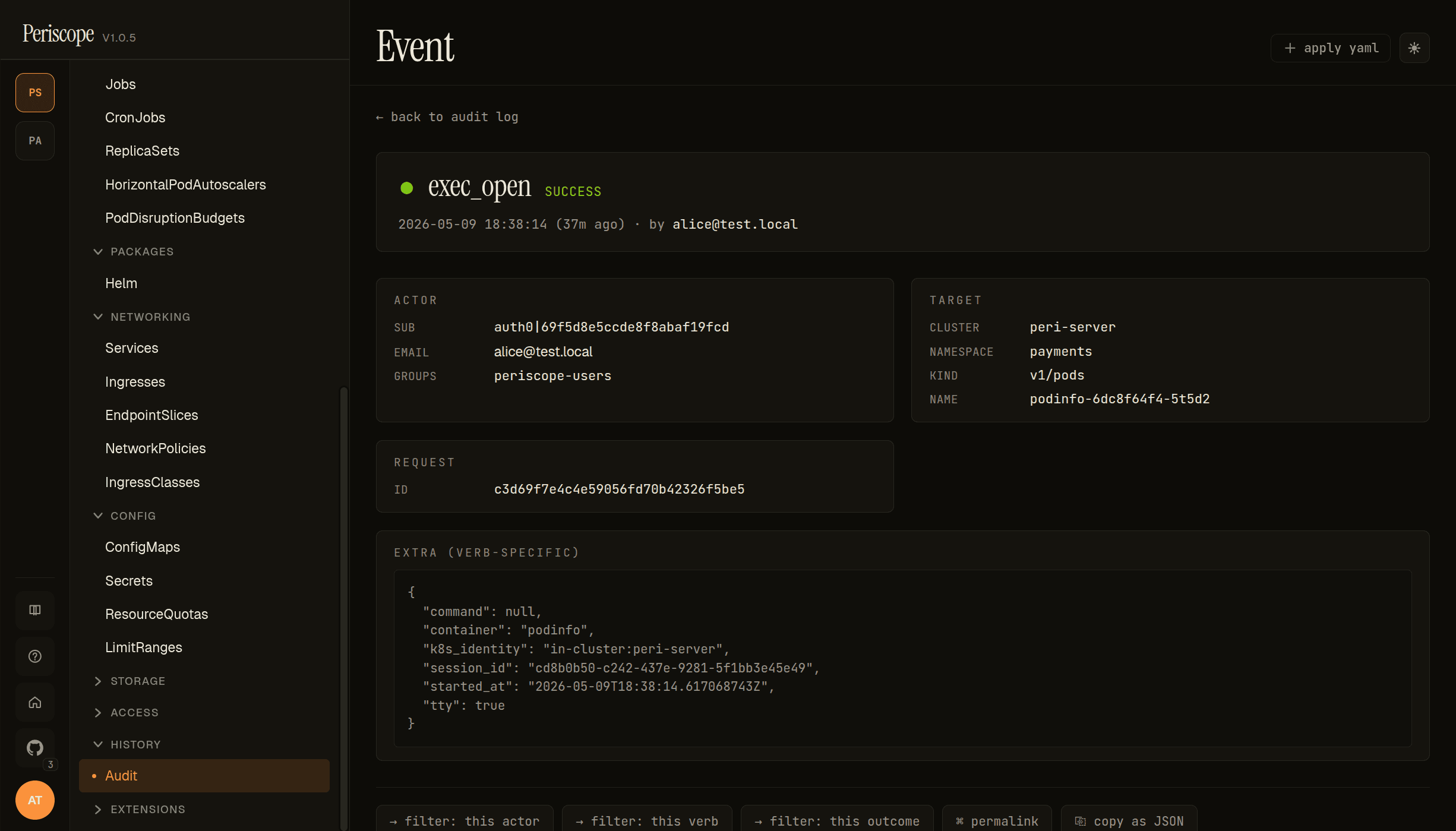
Each event carries an ACTOR block (sub, email, groups), a TARGET block (cluster, namespace, kind, name), the REQUEST ID for log correlation, and an EXTRA (verb-specific) JSON blob with verb-specific context (e.g. for exec_open: container, k8s_identity, session_id, started_at, tty). Footer actions let the operator filter to this actor / verb / outcome in one click, permalink the event, or copy as JSON for export to an external SIEM.
Quick decision tree
Do you need persistence beyond pod restart?
├── No  → leave audit.enabled=false (default). Events still go to
│         stdout; ship them somewhere via your log aggregator
│         (Loki, CloudWatch, ELK).
└── Yes → audit.enabled=true. Then:
          ├── Production?      audit.storage.type=pvc   (default)
          └── kind/minikube?   audit.storage.type=emptyDir
Operational reference
Enabling
audit:
  enabled: true
The default is false — opt-in. When off:
- No SQLite DB is opened.
- No PVC is rendered (in
pvcmode the template is gated onaudit.enabled). - The
/api/auditendpoint is not registered — clients get 404. - Audit events still emit to stdout via
StdoutSink. If you ship container logs to a SIEM, that's your source of truth and you can legitimately leave persistence off.
Helm values ↔ env var mapping
The chart templates each audit.* value to a PERISCOPE_AUDIT_*
env var on the pod. Useful when debugging what's actually applied;
the central reference for every Periscope env var (with semver
coverage) is environment-variables.md.
| Helm value | Env var | Required when audit.enabled=true |
|---|---|---|
audit.enabled | PERISCOPE_AUDIT_ENABLED=true | — (gates the rest) |
| (fixed) | PERISCOPE_AUDIT_DB_PATH=/var/lib/periscope/audit/audit.db | always |
audit.retentionDays | PERISCOPE_AUDIT_RETENTION_DAYS | optional (default 30) |
audit.maxSizeMB | PERISCOPE_AUDIT_MAX_SIZE_MB | optional (default 1024) |
audit.vacuumInterval | PERISCOPE_AUDIT_VACUUM_INTERVAL | optional (default 24h) |
audit.storage.type | (mount only — no env var) | required: pvc or emptyDir |
audit.storage.size | (PVC spec.resources.requests.storage) | required when storage.type=pvc |
Setting both retentionDays and maxSizeMB to 0 is the
unbounded-growth footgun. The startup validator emits a slog.Warn
line — visible in pod logs but easy to miss; don't do it.
Storage
Two modes, both rendered in templates/deployment.yaml:
| Mode | Survives pod restart? | Use when |
|---|---|---|
pvc (default) | ✅ Yes | Production, anywhere the audit trail matters |
emptyDir | ❌ No | kind/minikube smoke testing, or when you ship to an external SIEM and just want short-lived local query |
audit:
  storage:
    type: pvc           # or emptyDir
    size: 5Gi           # PVC request — only used when type=pvc
    storageClass: ""    # empty = cluster default
    accessMode: ReadWriteOnce
For emptyDir, the kubelet sizeLimit is auto-derived as
2 × maxSizeMB. The 2× factor covers VACUUM's transient file-doubling
plus WAL growth between checkpoints. You don't tune it directly.
Retention
Two caps act as belt-and-suspenders:
audit:
  retentionDays: 30     # delete rows older than this
  maxSizeMB: 1024       # delete oldest rows until file ≤ this size
  vacuumInterval: 24h   # how often the prune+VACUUM loop runs
Whichever cap binds first wins. If you want unbounded growth (don't),
set both to 0 — the startup validator will warn loudly.
The vacuum loop:
- Deletes age-expired rows (
DELETE WHERE ts < cutoff). - Estimates how many oldest rows to drop to fit
maxSizeMB, deletes them in one shot. - Runs
VACUUMonce to reclaim freed pages back to the filesystem. - Truncates the WAL (
PRAGMA wal_checkpoint(TRUNCATE)) soaudit.db-waldoesn't grow alongsideaudit.db.
VACUUM holds an exclusive write lock for its duration (5–30s on a 1 GiB
DB), during which Record() calls are buffered and audit drops are
swallowed (per the fail-open contract). Pick a quiet vacuumInterval
window if you can.
Startup behavior
OpenSQLiteSink runs an initial retention sweep synchronously before
returning, with a 30-second deadline. This handles the "pod woke up
after a long downtime with stale rows" case without making the
readiness probe wait minutes. If 30s isn't enough, the regular vacuum
loop catches up on its 24h cadence.
Schema migrations
The DB tracks PRAGMA user_version. Schema changes are append-only
entries in the migrations slice in internal/audit/sqlite_sink.go.
Each migration runs in a transaction; failure aborts the migration,
not the migration history. A DB at a higher user_version than the
binary knows is refused at open time — no silent downgrade.
Failure mode: fail-open
If SQLite can't open at startup (PVC unmountable, disk full, schema migration fails), Periscope:
- Logs the failure at
slog.Warnlevel. - Continues with stdout-only audit.
- Leaves
/api/auditunregistered (returns 404).
A stuck PVC must never take down the platform. The audit pipeline is load-bearing; it can't itself become a SPOF.
Sizing guidance
| Workload | Rough audit volume | Suggested maxSizeMB |
|---|---|---|
| Small team, few mutations/day | < 1k events/day | 256 |
| Mid-size team, daily ops | 10–50k events/day | 1024 (default) |
| Large org, heavy automation | 100k+ events/day | 4096+ |
Each event averages 600–1200 bytes (with structured extra fields).
At 1024 MiB cap and 1 KiB per event, you fit ~1M events. With 30-day
retention, that's ~33k events/day before the size cap binds before age.
RBAC reference
The /api/audit endpoint
GET /api/audit?actor=...&verb=...&outcome=...&from=...&to=...&limit=N
Returns { items: [...], total: N, limit: N, offset: N }. Filters are
exact-match (or time-range for from / to). All filters are indexed.
limit is clamped at 500.
Who can see what
Two scopes:
self— the server hard-overrides theactorfilter to the caller's own subject. The caller can self-audit but never sees what colleagues did. Response carriesX-Audit-Scope: self.all— the caller can query any actor's rows. Response carriesX-Audit-Scope: all.
The SPA reads X-Audit-Scope to render a banner explaining the scope
to the user, and consults /api/whoami (which returns auditEnabled
and auditScope) to hide audit nav items when the feature isn't
available.
How scope is decided
In resolution order:
-
auth.authorization.auditAdminGroups— if non-empty, the user getsscope: alliff any of their IdP groups appears in the list. This is the explicit operator switch and wins regardless of authz mode. Use this when you want security-team or SRE-team access independent of K8s admin status. -
Otherwise, mode-specific fallback:
Mode Default audit-admin tierUsers whose resolved tier is adminsharedUsers in allowedGroups(only when that list is non-empty)rawNobody — must use auditAdminGroups -
Otherwise →
scope: self.
Example: shared-IRSA install
The default v1 deployment shape. To grant audit-read to your security team:
auth:
  authorization:
    mode: shared
    allowedGroups: [periscope-users]
    auditAdminGroups: [Sec-Team]
Anyone in Sec-Team sees X-Audit-Scope: all. Everyone else
(periscope-users who aren't Sec-Team) sees X-Audit-Scope: self
and can only query their own actions.
Example: tier mode
auth:
  authorization:
    mode: tier
    groupTiers:
      SRE-Platform: admin
      SRE-OnCall:   triage
Backend-Eng: writeSRE-Platformmembers → tier=admin → auditscope: all(mode-default).- Everyone else → audit
scope: self.
If you also want, say, your security auditors (who don't carry K8s admin power) to see all rows:
auth:
  authorization:
    mode: tier
    groupTiers:
      SRE-Platform: admin
      ...
    auditAdminGroups: [Sec-Audit]   # additive
Now Sec-Audit members get audit scope: all without getting
cluster-admin K8s permissions. Audit-admin is decoupled from K8s admin
on purpose — security teams who can read history shouldn't need to
mutate prod.
Example: raw mode
Raw mode delegates RBAC entirely to K8s — Periscope has no opinion about who's an admin. Audit-admin is always self-only by default in raw mode. To grant access:
auth:
  authorization:
    mode: raw
    groupPrefix: "corp:"
    auditAdminGroups: [corp-admins, corp-sres]
The groupPrefix controls K8s impersonation; auditAdminGroups is
matched against the user's raw IdP groups (no prefix). So
corp-admins here means "the IdP group named corp-admins," not
corp:corp-admins.
Why audit-admin is decoupled from K8s admin
A common ask is "if the user has cluster-admin on the cluster, why not auto-grant audit-read?" Two reasons:
- Security-team workflows. Compliance / forensics often live in a separate team that needs to read history but should not hold cluster-admin. Coupling them forces over-permissioning.
- Tier-mode
adminisn't always cluster-admin. Periscope'sadmintier maps to a group likeperiscope-tier:admin, which the operator binds to whatever K8s ClusterRole they choose — oftencluster-admin, sometimes a custom role. The dashboard can't assume the bound role includes the auditor mindset.
The auditAdminGroups knob is the explicit lever; mode-defaults are
the convenience case for the most common installs.
Verifying
After enabling:
# 1. PVC is bound (pvc mode):
kubectl -n <ns> get pvc

# 2. SQLite is open and the route is registered. The port-forward maps
#    a local port (8088 below — pick whatever's free) to the Service's
#    8080. Use whichever local port suits you; the rest of this guide
#    uses 8088 to keep examples copy-pasteable.
kubectl -n <ns> port-forward svc/<release>-periscope 8088:8080
curl -s http://localhost:8088/api/whoami    # {"actor":"...","auditEnabled":true,"auditScope":"self"}
curl -s http://localhost:8088/api/audit     # {"items":[],"total":0,...}

# 3. Trigger a privileged action and confirm it lands:
kubectl -n <ns> exec deploy/<release>-periscope -- ls /var/lib/periscope/audit/
# audit.db audit.db-shm audit.db-wal

# 4. Audit-admin scope (use a session in your auditAdminGroups):
curl -s -i http://localhost:8088/api/audit | grep X-Audit-Scope
# X-Audit-Scope: all
Troubleshooting
Cross-cutting Periscope-pod issues live in troubleshooting.md. This section covers the audit pipeline (SQLite sink, retention, identity scope).
/api/audit returns 404
→ audit.enabled=false in your values, OR the SQLite sink failed to
open. Check pod logs for audit: sqlite disabled (open failed).
Note that the binary fails open by design: a stuck PVC or schema
migration error logs at slog.Warn and continues with stdout-only
audit. The pod stays Ready, the SPA hides the audit nav (because
/api/whoami reports auditEnabled: false), and the warning is
easy to miss in a noisy log stream. When debugging, grep
specifically for audit: lines around startup time.
X-Audit-Scope is always self even for an admin
→ Your auditAdminGroups list doesn't match the user's actual IdP
groups. Check the OIDC groups claim with
curl -s http://localhost:8088/api/auth/whoami | jq .. In tier mode,
verify the user's tier resolved to admin via /api/auth/whoami.
Audit DB grows past maxSizeMB
→ The cap is enforced lazily on vacuumInterval ticks (default 24h).
Wait one cycle, or bounce the pod (initial sweep runs synchronously at
startup, deadline 30s).
Pod fails readiness on startup
→ Initial sweep deadline (30s) hit on a stale DB. Bounce the pod or
manually kubectl exec and sqlite3 audit.db "DELETE FROM audit_events WHERE ts_unix_nano < <epoch>". Long-term: lower
retentionDays so the steady-state row count fits the deadline budget.