docssetupcluster shell
Cluster shell
Periscope ships an in-browser cluster-wide kubectl REPL — the Shell button in the cluster page header opens a WebSocket-attached terminal backed by a per-session ephemeral pod that runs on the target cluster. Every ac…
Periscope ships an in-browser cluster-wide kubectl REPL — the Shell button in the cluster page header opens a WebSocket-attached terminal backed by a per-session ephemeral pod that runs on the target cluster. Every action the operator takes inside the shell impersonates the human's identity and lands as their tier in apiserver RBAC.
This page is the operator guide: when it's available, how to enable it, the RBAC scaffolding the chart installs, how the per-session pod is constructed, the audit shape, and what to do when things misbehave. The design lands the GitHub epic at issue #104.
What you see
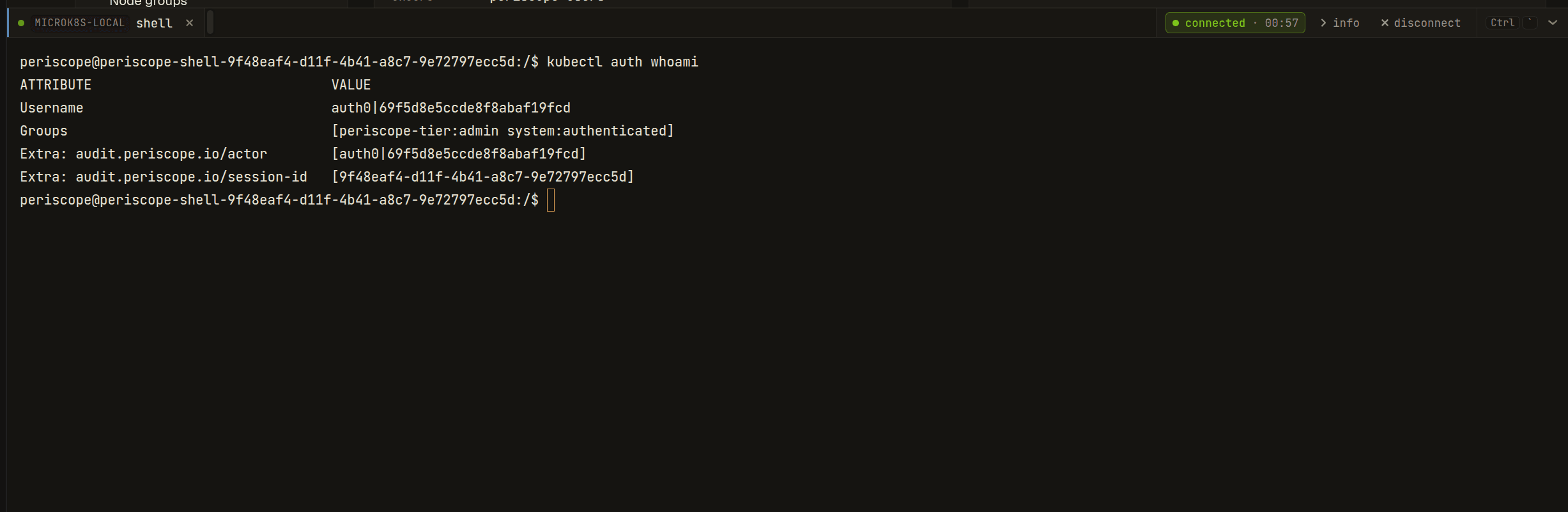
Click shell on any cluster page. Periscope provisions an ephemeral
pod in periscope-system on the target cluster, mounts a per-session
Secret carrying a kubeconfig wired with your impersonation identity,
and attaches the same drawer the pod-exec terminal uses. The tab is
labeled shell (vs <pod>/<container> for pod-exec); the info
expander shows kind: cluster shell, mode: bash, and
(cluster-scoped) instead of namespace/pod/container.
The shell streams stdin / stdout / stderr through the same hello/stdin/stdout/closed/error WebSocket frame protocol that pod-exec uses, so reconnect / idle / heartbeat / cap behavior all match.
1. Default behavior
Cluster shell is opt-in and off by default — opposite stance
from pod-exec. The feature requires auth.authorization.mode=tier
(it doesn't make sense without tier-narrow impersonation), and chart
install fails fast with a clear recipe message if you enable
cluster-shell while leaving authz in raw or shared mode.
Backend support matrix
| Backend | Cluster shell works? | Notes |
|---|---|---|
eks (Pod Identity / IRSA) | Yes | Direct apiserver dial; pod created on the EKS cluster itself |
kubeconfig | Yes | Same as eks |
in-cluster | Yes | Pod lands in Periscope's own cluster, on the periscope-system namespace the chart provisioned |
agent | Yes | Pod-create / Secret-create / exec stream route through the agent tunnel to the target cluster; transparent to the operator. See Operator notes for agent-backed clusters below. |
Operator notes for agent-backed clusters
On the agent-managed cluster, the agent's ServiceAccount becomes
the apiserver caller for the pod-create / secret-create / sa-token
mint requests Periscope main issues through the tunnel. The
periscope-agent chart's clusterShell.enabled=true block installs:
- A namespace-scoped
Rolegrantingpods/secrets/serviceaccounts/tokenwrite verbs onperiscope-system, bound to the agent SA via aRoleBinding. - The same per-tier
ServiceAccount+ impersonatorClusterRoleprimitives the main chart installs (so the kubeconfig delivered into the shell pod looks the same regardless of which side provisioned the pod).
Server-side clusterShell.tiers and agent-side clusterShell.tiers
must match. A tier listed on the server but missing on the agent
would 403 when a session tries to mint its SA token.
CA discovery for kubeconfig generation
The kubeconfig the shell pod uses needs the target apiserver's CA bundle. Periscope main reads this differently per backend:
| Backend | Source |
|---|---|
in-cluster | /var/run/secrets/kubernetes.io/serviceaccount/ca.crt on the Periscope main pod |
eks / kubeconfig | The cluster's existing kubeconfig entry |
agent | kube-public/cluster-info ConfigMap on the target cluster, fetched through the tunnel and cached per cluster |
The agent-backend path mirrors the kubeadm-style discovery contract:
the cluster-info ConfigMap is readable unauthenticated and carries
the apiserver CA. No additional config is required on the agent
chart for CA delivery.
Per-cluster opt-out
Cluster shell is currently a server-wide toggle — when
clusterShell.enabled=true on the central server, it's available on
every registered cluster whose target chart also has
clusterShell.enabled=true. A future release will expose a per-cluster
override in clusters[i].clusterShell; until then, omit the agent
chart's clusterShell.enabled=true on any managed cluster you want
to keep out of scope.
When clusterShell.enabled: false on the server:
- The SPA hides the shell action everywhere (the per-cluster meta
field
clusterShellEnabledreturnsfalse). - A direct WebSocket request to
/api/clusters/{c}/shellreturns HTTP 403 with body{"error": "E_CLUSTER_SHELL_DISABLED"}.
Required RBAC
Two layers:
- The operator must belong to a tier listed in
clusterShell.tiers. The handler rejects non-listed tiers withE_FORBIDDEN. Defaulttiers: [admin]. - Periscope main's SA (or the agent SA on tunnel-managed
clusters) needs pod / secret / serviceaccounts-token write verbs
on
clusterShell.namespace. Both chart'sclusterShellblocks install thisRole+RoleBindingautomatically whenclusterShell.enabled=true.
The per-tier impersonator ClusterRoles are tier-narrow — the
group impersonation rule uses resourceNames: ["periscope-tier:<tier>"] so a stolen SA token cannot impersonate
across tiers. See Security posture below for
the threat model.
2. Enable it on the central server
# values.yaml for the periscope chart on the central server
auth:
  authorization:
    mode: tier             # REQUIRED — chart install fails if mode != tier
    groupTiers:
      platform-admins: admin

clusterRBAC:
  adminTier:
    enabled: true          # The admin tier ClusterRoleBinding to cluster-admin

clusterShell:
  enabled: true
  mode: bash               # bash (default). kubectl-only ships in a follow-up release.
  tiers: [admin]           # Only these tiers may open a session
  namespace: periscope-system
  idleSeconds: 1200        # 20 min — longer than pod-exec's 10 min default
  podStartTimeoutSeconds: 30
  transcriptMaxBytes: 1048576
  maxSessionsPerUser: 2
  maxSessionsTotal: 10
  image:
    repository: ghcr.io/gnana997/periscope-shell
    tag: ""                # defaults to Chart.AppVersion
    pullPolicy: IfNotPresent
Each value renders to a PERISCOPE_CLUSTER_SHELL_* environment
variable on the Periscope pod. Cross-reference:
| Helm value | Env var | Code default |
|---|---|---|
clusterShell.enabled | PERISCOPE_CLUSTER_SHELL_ENABLED | false |
clusterShell.mode | PERISCOPE_CLUSTER_SHELL_MODE | bash |
clusterShell.tiers | PERISCOPE_CLUSTER_SHELL_TIERS | admin |
clusterShell.namespace | PERISCOPE_CLUSTER_SHELL_NAMESPACE | periscope-system |
clusterShell.idleSeconds | PERISCOPE_CLUSTER_SHELL_IDLE_SECONDS | 1200 (20 min) |
clusterShell.podStartTimeoutSeconds | PERISCOPE_CLUSTER_SHELL_POD_START_TIMEOUT_SECONDS | 30 |
clusterShell.transcriptMaxBytes | PERISCOPE_CLUSTER_SHELL_TRANSCRIPT_MAX_BYTES | 1048576 (1 MiB) |
clusterShell.maxSessionsPerUser | PERISCOPE_CLUSTER_SHELL_MAX_SESSIONS_PER_USER | 2 |
clusterShell.maxSessionsTotal | PERISCOPE_CLUSTER_SHELL_MAX_SESSIONS_TOTAL | 10 |
clusterShell.image.repository + tag | PERISCOPE_CLUSTER_SHELL_IMAGE | ghcr.io/gnana997/periscope-shell:<AppVersion> |
clusterShell.image.pullPolicy | PERISCOPE_CLUSTER_SHELL_IMAGE_PULL_POLICY | IfNotPresent |
3. Enable it on each managed cluster
For every agent-backed cluster that should accept cluster-shell sessions, set the matching values in the periscope-agent chart:
# values.yaml for the periscope-agent chart on each managed cluster
clusterShell:
  enabled: true
  namespace: periscope-system  # MUST match the server's clusterShell.namespace
  tiers: [admin]               # MUST match the server's clusterShell.tiers
For in-cluster backend (Periscope main targeting the cluster it
runs in), no separate agent chart install is needed — the main chart
already provisions everything because clusterShell.enabled=true
triggers the namespace + per-tier RBAC + provisioner Role rendering
in the main chart too.
For eks / kubeconfig backends, you must install the RBAC manifests
on the target cluster manually. The shipped templates in
deploy/helm/periscope-agent/templates/cluster-shell-* are a
reference; apply equivalent manifests via your existing GitOps flow.
4. The per-session pod
Each session creates one ephemeral pod in clusterShell.namespace
(default periscope-system) with these properties:
- Image:
clusterShell.image.repository:tag—debian:bookworm-slimruntime carryingbash,kubectl,helm,nano,jq,coreutils,curl, andca-certificates. The binaries are SHA-pinned in the Dockerfile. - ServiceAccount:
periscope-shell-<tier>(e.g.periscope-shell-admin) — owns ONLY the per-tier impersonate rules. Token-stealing nets nothing beyond what the operator could already do. - Mounted Secret:
periscope-shell-<session-id>carries a kubeconfig whoseusers[0]entry has the SA bearer token AND theas: <operator-sub>,as-groups: [periscope-tier:<tier>], andas-user-extra: { audit.periscope.io/session-id: [<uuid>], audit.periscope.io/actor: [<sub>] }impersonation fields baked in. - Entrypoint:
cmd/periscope-shell/main.goreadsPERISCOPE_SHELL_SESSION_ID/PERISCOPE_SHELL_MODE/PERISCOPE_SHELL_AUDIT_FILE, thensyscall.Execs into/bin/bash --loginwithKUBECONFIG=/etc/periscope/kubeconfig. - Audit wrapper:
/usr/local/bin/kubectlAND/usr/local/bin/helmare both symlinks toperiscope-audit-exec, a tiny Go wrapper that keys off its ownargv[0]to figure out which real binary to invoke (kubectl-real/helm-realunder/opt/periscope/bin/). For every call it appends a{ts, pid, argv}JSON line to the in-pod audit file beforesyscall.Exec-ing the real binary. Best-effort — audit write failure does NOT block the command. Adding a new wrapped tool is a one-line allow-list entry in the wrapper plus a matching symlink inDockerfile.shell. KUBE_EDITOR=nanopinned in the image sokubectl edit(and other editor-using subcommands) work without operators having to set the variable themselves. The image only shipsnano; vi/vim are not installed.
The pod is deleted on session close (clean exit / Ctrl-D / WS close
/ idle-timeout). Pod + Secret cleanup is idempotent and runs even on
error paths.
5. Concurrency caps
Two caps gate session creation; both return HTTP 429 with {"error": "E_CAP_USER"} / {"error": "E_CAP_CLUSTER"} and an
activeSessions body field:
| Cap | Default | Helm value |
|---|---|---|
| Per OIDC subject, all clusters | 2 | clusterShell.maxSessionsPerUser |
| Per cluster, all subjects | 10 | clusterShell.maxSessionsTotal |
Caps are deliberately tighter than pod-exec's (5 / 50) — each cluster-shell session burns a full pod + Secret on the target cluster, vs pod-exec's zero-side-effect attach.
6. Lifecycle: idle, heartbeat, warn, close
The handler reuses internal/exec.Run for WebSocket lifecycle
plumbing — so heartbeat (20s default) and idle-warn (30s lead)
behavior is identical to pod-exec. The only difference is the
idle-cut timeout itself:
| Knob | pod-exec default | cluster-shell default |
|---|---|---|
| Idle before cut | 10 min (exec.serverIdleSeconds) | 20 min (clusterShell.idleSeconds) |
| Idle-warn lead | 30s | 30s |
| Heartbeat | 20s | 20s |
Activity = any stdin or stdout byte. The longer cluster-shell
default reflects the typical session — kubectl get / helm list
loops, reading describe output — vs the tighter pod-exec pattern.
7. Audit
Three verbs land in the audit pipeline; the cross-reference key
that joins the SPA-side audit row to the apiserver's own audit log is
audit.periscope.io/session-id:
| Verb | When emitted | Body fields |
|---|---|---|
cluster_shell_open | After cap checks pass, before WS upgrade | cluster, mode, tier, session_id |
cluster_shell_command | (reserved — currently bulk-on-close in body of close) | — |
cluster_shell_close | After session ends, regardless of cause | cluster, mode, duration_ms, exit_code, bytes_in, bytes_out, close_reason, commands: [{timestamp, argv, pid}] |
The commands slice on cluster_shell_close is read from the
in-pod audit file (PERISCOPE_SHELL_AUDIT_FILE) via a final exec
stream during teardown. It captures every kubectl and helm
invocation made through the session (both wrapped by the
periscope-audit-exec binary). Other commands (cat, jq,
grep, bash builtins) don't write per-invocation rows here — they
still contribute to the bytes_in / bytes_out counters, and any
K8s API calls they trigger show up in the apiserver audit log
keyed by the session UUID.
Best-effort: a pod that died before the readback completes loses its command log, but the open / close envelopes are durable.
8. Security posture
Three properties limit blast radius:
- Tier-narrow impersonator ClusterRoles. The per-tier
periscope-shell-impersonator-<tier>rule usesresourceNames: ["periscope-tier:<tier>"]on thegroupsimpersonate rule. An admin-tier SA token cannot escalate to a different tier's group; users impersonation stays wildcard (the user identity is the operator's OIDC sub anyway). - Audit-extras impersonation. Every kubectl call from the shell
carries
audit.periscope.io/session-id+actoras user-extras. The apiserver audit log records these, and Periscope's owncluster_shell_closeenvelope carries the same session id — joining the two logs is onegrepof the UUID. - No shared kubeconfig. The Secret is per-session and deleted on close. There is no persistent SA token left on the cluster after teardown; the per-tier SA carries only the impersonate rules and no cluster read.
The full RBAC posture writeup is in
docs/security/rbac-posture.md.
9. Troubleshooting
Cross-cutting issues (chart-versions OOM, scanner false-positives, local-dev TLS, image-pull behind a corporate proxy) live in troubleshooting.md.
| Symptom | Likely cause | Fix |
|---|---|---|
| Shell button missing on the cluster header | Backend says clusterShellEnabled=false on this cluster | Check /api/clusters response; confirm clusterShell.enabled=true on the server helm release |
403 E_FORBIDDEN on click | Operator's tier not in clusterShell.tiers | Either add the operator to a listed tier or add their tier to the list |
429 E_CAP_USER / E_CAP_CLUSTER | Cap reached | Close an old session, or bump maxSessionsPerUser / maxSessionsTotal |
Pod stays Pending for >30s | Image not pulled / scheduling issue | kubectl -n periscope-system describe pod periscope-shell-* for events. Common: image pull from ghcr.io/gnana997/periscope-shell rejected by an air-gapped cluster — mirror to your registry and set clusterShell.image.repository accordingly |
Pod runs but kubectl auth whoami shows nothing | Operator's group claim missing | Verify auth.authorization.groupsClaim matches your IdP, then re-log-in for the new claim |
kubectl get returns 403 | Tier's ClusterRoleBinding not installed on target cluster | Set clusterRBAC.enabled=true (and adminTier.enabled=true if your tier maps to admin) on the periscope-agent chart |
Agent-backed cluster: Forbidden on pod-create | Provisioner Role/RoleBinding missing on managed cluster | Set clusterShell.enabled=true on the periscope-agent chart so the chart installs the namespace-scoped Role binding the agent SA |
| Session disconnects after ~20 min of typing pause | Hit idleSeconds cut | Expected — re-open the shell, or bump clusterShell.idleSeconds for long-running incidents |
For deeper agent-tunnel diagnostics — request IDs, pod-create
failures observed on the agent side — see
docs/architecture/agent-tunnel.md.