docsusagecustom resources
Custom Resources (CRDs)
The EXTENSIONS → All CRDs sidebar entry surfaces every apiextensions.k8s.io/v1 CustomResourceDefinition installed on the cluster, grouped by API group. From there, drilling into any CRD opens a per-kind list view that…
The EXTENSIONS → All CRDs sidebar entry surfaces every
apiextensions.k8s.io/v1 CustomResourceDefinition installed on the
cluster, grouped by API group. From there, drilling into any CRD
opens a per-kind list view that reads identically to the built-in
list pages — same describe / yaml / events tabs, same live SSE
updates, same RBAC gating.
CRDs are runtime-discoverable, so this page reflects whatever operators have installed (cert-manager, Prometheus Operator, AWS VPC CNI, EKS pod-identity association controller, ArgoCD, …) without any Periscope-side config.
What you see
All CRDs
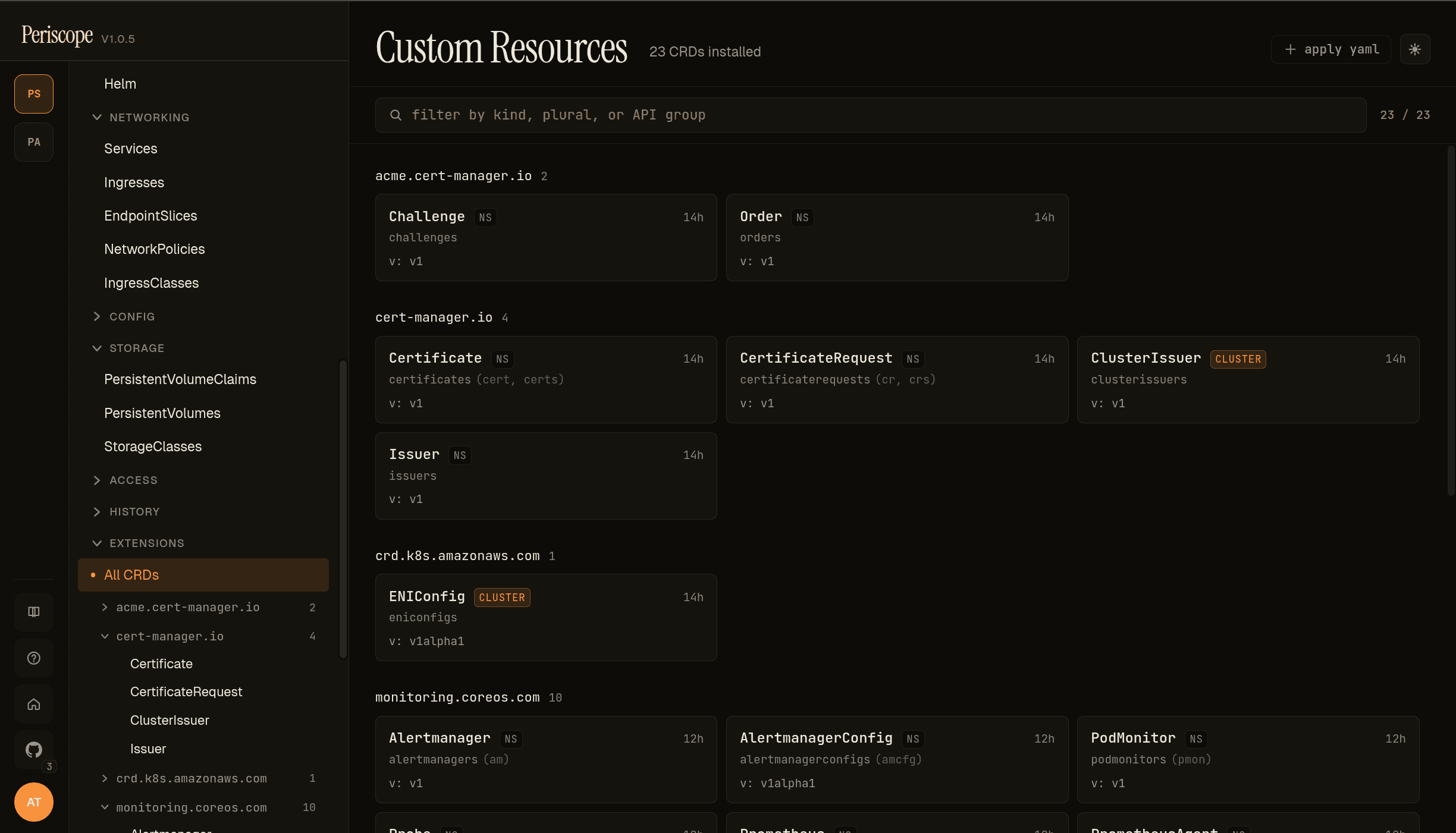
The page header carries:
- Title —
Custom Resources+ the total CRD count (23 CRDs installedin the screencap). - Filter — substring match across kind, plural, and API group.
+ apply yaml— quick-action for installing a new CRD via the Apply YAML dialog.
The body groups CRDs by spec.group. Each group renders as a header
with the count, then a grid of cards. Per-card fields:
- Kind name —
metadata.nameparsed;Certificate,ClusterIssuer, etc. - Short names — comma-separated shortcuts the apiserver accepts
(e.g.
cert,certsforcert-manager.io/v1 Certificate). - Stored version —
spec.versions[?served=true&storage=true].name, e.g.v: 1,v: 1alpha1. - AGE — relative timestamp from
metadata.creationTimestamp. - CLUSTER chip — present when
spec.scope=Cluster(vs the defaultNamespaced). The screencap showsClusterIssuerandENIConfigcarrying the chip.
The screencap above is from peri-server with cert-manager + AWS VPC
CNI + Prometheus Operator installed — 23 CRDs across 5 groups
(acme.cert-manager.io, cert-manager.io, crd.k8s.amazonaws.com,
monitoring.coreos.com, plus a few more below the fold).
Sidebar drill-down
The sidebar EXTENSIONS group expands to show the same grouping —
All CRDs at the top, then per-group entries that open per-kind
lists. The screencap shows the sidebar with cert-manager.io
expanded → Certificate selected. This is the operator-friendliest
path for "I just want to see the Certificates" without hopping
through the All CRDs page each time.
Per-CRD list
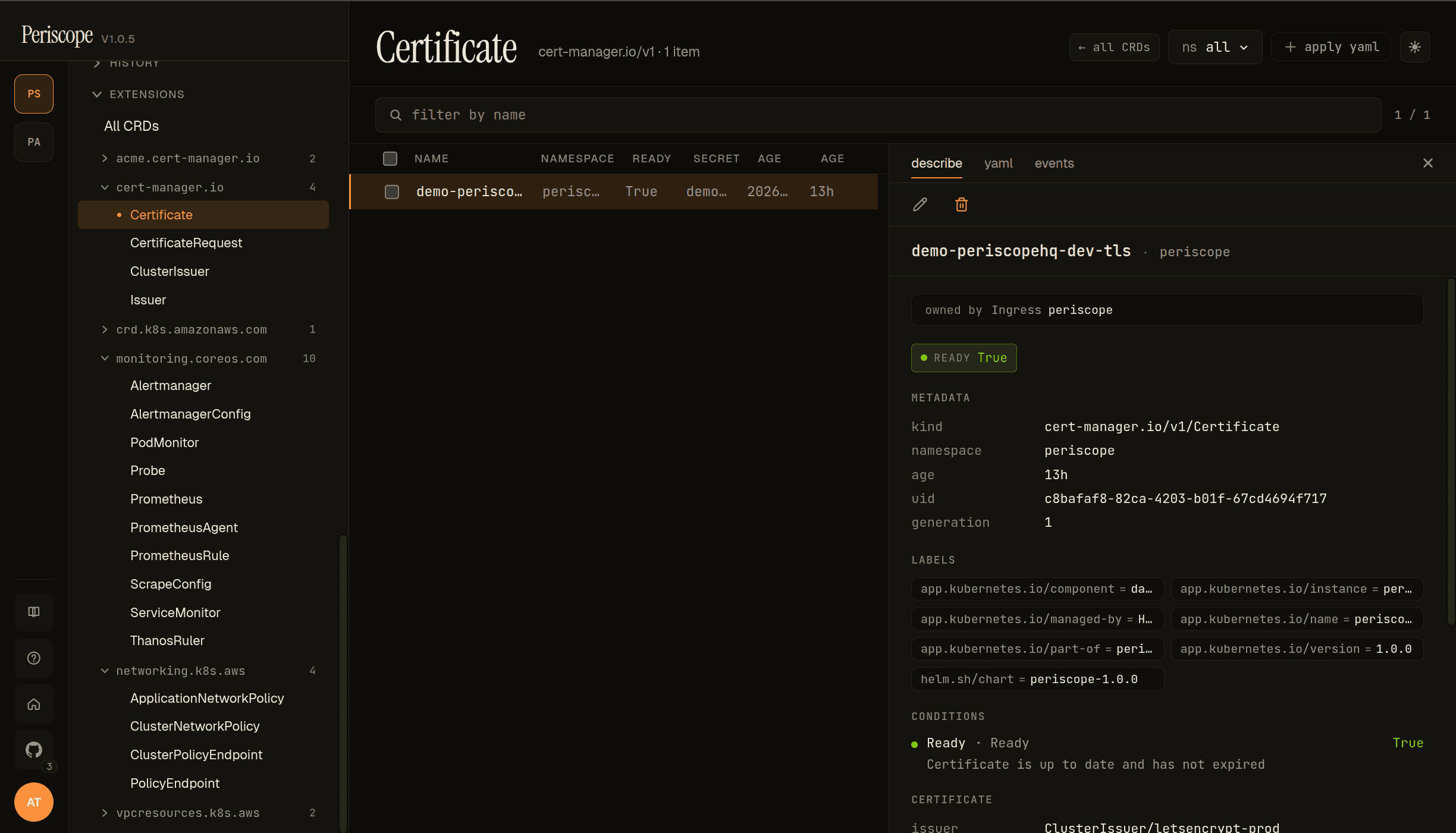
Clicking a kind on the All CRDs page (or the sidebar tree) opens the per-kind list view, which reads exactly like the built-in resource pages:
- Header — kind name + the API group chip (
cert-manager.io/v1)- the item count + namespace picker +
+ apply yaml.
- the item count + namespace picker +
- Back link —
← all CRDsjumps back to the catalog. - Columns — kind-specific from the CRD's
spec.versions[].additionalPrinterColumnsif defined, else a defaultNAME / NAMESPACE / AGEset. The screencap shows Certificate's printer columns:READY/SECRET/AGE. - Detail pane — same
describe/yaml/eventstabs the rest of the SPA uses.
The describe tab runs the standard render pipeline:
- Header — the resource's kind + namespace + edit / labels / delete actions.
- Owner-reference link — when
metadata.ownerReferencesis set, the owner renders as a clickable chip (owned by Ingress periscopein the screencap — cert-manager's ingress-shim created this Certificate from an Ingress annotation). - Status chip — pulled from the CRD's
additionalPrinterColumnsready-condition orstatus.conditions[type=Ready].READY=Truerendered in green;Falsein red. - METADATA — kind / namespace / age / uid / generation.
- LABELS + ANNOTATIONS — the Helm-managed set + any controller-set annotations.
- CONDITIONS — every
status.conditions[]entry as a row with the conditiontype+status+message. The screencap shows Certificate'sReady=True / "Certificate is up to date and has not expired". - CRD-specific cards — when the CRD has well-known status fields
(e.g. Certificate's
issuer/notAfter/notBefore), they render as dedicated cards below conditions. Otherwise the yaml tab is the full-fidelity view.
YAML + events
The yaml tab is the canonical manifest. Useful for CRDs whose
status is structured beyond what the describe tab surfaces (CRD
authors put a lot of state in status.conditions[] and
status.<custom> fields; the yaml tab is where you find the
<custom> part).
The events tab is the per-resource event feed. For CRDs whose
controller is observable (cert-manager, Prometheus Operator), the
events tab is where you find Issuing / Reconciling / Synced
verbatim.
Live updates
Both the catalog and per-CRD list pages are wired to the cluster's
watch streams. When a controller
installs a new CRD or a new CR is created, the lists update without
a refresh.
RBAC
The catalog needs customresourcedefinitions:list on
apiextensions.k8s.io (cluster-scoped — the standard view
ClusterRole grants it). Per-CRD list pages additionally need
<plural>:list on the CRD's group (e.g.
certificates:list on cert-manager.io).
A user denied either verb sees the standard "your role can't see these" forbidden state. Per-CRD list pages render the kind on the sidebar tree even when the user is denied the list — clicking shows the forbidden state, so the operator knows the CRD exists but they can't see instances. (This is a deliberate UX choice: hiding denied kinds from the sidebar would create the false impression that the CRD isn't installed.)
What's not yet
- Form-mode editing for CRDs. The schema engine renders most
kubebuilder-generated CRDs (since
oneOfandallOflanded in v1.1 — seeform-editor.md), butKindEditRouteris intentionally scoped to ConfigMap / Secret / Service / Ingress for v1.x. CRD edits open in YAML mode. - Controller-aware actions. No "trigger renewal" button on Certificate, no "force resync" on Application — those are controller-specific verbs that don't generalize. Use the YAML editor + label/annotation pokes the controllers respect, or shell out to the controller's CLI.
Related docs
form-editor.md— the form/yaml toggle that CRDs currently fall through to YAML on.../setup/apply-yaml.md— installing a new CRD or applying CR instances.../setup/watch-streams.md— the SSE plumbing that makes the catalog + per-CRD lists live.workloads.md— for CRDs whoseownerReferencespoint at a workload, the link in the describe header jumps there.