docsusageform editor
Form-mode editor for ConfigMap, Secret, Service, Ingress
Periscope's resource editor offers a schema-aware form view for the four operator-facing config kinds — ConfigMap, Secret, Service, Ingress — alongside the existing Monaco YAML editor. Form view is the default when yo…
Periscope's resource editor offers a schema-aware form view for the four operator-facing config kinds — ConfigMap, Secret, Service, Ingress — alongside the existing Monaco YAML editor. Form view is the default when you click edit on one of those four kinds; the Monaco editor stays one click away as the escape hatch.
Workloads (Deployment, StatefulSet, DaemonSet, Job, CronJob) and every other kind continue to open in YAML mode unchanged.
What you see
Secret form (kv-map + base64 round-trip)
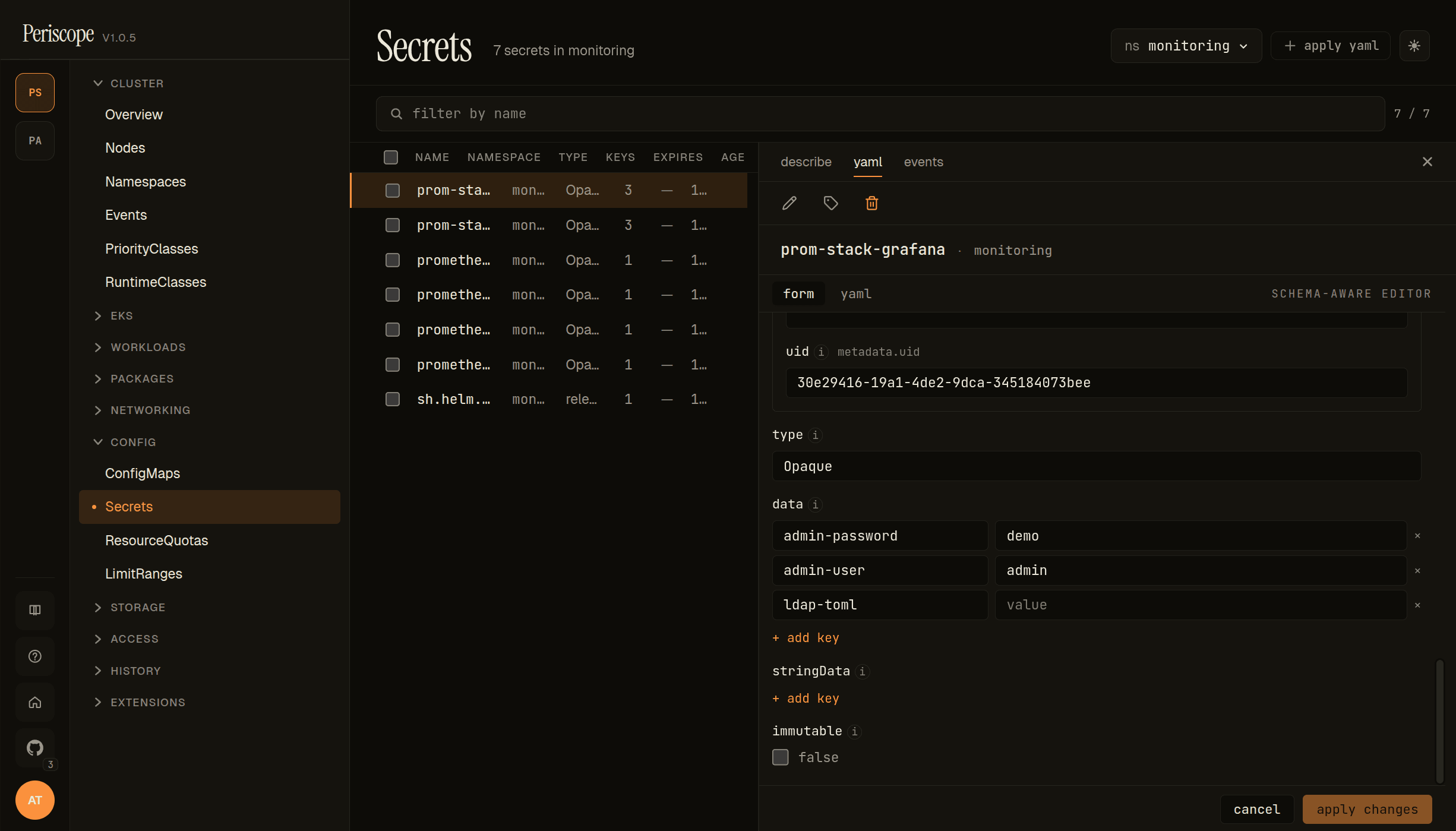
The detail pane's edit view shows:
form/yamltabs in the header, with a small SCHEMA-AWARE EDITOR badge to the right when the form has a real OpenAPI v3 schema backing it.uidrendered as a read-only metadata input (immutable post-create).typeas a free-text input (Opaquehere; forkubernetes.io/dockerconfigjsonetc. the type is whatever the apiserver accepts).dataas a key/value map editor — each key is a row with key + value text inputs. The screencap shows three keys (admin-password,admin-user,ldap-toml); the + add key button below the list adds a new pair.stringDataas a parallel kv-map editor (plaintext, no base64 round-trip — seeSecret base-64 layerfor the data path).immutableas a checkbox (false here).- Footer: cancel / apply changes. Apply runs the same
SelfSubjectAccessReviewpre-flight + server-side dry-run + audit row that the YAML editor uses.
Service form (array-of-objects)
![Service detail pane in form mode — spec.ports[] array editor with named entry, port 80, protocol TCP](/_next/image?url=%2F_next%2Fstatic%2Fmedia%2Fservice.0ue5heh65gh9i.png&w=3840&q=75&dpl=dpl_CNi8twe8Kz2aBnH3UEytMa77o9Wv)
Service exercises the array-of-objects path of the form engine. spec.ports[] renders as a list of expandable cards; each card carries the schema-defined fields (appProtocol, name, nodePort, port, protocol, targetPort) with the (i) tooltips on every label.
- PORTS #1 header + per-row remove button — array entries can be deleted independently.
add item, press Enterinput below — type a label name to push a new entry onto the array. Required-field validation runs per entry, so the new card lights up missing required fields immediately.portis required (asterisk shown);protocoldefaults toTCPvia the schema's default.targetPortis the canonicaloneOf(string-or-int) discriminator picker — flip the picker to switch between an int (e.g.9898) and a string port name (e.g.http); branch switching wipes the previous-branch value with a confirm prompt as described underComposition-keyword coverage.
ConfigMap form (kv-map for data)
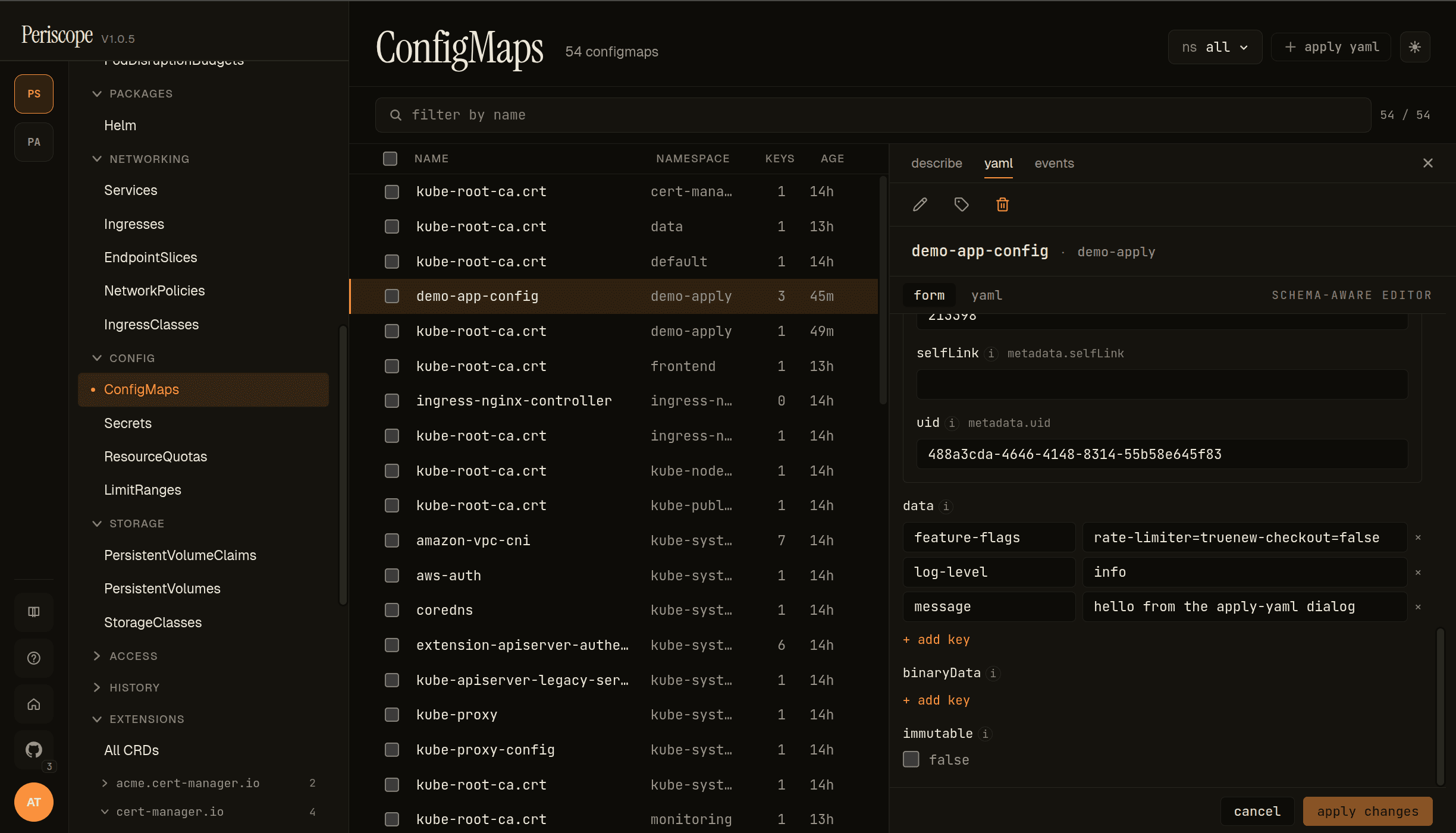
ConfigMap exercises the same kv-map path as Secret, minus the base64 layer (ConfigMap stores plaintext on the wire). The screencap is the demo-app-config ConfigMap from the Apply YAML demo, in the demo-apply namespace:
selfLink+uidrender as read-only metadata inputs at the top — populated from the existing object, immutable on update.dataas a kv-map. Each row is a key + value pair. Multi-line values (thefeature-flagsentry:rate-limiter=true\nnew-checkout=false) are preserved verbatim; the value editor wraps without re-flowing.+ add keyappends a fresh row at the bottom.binaryData(collapsed) for binary-only contents (base64-encoded on the wire).binaryDatakeys cannot collide withdatakeys; the form enforces this client-side before apply.immutableas a checkbox. Settingimmutable: trueis a one-way door (the apiserver rejects mutations after); the form surfaces a confirmation step before applying.
Ingress form (deeply-nested objects + enum picker)
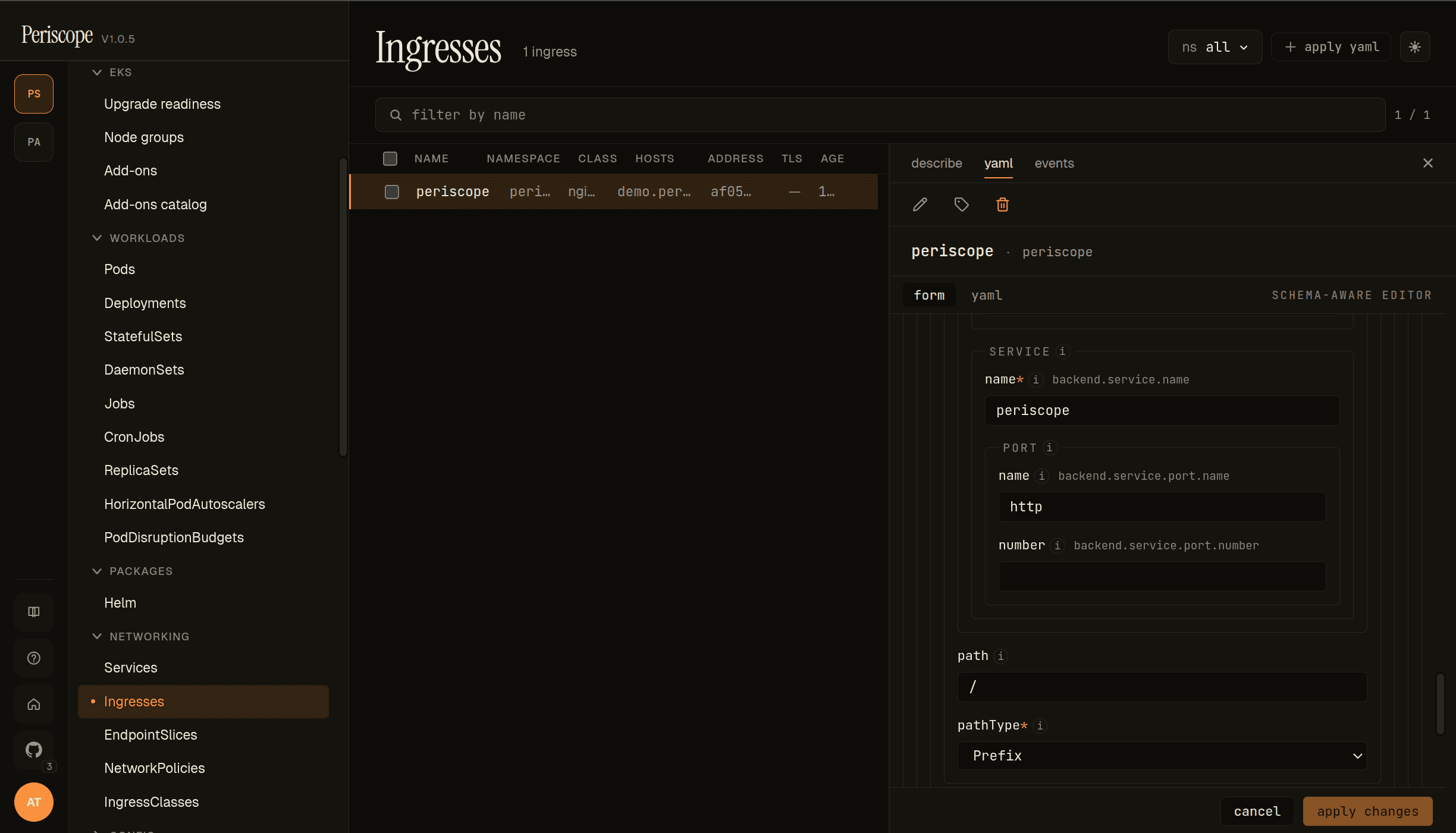
Ingress exercises the deeply-nested object path. The screencap is peri-server's periscope Ingress, with the rule's backend service expanded:
- SERVICE →
name— the backing Service name (periscope). - PORT →
name/number— the canonicaloneOf(string-or-int) port reference. Either field is sufficient; supplying both is rejected by the apiserver. - path — the request path (
/). The form does no validation beyond the schema'spattern; controller-specific quirks (nginx regex paths, ALB wildcards) pass through. - pathType — enum dropdown surfacing the schema's three values:
Prefix(default in the screencap),Exact,ImplementationSpecific. Schema enums always render as dropdowns; free-text isn't allowed.
Above the rule (off-screen in the screencap), spec.tls[] and spec.ingressClassName follow the same patterns — tls[] is array-of-objects (one card per TLS host group with hosts[] + secretName), ingressClassName is a free-text input (no enum because IngressClasses are discovered runtime, not schema-defined).
Controller-specific annotations (alb.ingress.kubernetes.io/*, nginx.ingress.kubernetes.io/*, cert-manager.io/*) pass through the metadata annotations editor verbatim — the form does not validate them, since they vary by ingress controller.
When the form shows up
| Kind | Default mode |
|---|---|
| ConfigMap, Secret, Service, Ingress | Form (with YAML toggle) |
| Everything else (Deployment, Pod, CRDs, …) | YAML |
The schema for each form is sourced from the apiserver's
/openapi/v3/{group}/{version} doc, which Periscope already caches
for the YAML editor's autocomplete. When the schema isn't reachable
(a transient apiserver fetch failure), the form falls back to a banner
prompting you to switch to YAML.
What the form covers per kind
| Kind | Surfaced fields |
|---|---|
| ConfigMap | metadata.{name, namespace, labels, annotations}, data (key/value editor), binaryData, immutable |
| Secret | metadata, type, data (plaintext editor with base64 round-trip), stringData, immutable |
| Service | metadata, spec.{type, selector, ports[], clusterIP, externalTrafficPolicy, internalTrafficPolicy, sessionAffinity, loadBalancerSourceRanges, loadBalancerClass, ipFamilies, ipFamilyPolicy} |
| Ingress | metadata, spec.{ingressClassName, rules[], tls[], defaultBackend} |
Fields that aren't on the per-kind allowlist (e.g. status,
metadata.managedFields, metadata.uid, metadata.creationTimestamp,
metadata.resourceVersion) are filtered out before the form renders so
operators never see them.
metadata.name, metadata.namespace, Service spec.clusterIP, and
Service spec.loadBalancerClass are immutable after create — they
render as read-only inputs in edit mode.
Controller-specific Ingress annotations (alb.ingress.kubernetes.io/*,
nginx.ingress.kubernetes.io/*, etc.) pass through verbatim in the
annotations key/value editor; Periscope does not validate them.
Secret base-64 layer
The Secret form decodes data[k] to plaintext for editing and
re-encodes to base64 on apply. A show raw base64 toggle in the
banner switches the data editor between plaintext and the canonical
wire format — useful when auditing what's actually stored.
stringData continues to be edited as plaintext (matching the K8s API
itself). Multi-byte characters in plaintext (UTF-8) round-trip
cleanly.
Form ↔ YAML toggle
Every form view ships a [form | yaml] toggle in the header.
- The toggle persists per-user via
localStorage["periscope.editor.preferred"]("form"or"yaml"). Power users who prefer YAML can flip the default once. - Toggling preserves your edits in both directions. The draft YAML buffer is shared between the two modes — flipping form→yaml carries your form edits straight into Monaco; flipping yaml→form re-parses your YAML edits back into the form. Only Cancel prompts to discard.
- The dirty-tracking anchor stays the original server YAML, so the
tab strip's
yaml*indicator reflects "edited since fetch" consistently across both modes.
Composition-keyword coverage (oneOf, allOf)
JSON Schema's composition keywords used to all surface as a yellow "yaml only" badge. Two of them now render properly in the form:
allOfflattens.allOf:[{$ref: Base}, {properties: Override}]is the standardkubebuildershape for embeddingmetav1.ObjectMetaand similar inheritance — the form merges the entries into a single rendered shape before the walker emits descriptors. This is whymetadatarenders as a regular nested object on every kind (was previously yaml-only). Type conflicts acrossallOfentries (rare schema authoring bug) abort the merge and surface as the unsupported badge.oneOfrenders as a discriminator picker. Two structural shapes are detected:- Whole-value oneOf — e.g.
Service.spec.ports[].targetPort(string-or-int),Ingress.spec.rules[].http.paths[].backend(Service backend or Resource backend). Picker switches between the branch shapes. - Object-level oneOf with required-key branches — e.g.
cert-manager
Issuer.spec(selfSigned/ca/vault/acme),aws-ebs-csi-driverIAM identity (IRSA vs Pod Identity vs none). Picker uses the required key as the branch label. - Branch switching is destructive: the values you set under the previous branch are wiped (different shapes, no clean merge). Periscope confirms before wiping.
- Whole-value oneOf — e.g.
anyOf and patternProperties still surface as the unsupported
badge. They're rare in K8s/Helm/CRD schemas — most authors who want
disambiguation reach for oneOf instead.
Field descriptions
Every field carries a small (i) icon next to its label. Hover or
focus the icon to see the schema's description (sourced from the
apiserver's OpenAPI v3 doc for K8s kinds, or the chart's
values.schema.json for Helm). Some K8s fields have lengthy
multi-paragraph descriptions — these stay tucked behind the tooltip
to keep the form scannable.
Field ownership and apply semantics
The form submits via the same PATCH .../resources/{group}/{version}/{resource}/{ns}/{name}
endpoint the YAML editor uses, with application/apply-patch+yaml,
field manager periscope-spa, and a server-side dry-run before the
real apply. All of the following still happen on every form apply:
- Per-doc
SelfSubjectAccessReviewpre-flight (PR #100). - Audit log row with
verb=apply,kind/namespace/name/operation. - Server-side apply: Periscope takes ownership only of the fields it serializes; fields managed by other controllers (e.g. an Operator) remain owned by them.
When form mode submits and the apiserver returns a 409 field-manager
conflict, the form surfaces a banner that links you to switch to YAML
mode — that's where the per-field ConflictResolutionView lives, so
you can resolve fields individually. The form's banner explains why
form mode doesn't try to handle 409s itself.
What the form doesn't do (yet)
- Drift detection while you edit. Form mode loads pristine YAML once on mount; if the cluster object changes under you mid-edit, you won't see a drift banner like you do in YAML mode. Apply still goes through SSA and will be rejected by the apiserver if it conflicts.
- Per-field reset to default.
- Field-ownership glyphs in the form margin (the YAML editor still shows them).
- Controller secret picker for
tls[].secretName— currently a plain text input. Selecting from existing Secrets in the namespace is a polish follow-up. - CRDs. See
custom-resources.md— form-mode routing is intentionally limited to the four v1.1-supported kinds (the schema engine itself can render most kubebuilder-generated CRDs now thatoneOfandallOfare handled, but CRDs aren't wired throughKindEditRouter). CRDs and workloads stay YAML-only as a deliberate scope choice. anyOfandpatternPropertiesschemas. Used much less thanoneOfin real K8s/Helm/CRD schemas, so still surface as the unsupported badge. Switch to YAML for fields that use these keywords.
For any of the above, switch to YAML mode — it remains the full-power editing path.