docssetupworkload rollback
Workload rollback
Periscope ships a one-click rollback affordance for the three workload kinds Kubernetes tracks rollout history for: Deployment, StatefulSet, and DaemonSet. The button surfaces a revision picker with a YAML diff previe…
Periscope ships a one-click rollback affordance for the three workload
kinds Kubernetes tracks rollout history for: Deployment,
StatefulSet, and DaemonSet. The button surfaces a revision
picker with a YAML diff preview, GitOps-aware safety warnings, and an
optional reason field that flows into the
kubernetes.io/change-cause annotation and the audit row.
The mechanic mirrors kubectl rollout undo: a strategic-merge patch
that retargets the workload's spec.template to a chosen revision's
pod template. The controller picks up the change and rolls forward
using the workload's configured strategy
(RollingUpdate / OnDelete / partition).
What you see
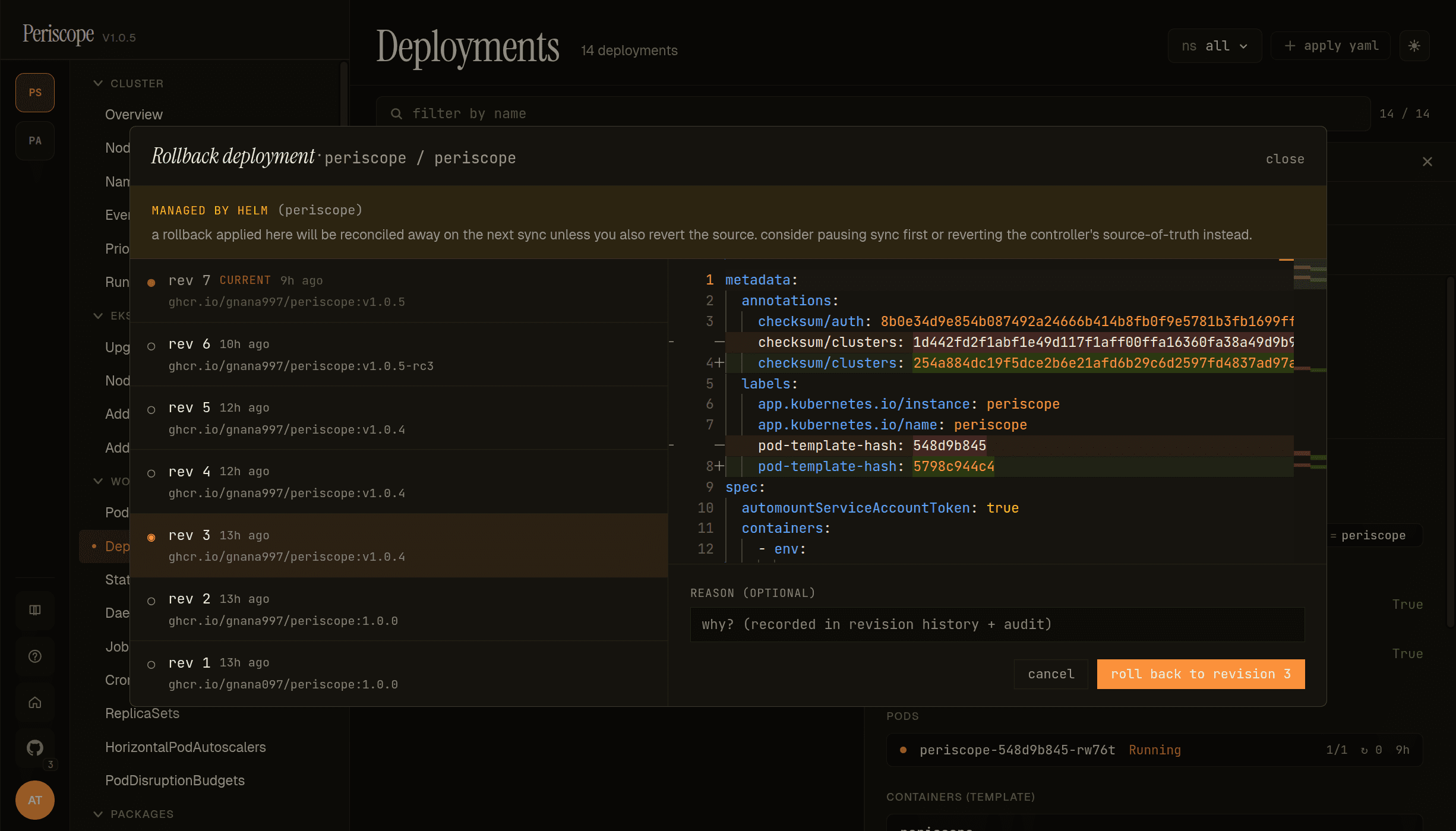
The dialog shows every ReplicaSet revision Kubernetes has retained for the Deployment, newest first. Each entry carries the revision number, age, and container image (or first container'''s image for multi-container pods). The currently-running revision is badged CURRENT; click any other to preview the diff in the right pane.
Diff pane shows the spec.template change between the picked revision and CURRENT. The screencap above is rolling Periscope itself from v1.0.5 → v1.0.4 — annotations + labels + image tag visible in the diff.
Pre-flight banner at the top calls out cases where a rollback would be reconciled away or otherwise unsafe — MANAGED BY HELM, MANAGED BY ARGOCD / FLUX, paused Deployment, HPA-managed replicas (see the per-warning sections below for what each one means and how to handle it).
Reason capture at the bottom is optional but recorded in the revision history annotations and the audit trail when filled. Strongly recommended for compliance-tracked clusters.
Where to find it
Open a Deployment / StatefulSet / DaemonSet in the detail pane. The action bar (top of the pane) shows a Rollback button alongside Edit, Scale, Restart, Delete.
The button is hidden for kinds without revision history (Pods,
ConfigMaps, etc.) and disabled with a tooltip when the user lacks
patch permission on the kind.
Picking a revision
The dialog opens with:
- Current revision marked with
●, dimmed, not selectable. - Older revisions marked with
○. Click to select. - Change-cause rendered below each revision number — the value
of the
kubernetes.io/change-causeannotation kubectl populates when you set it on the workload before a rollout. - Images in each revision's pod template, comma-separated.
- Age relative to now ("2h ago", "3d ago").
Selecting a revision opens the diff preview on the right — Monaco's inline (top/bottom) diff between the live pod template and the target revision's pod template, in YAML.
Pre-flight warnings
The dialog surfaces three classes of warning before you confirm:
GitOps-managed workloads
If the workload carries one of these markers:
argocd.argoproj.io/instanceannotation → ArgoCDmeta.helm.sh/release-nameannotation ORapp.kubernetes.io/managed-by: Helmlabel → Helmkustomize.toolkit.fluxcd.io/nameannotation ORapp.kubernetes.io/managed-by: Fluxlabel → Flux
…the dialog renders a yellow banner: "a rollback applied here will be reconciled away on the next sync unless you also revert the source. consider pausing sync first or reverting the controller's source-of-truth instead." The Apply button stays enabled — the user can still proceed if they know what they're doing — but they're warned.
Paused Deployments
If a Deployment has spec.paused: true, the rollback PATCH would
land but the controller wouldn't act on it until the rollout is
resumed. The dialog detects this and replaces the revision picker
with a Resume rollout button. Clicking it patches
spec.paused: false; the user then re-opens the dialog to pick a
revision.
HPA-managed replicas
If a HorizontalPodAutoscaler in the same namespace targets the
workload, the dialog adds an inline note: "hpa <name> targets this
workload — replicas remain hpa-managed; rollback only changes the
pod template." This is a friendly reminder, not a blocker — rollback
patches spec.template, not spec.replicas.
Reason capture
The dialog's footer includes an optional one-line reason field. If
filled, the value is appended to the kubernetes.io/change-cause
annotation Periscope writes on the rollback patch:
rolled back to revision 3 via Periscope ([email protected]): OOMKill on app:v1.4.2 — incident-2026-04-29The annotation propagates to the new revision's ReplicaSet (for
Deployments) or ControllerRevision (for STS / DS), so the next
operator running kubectl rollout history sees the reason in the
CHANGE-CAUSE column. The same string also appears in the structured
audit row's reason field.
Length cap: 200 characters; longer reasons truncate with … and the
full text is preserved in the audit row's body.
Audit trail
Every rollback emits two structured audit rows (RFC 0003):
rollback_intent— emitted before the apiserver patch fires. Carries the operator identity, target revision, and reason. Captures intent even when the patch later fails or the request hangs mid-flight.rollback— emitted after the patch with the outcome (successcarriesnewRevision;failure/deniedcarry the error). Together with the intent row, the pair is the forensic record auditors look for during incident review.
Both rows carry the standard Resource ref
(group=apps, version=v1, resource=kind plural, namespace, name)
so existing audit filters work without change.
Errors
| Backend response | When it happens | What the dialog does |
|---|---|---|
404 revision_not_found | Target revision was pruned by revisionHistoryLimit between dialog open and confirm | Toast with the error; dialog stays open so user can pick another |
409 deployment_paused | Race: Deployment got paused between open and confirm | Toast; dialog stays open. User opens again to see the resume pane. |
409 already_at_revision | User selected the live revision | Server-side guard — the picker also disables it client-side |
403 | Apiserver rejected the impersonation chain | Toast with the apiserver's reason |
422 no_revision_history | revisionHistoryLimit: 0 configured on the workload | Toast — rollback is impossible until the limit is raised |
Limitations
- No undo of an undo. A rollback creates a new revision (the controller's normal behavior). To revert a rollback, pick the prior revision from the dialog again.
revisionHistoryLimit: 0disables rollback. This is a workload-config decision; Periscope can't override it.- Custom controllers without ControllerRevision history (some CRD-backed workloads) aren't supported. The button doesn't appear for kinds outside Deployment / StatefulSet / DaemonSet.
- GitOps reconciliation will revert the rollback unless the source is also updated. The dialog warns; it doesn't prevent.
API endpoints
For SPA / external integrators (covered by the public HTTP API
contract in docs/api.md):
GET  /api/clusters/{cluster}/{kind}/{ns}/{name}/revisions
POST /api/clusters/{cluster}/{kind}/{ns}/{name}/rollback
{kind} is the apiserver resource plural (deployments /
statefulsets / daemonsets). The POST body shape:
{ "revision": 5, "reason": "OOMKill on app:v1.4.2" }reason is optional. Response:
{ "newRevision": 8, "patchedAt": "2026-05-06T..." }