docsusagestorage
Storage (PVs, PVCs, StorageClasses)
The STORAGE sidebar group surfaces the three K8s storage objects operators reach for during incidents — PersistentVolumes, PersistentVolumeClaims, and StorageClasses. Live-watched lists with detail panes that pair the…
The STORAGE sidebar group surfaces the three K8s storage objects
operators reach for during incidents — PersistentVolumes,
PersistentVolumeClaims, and StorageClasses. Live-watched lists
with detail panes that pair the Bound PV ↔ PVC for a single click.
PersistentVolumes
List
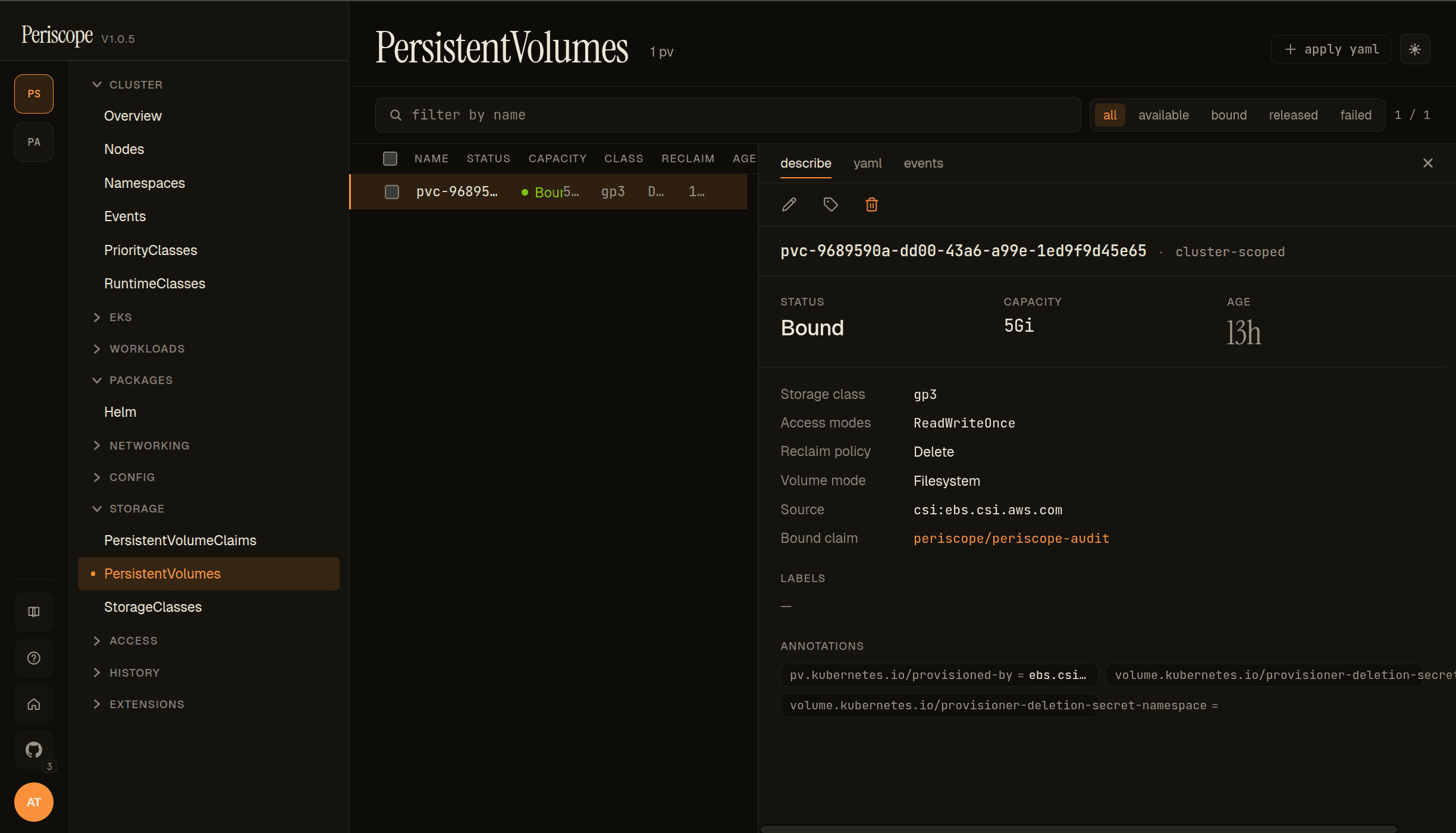
The page header shows the PV count and the status filter pills —
all / available / bound / released / failed. Each row carries:
- NAME —
metadata.name. Dynamically-provisioned PVs use thepvc-<uid>convention. - STATUS — colored chip (
Boundgreen,Availableneutral,Released/Failedwarning). - CAPACITY —
spec.capacity.storage. - CLASS —
spec.storageClassName. - RECLAIM —
spec.persistentVolumeReclaimPolicy.Retainkeeps the underlying volume on PVC delete;Deletereclaims it. - AGE — relative timestamp.
Detail (describe)
The detail pane's describe tab carries:
- Header — name + the
cluster-scopedchip (PVs are cluster-scoped) + edit / labels / delete actions. - Runtime cards — STATUS / CAPACITY / AGE.
- Storage class / Access modes / Reclaim policy / Volume mode — the four config knobs, each one row.
- Source — the CSI driver name (
csi.ebs.csi.aws.comin the screencap, indicating the AWS EBS CSI driver provisioned this PV). In-tree drivers (legacy) render asawsElasticBlockStore,gcePersistentDisk, etc.; the source row is the easiest way to spot in-tree usage you should migrate off. - Bound claim —
namespace/nameof the PVC currently bound to this PV. Click to jump to the PVC detail. - Annotations — provisioner-set annotations are surfaced verbatim
(e.g.
pv.kubernetes.io/provisioned-by, the deletion-secret annotations).
The screencap above is the EBS-backed PV that holds Periscope's
own audit log on peri-server — a 5Gi gp3 RWO volume bound to
periscope/periscope-audit.
Detail (yaml + events)
The yaml tab shows the canonical manifest including the source
spec block (csi: { driver, volumeHandle, fsType, volumeAttributes })
that the describe tab summarizes. The events tab is the
per-PV event feed — most operationally interesting for surfacing
provisioner failures (ProvisioningFailed, Resizing).
PersistentVolumeClaims
List
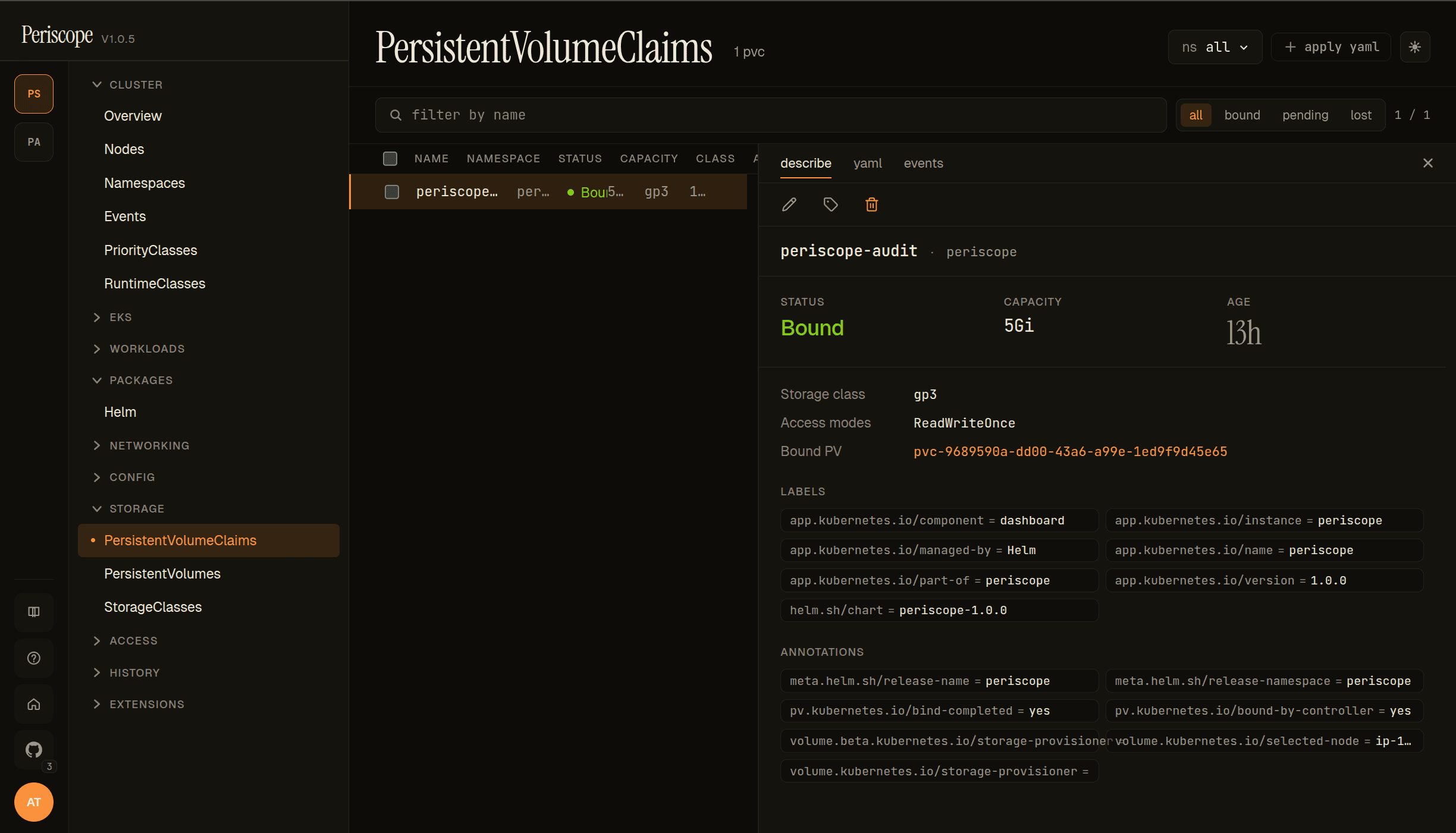
Same shape as the PV list, scoped per-namespace via the namespace
picker. Status filter pills — all / bound / pending / lost.
Each row carries:
- NAME / NAMESPACE — the claim itself.
- STATUS — colored chip (
Boundgreen,Pendingamber,Lostwarning). - CAPACITY —
status.capacity.storage(the actually-bound size). - CLASS —
spec.storageClassName. - AGE — relative timestamp.
Detail (describe)
- Runtime cards — STATUS / CAPACITY / AGE.
- Storage class / Access modes — same as the PV detail.
- Bound PV —
pvc-<uid>link to the matching PV detail page. The pairclaim → bound PVis one click each direction; useful when a PVC isPendingand you need to see whether a matching PV exists. - LABELS / ANNOTATIONS — Helm-managed labels render verbatim
(the screencap shows the standard
app.kubernetes.io/*set); provisioner annotations includevolume.kubernetes.io/storage-provisioner=ebs.csi.aws.comandvolume.kubernetes.io/selected-node=ip-…(CSI external-provisioner state).
Common Pending-state debugging
When a PVC stays Pending, the events tab surfaces the
ProvisioningFailed reason verbatim. Common culprits:
- No matching StorageClass. PVC requests
storageClassName: foobut no SC namedfooexists. Events tab showsstorageclass.storage.k8s.io "foo" not found. - Provisioner can't allocate. AZ mismatch (PVC on a node in
us-west-2cbut the EBS CSI driver IRSA only allowsus-west-2a), quota exhaustion, missing IAM permission. Events tab carries the CSI driver's verbatim error message. - WaitForFirstConsumer. PVC is
Pendingdeliberately — the StorageClass usesWaitForFirstConsumertopology and no Pod has been scheduled to a node yet. Not a problem; resolves when a Pod references the PVC.
StorageClasses
The StorageClasses page lists every storage.k8s.io/v1 StorageClass on the cluster. Operationally simpler than PV/PVC —
one row per SC with PROVISIONER, RECLAIM, VOLUME BINDING
MODE (Immediate / WaitForFirstConsumer), and DEFAULT chip
(set when the SC carries the
storageclass.kubernetes.io/is-default-class=true annotation).
The detail pane shows the full parameters block (the per-driver
config — for EBS, the type, encrypted, iopsPerGB, etc.) plus
labels / annotations.
No screenshot for this page — the layout matches the PV list shape with a smaller column set.
Live updates
All three list pages are wired to the cluster's
watch streams. PVC binding state
transitions (Pending → Bound) propagate without a refresh — useful
for staring at a fresh PVC and watching the provisioner pick it up.
RBAC
The standard view ClusterRole grants get + list on PVs, PVCs,
and StorageClasses cluster-wide. Role-restricted users see only the
PVCs in namespaces their Role permits; PVs and StorageClasses are
cluster-scoped, so a denial there hides the entire page.
Related docs
workloads.md— Pods reference their PVCs inspec.volumes; the workload detail surfaces the volume mounts.../setup/watch-streams.md— the SSE plumbing that makes these list pages live.cluster-overview.md— the Storage card on the overview page summarizes total/bound capacity.