docsusageaws access
AWS Access for EKS — what IAM does this pod grant?
Three EKS identity surfaces in Periscope: Cluster Access reconciles Access Entries with aws-auth, the per-workload AWS Access tab lists every IAM policy on a pod's role, and reverse lookup finds every pod that can perform an AWS action.
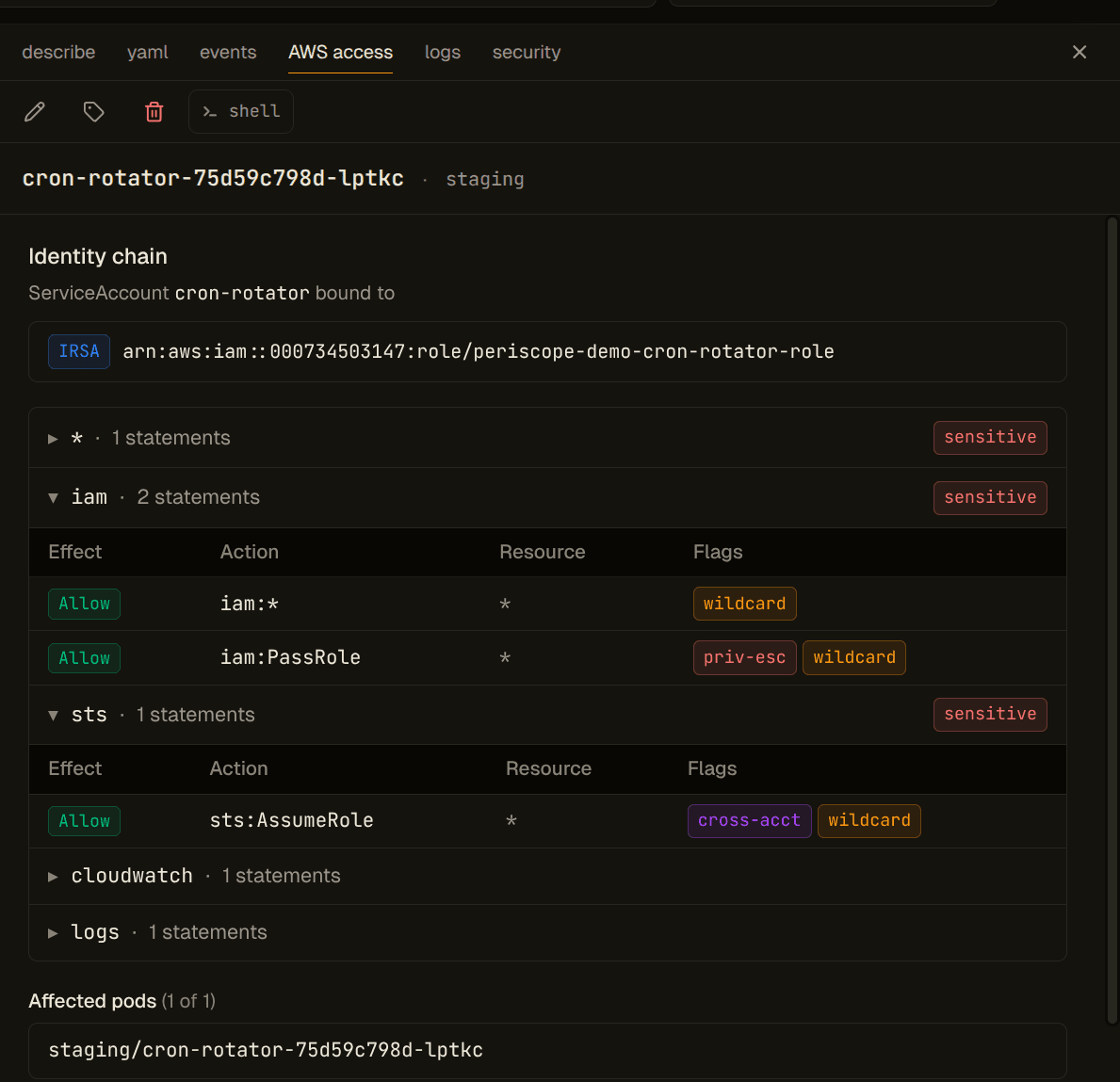
Periscope's v1.1 AWS Access surface answers three operational questions about an EKS-backed cluster without ever leaving the dashboard:
- Who has cluster access? — the Cluster Access page (sidebar →
EKS → Cluster Access). Reconciles EKS Access Entries with the
legacy
kube-system/aws-authConfigMap and shows the unified SA → IAM-role index spanning IRSA annotations and Pod Identity associations. - Forward view — what can this Pod / Deployment / ServiceAccount do in AWS? — an AWS access tab on Pod, ServiceAccount, Deployment, StatefulSet, and DaemonSet detail panes.
- Reverse lookup — which Pods can perform action X on resource Y? — the AWS reverse lookup page under the EKS section of the cluster nav.
All three sit on top of the EKS Identity layer (#178: Access Entries, aws-auth, Pod Identity, IRSA) and the IAM policy resolution engine (#187: inline + attached managed policy fetch + parsing + wildcard matching).
Cluster Access page
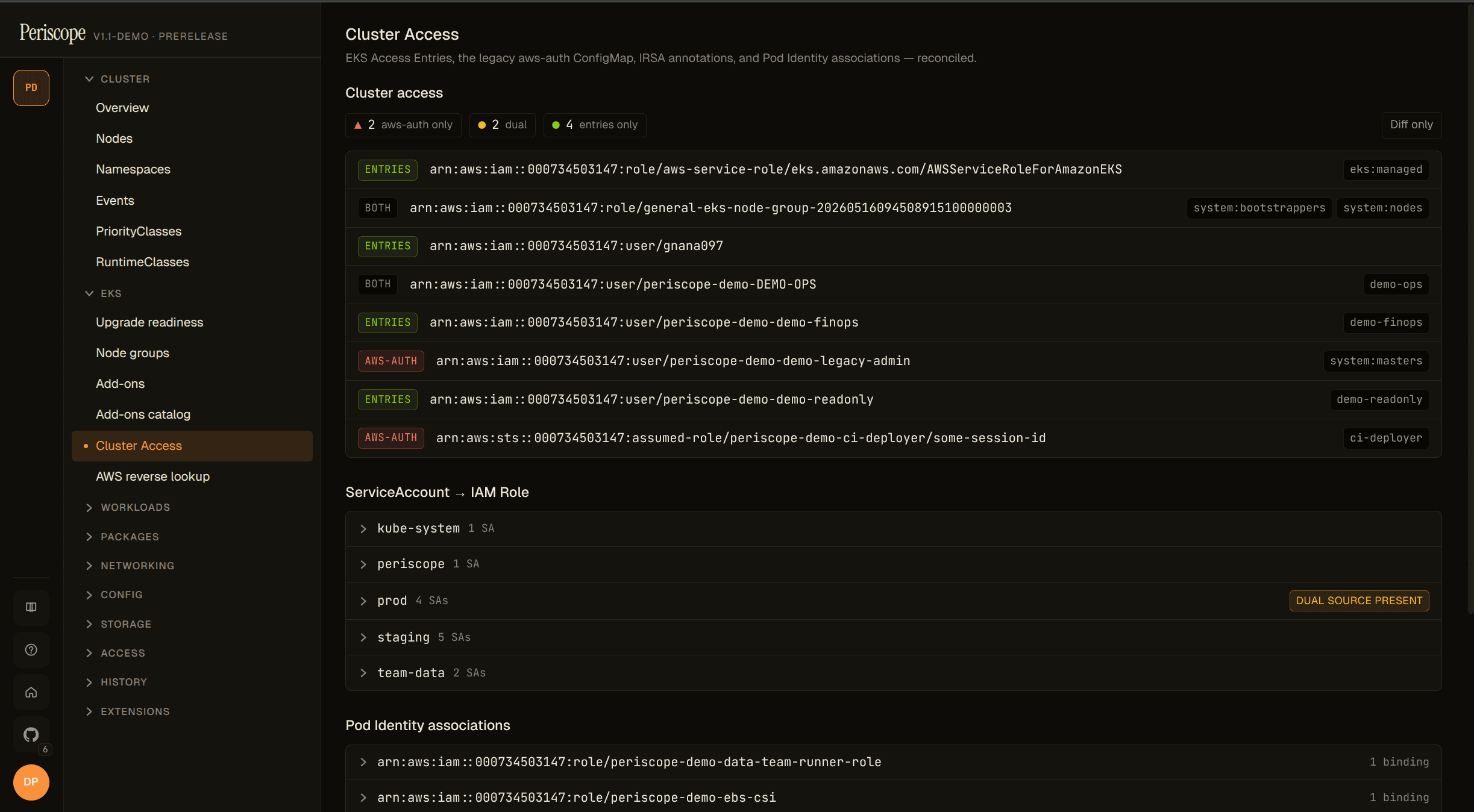
Open from the sidebar at EKS → Cluster Access. Three independently-
rendered sections share the page; each fetches its own data, so a 403 on
one (e.g. iam:GetRole missing) doesn't blank the rest.
Migration health (Access Entries ↔ aws-auth diff)
At the top of the page a single compact chip summarises the aws-auth → Access-Entries migration:
2 aws-auth-only · 2 dual · 4 entries-only| Segment | Color | What it means |
|---|---|---|
N aws-auth-only | red | Principals only in the legacy aws-auth ConfigMap. Migration not yet started for these. |
N dual | yellow | Principal mapped in BOTH aws-auth AND Access Entries. Functional, but you can safely remove the aws-auth row once you've verified the Access Entry covers it. |
N entries-only | green | Migrated to Access Entries. Healthy. |
Clicking a segment filters the AccessEntriesSection table; the
Diff only toggle hides the Both rows so operators mid-migration
focus on the delta:
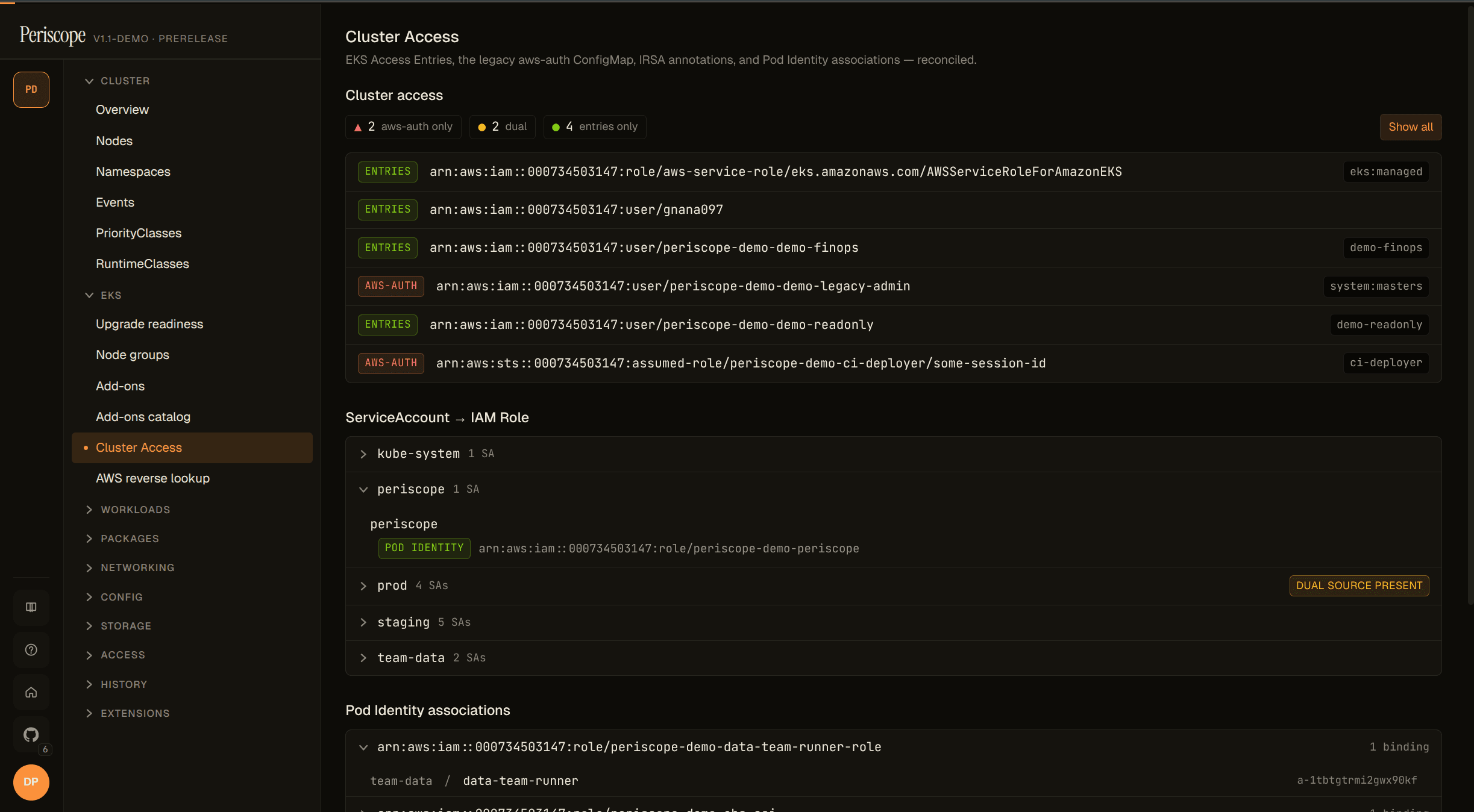
Principal ARNs are canonicalised before the diff runs — STS assumed-role
sessions collapse to their IAM-role form, casing is normalised — so a
case-mismatched aws-auth row and Access Entry resolve to the same
principal and render as Both instead of as two unrelated rows.
SA → Role index (IRSA + Pod Identity)
Grouped by namespace, alphabetical. Each row is one ServiceAccount with
either an IRSA annotation (eks.amazonaws.com/role-arn), a Pod Identity
association, or both.
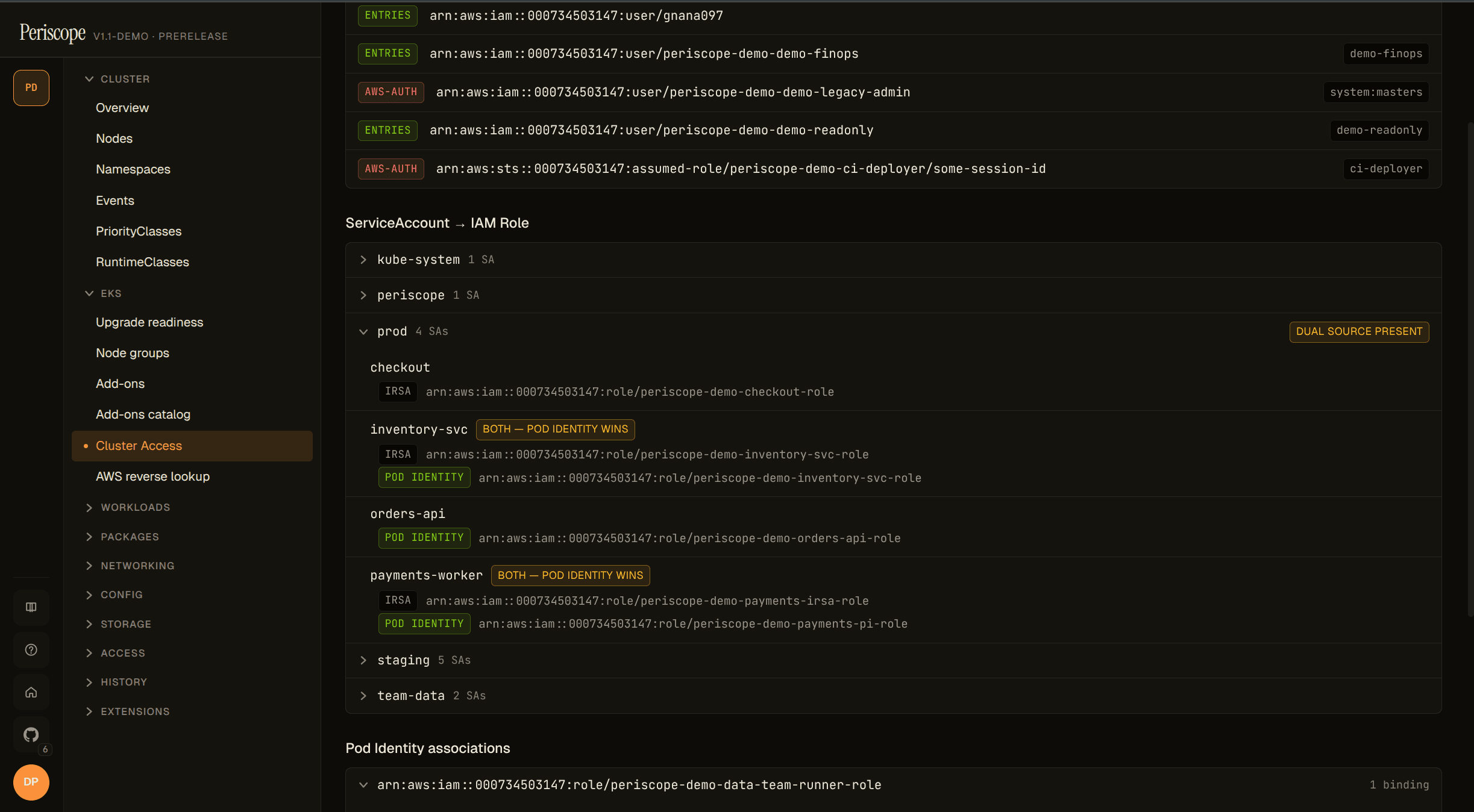
The most operationally-useful chip on this page: when the same SA has
BOTH an IRSA annotation AND a Pod Identity association at different
IAM roles, Periscope flags it with a both — Pod Identity wins
warning. Pod Identity wins at runtime — the IRSA annotation is
shadowed config that lies about what permissions the workload actually
has:
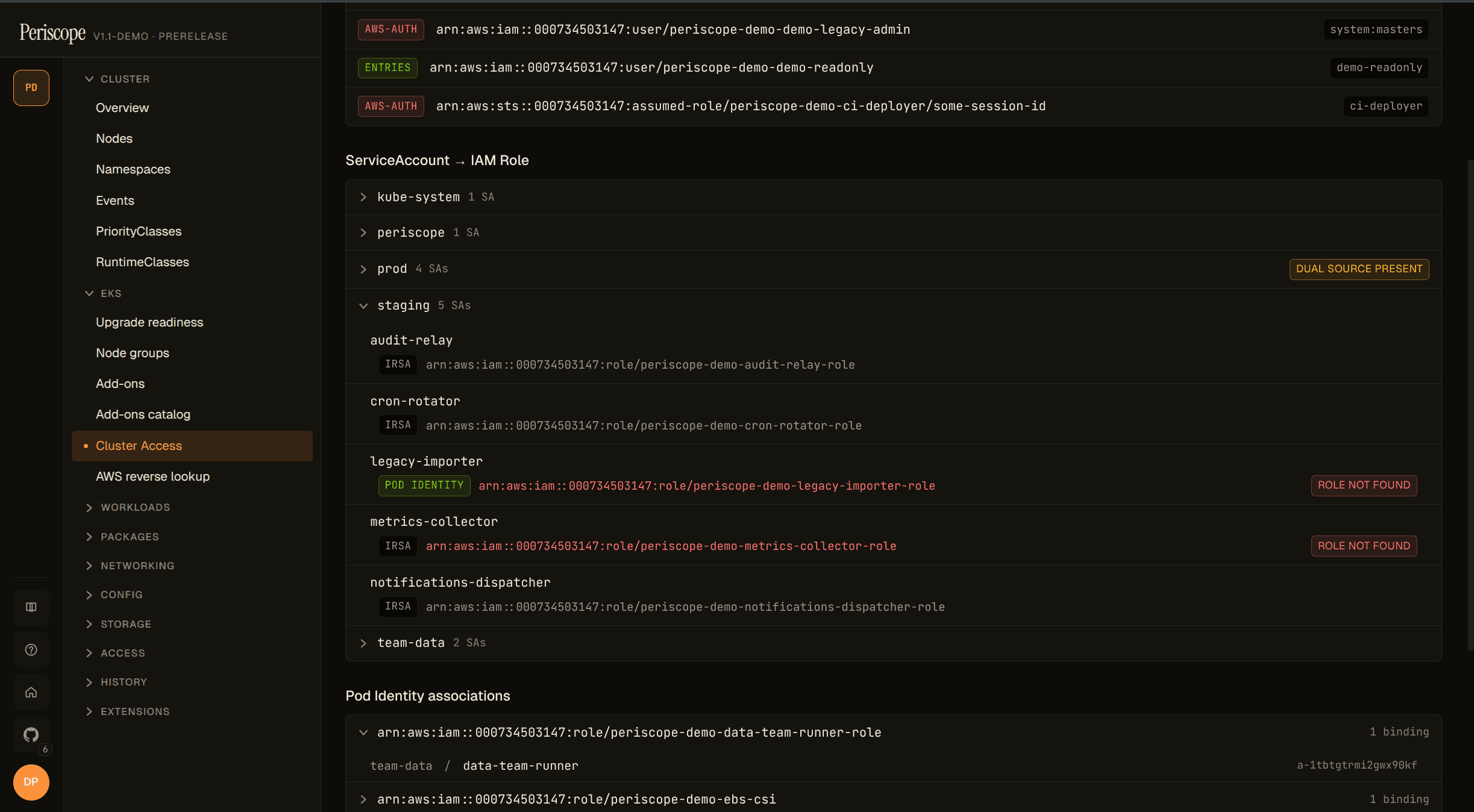
When an annotation or association points at an IAM role that's been
deleted, the row renders red with a role not found chip —
iam:GetRole returned NoSuchEntity. Typical cause: IaC drift where
the role was destroyed but the SA wiring wasn't cleaned up:
Pod Identity view (role-centric)
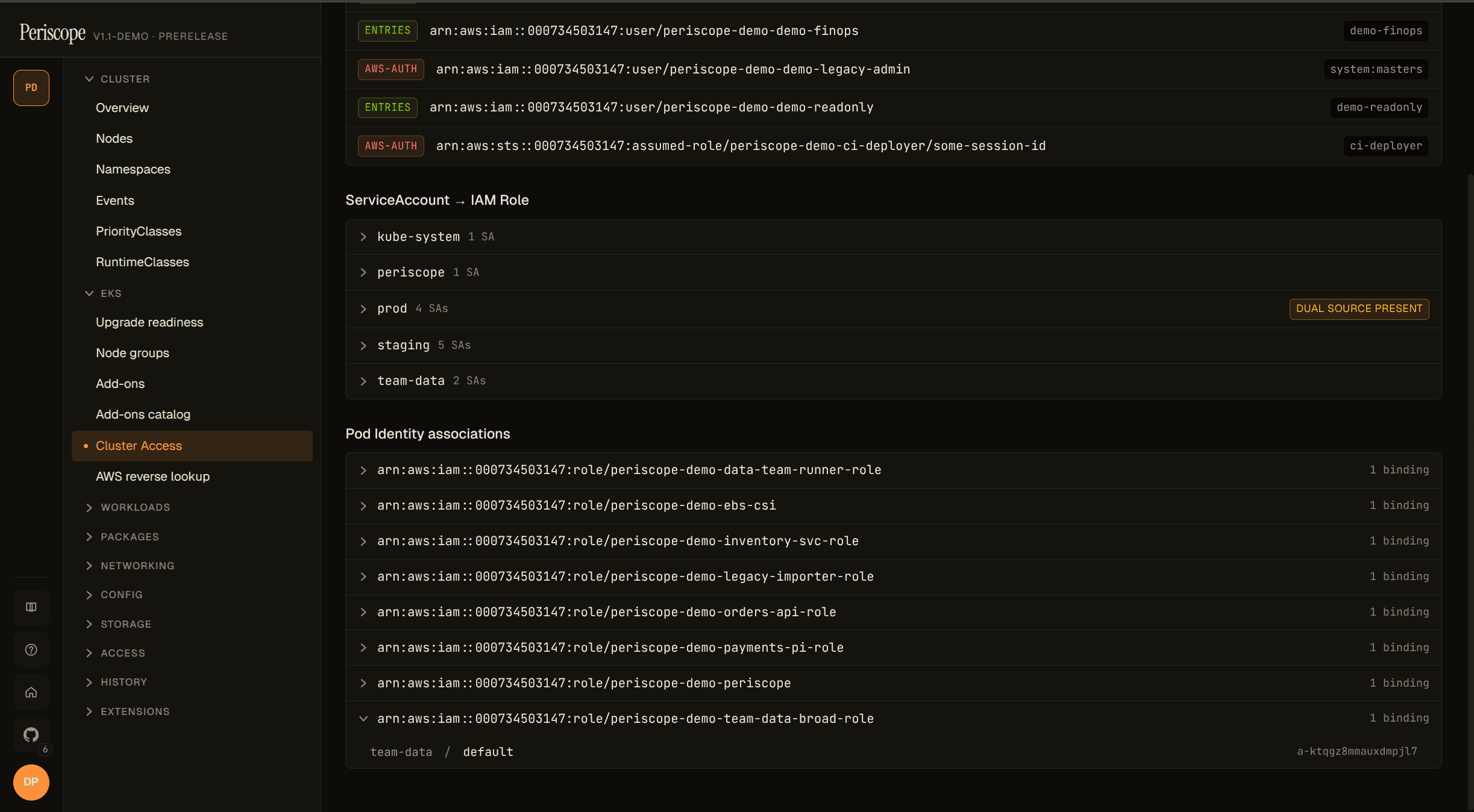
The inverse of SA → Role: grouped by IAM role, child rows are the
(namespace, ServiceAccount) pairs bound to each role via Pod Identity.
Surfaces the default-SA blind spot — when a Pod Identity association
targets the default SA in a namespace, every workload that doesn't
explicitly set serviceAccountName: silently inherits the role:
The audit verb for everything on this page is aws_identity_read (see
#178). The forward view and reverse lookup below use aws_iam_read.
Forward view — AWS Access tab
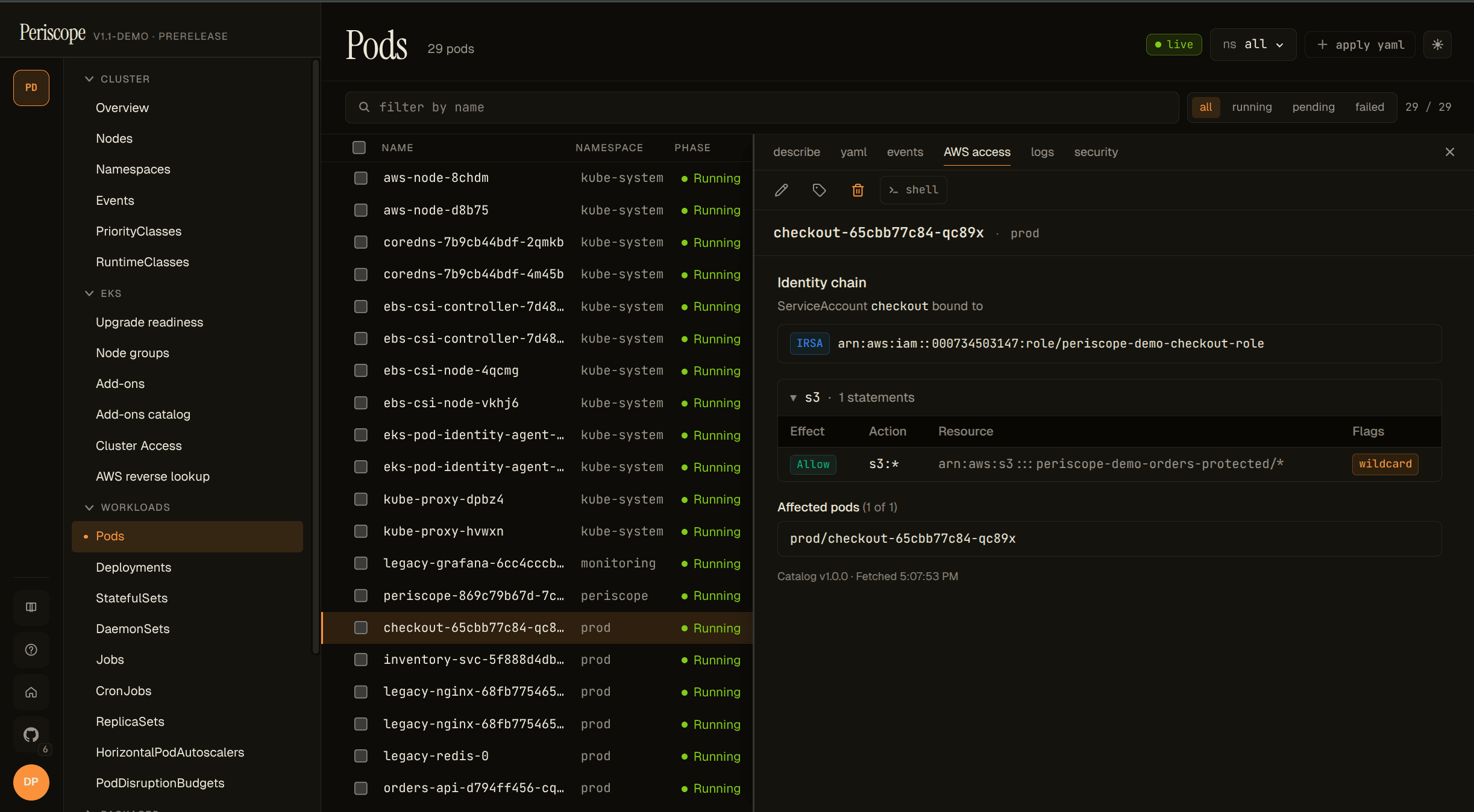
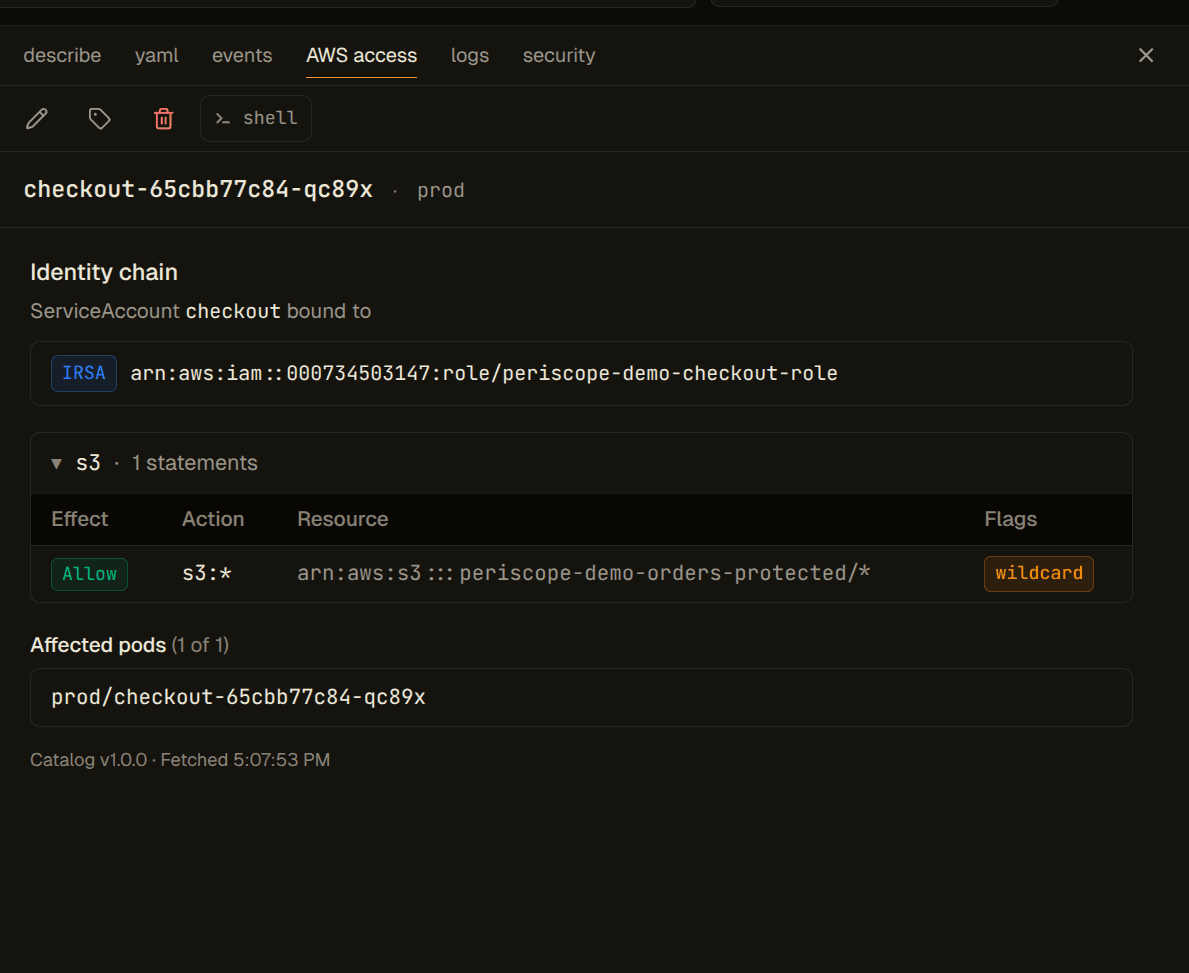
For any workload of one of the supported kinds, the tab body is a single backend call that composes:
- Identity chain — the resolved ServiceAccount and every IAM role
bound to it. Each binding shows its source (
IRSA,PodIdentity, orBoth); when both are present Periscope renders a DUAL_SOURCE_IRSA_SHADOWED warning because Pod Identity wins at runtime and the IRSA annotation is dead config. - Service-grouped permissions — every Statement from every attached
policy, expanded into one row per
(action, resource)and bucketed by AWS service (s3,iam,kms, …). Sensitive groups (any row flagged) sort to the top. - Sensitive-permission chips against the locked v1.1 catalog (see Sensitive-perms catalog below). 18 chips total — operators cannot extend or suppress in v1.1.
- Complex statements — NotAction / NotResource / NotPrincipal cases
render as a "see in IAM console" link rather than being silently
mis-evaluated. The link is partition-aware (
aws,aws-us-gov,aws-cn). - Affected pods — for Deployment / STS / DS / ServiceAccount kinds, up to 5 currently-running pods using the resolved SA, with a total count. For Pod kind, the pod itself.
Endpoint:
GET /api/clusters/{cluster}/identity/workload-permissions
    ?kind=Pod|ServiceAccount|Deployment|StatefulSet|DaemonSet
    &namespace=N
    &name=X
Returns a WorkloadPermissionsResponse (see
internal/awseks/iam/types.go). Every join, dedup, grouping, and
classification is computed server-side so an MCP tool can wrap the
endpoint as one tool call.
Examples
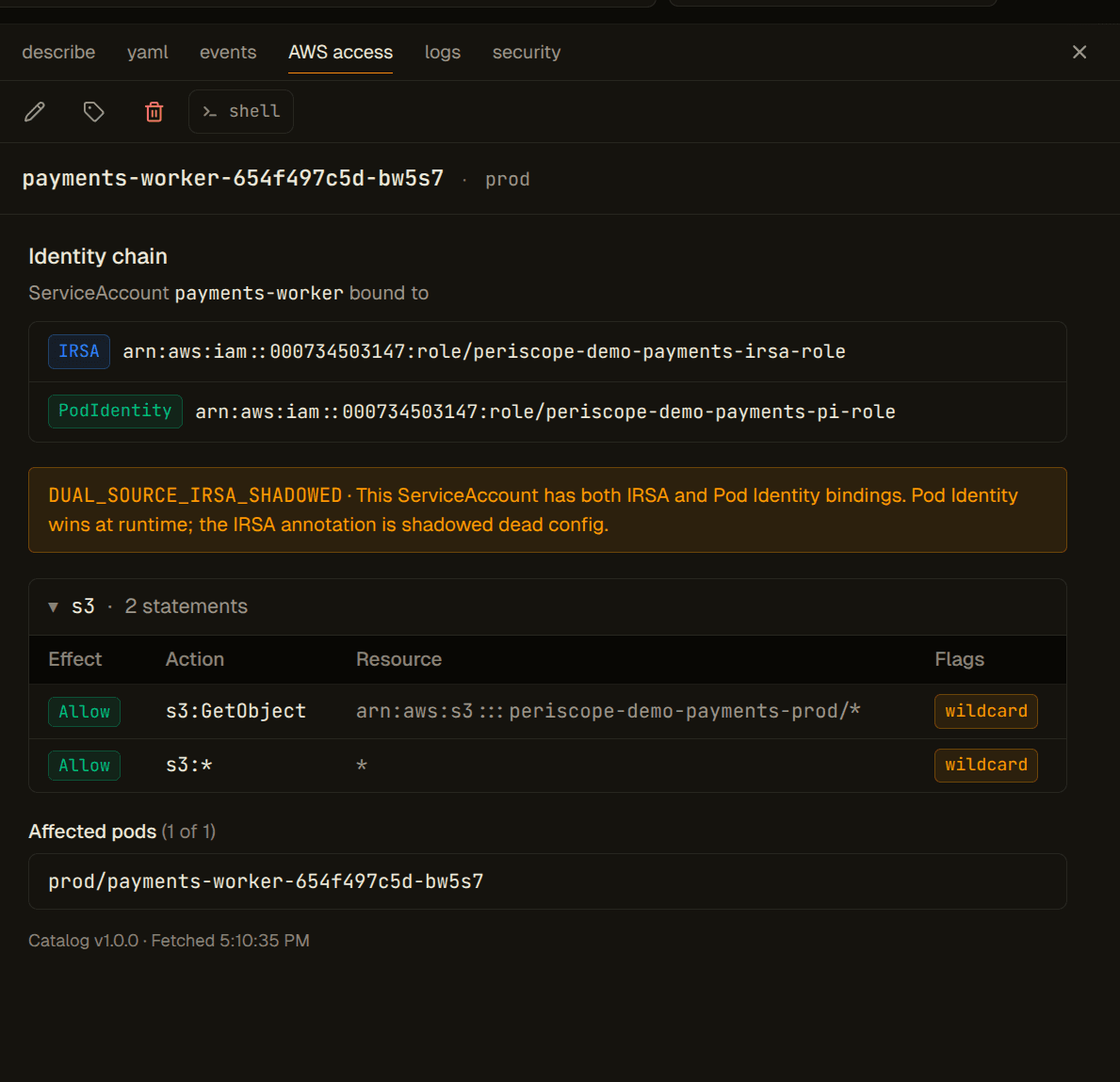
Dual-source identity chain. When the SA has both an IRSA annotation AND a Pod Identity association — at different roles — the chain header makes the runtime winner explicit and surfaces the shadowed binding so operators can clean it up:
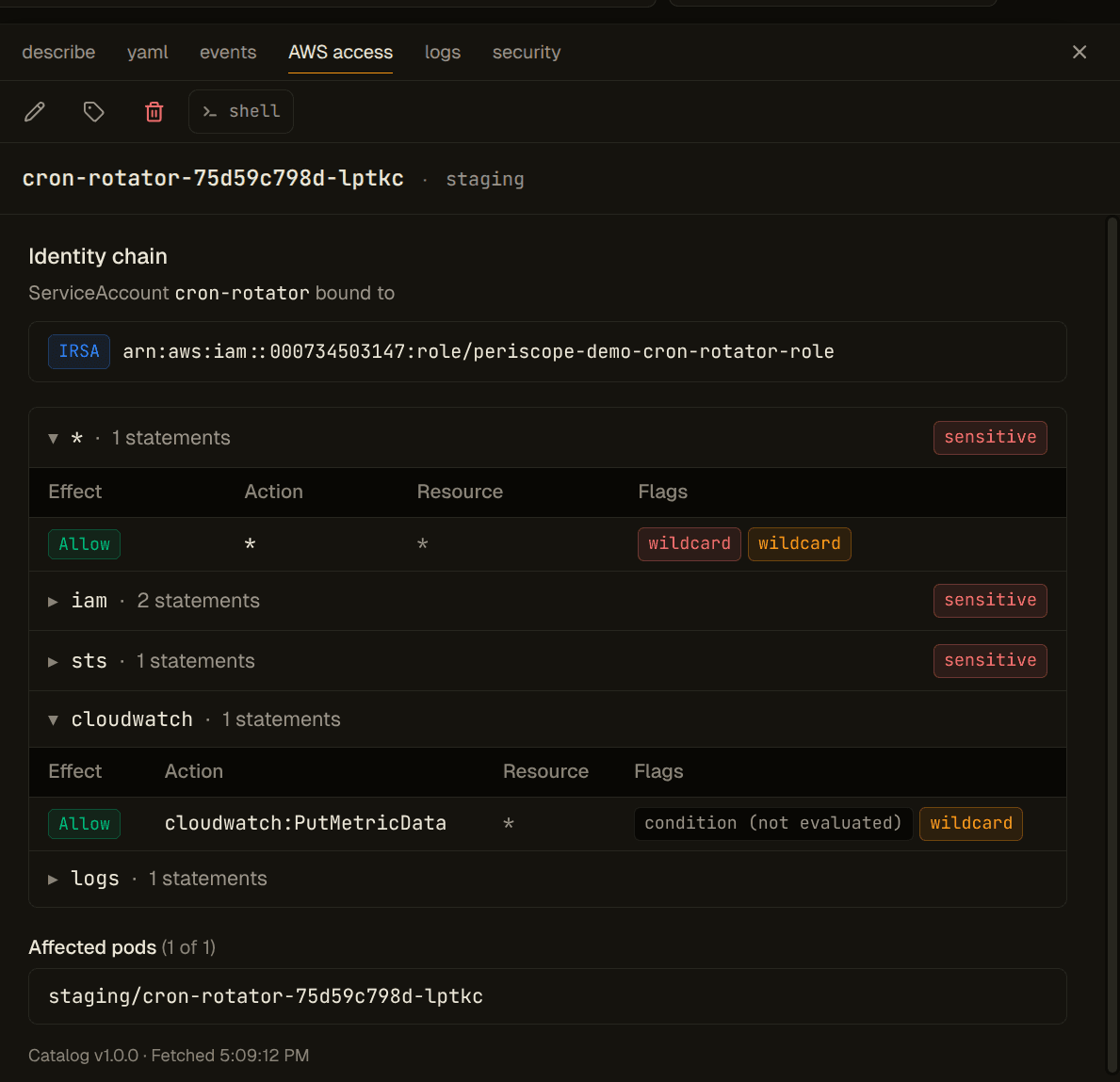
Sensitive-permission chip close-up. Every action in the locked v1.1
catalog renders with a red chip wherever it appears. s3:DeleteObject*
hits the catalog's data category:
Statement with a Condition block. v1.1 doesn't evaluate Condition
clauses; it surfaces presence as a neutral chip so operators don't
mistake the action for unconditionally granted. (Conditions evaluation
lands in v1.2.)
Reverse lookup
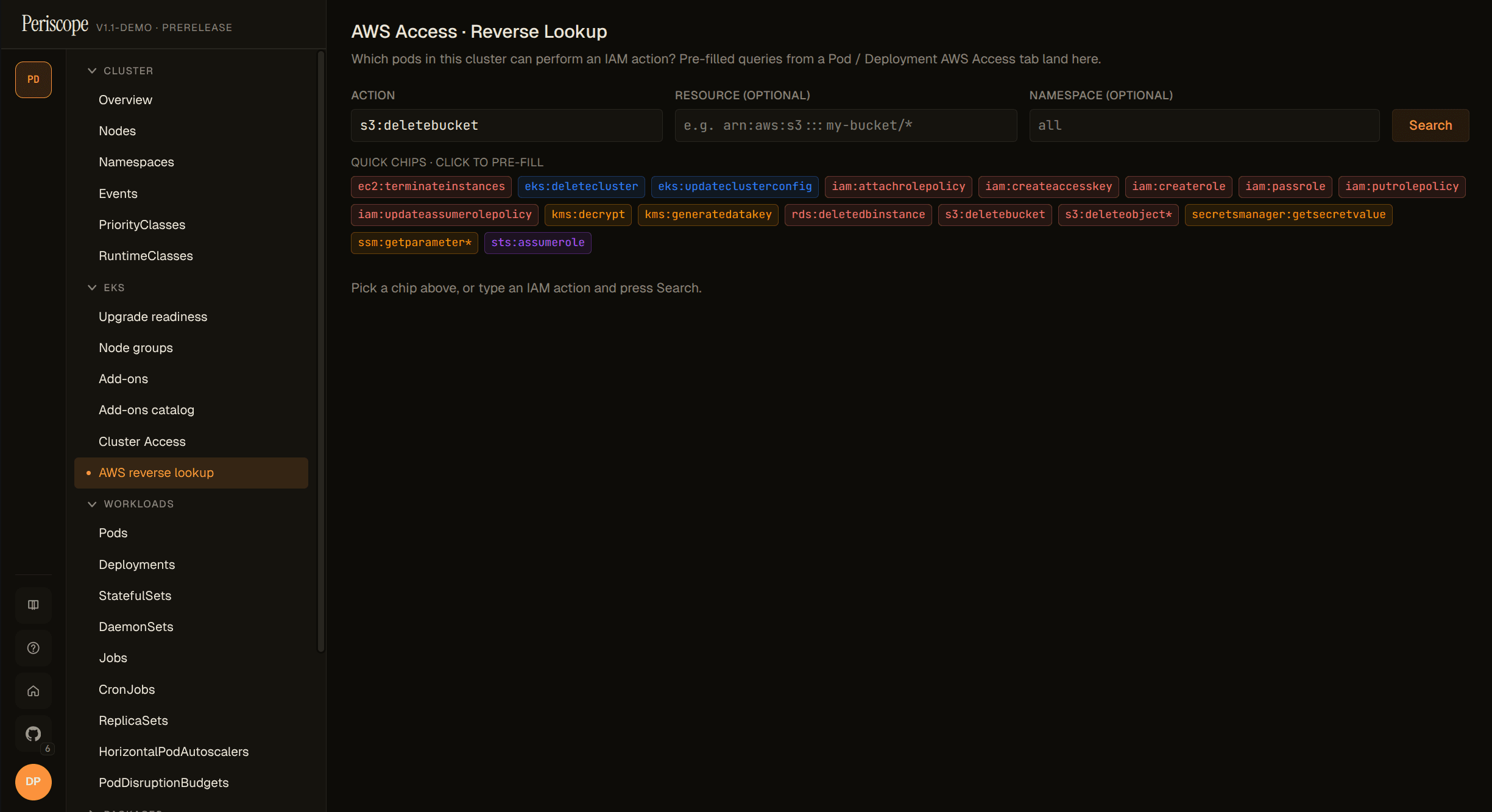
The page accepts an IAM action plus an optional resource ARN and optional namespace filter. Sensitive-permission chips on the page pre-fill the form. Each result row is one matched pod, with the IAM role and the binding source attributed:
GET /api/clusters/{cluster}/iam/reverse-lookup
    ?action=s3:GetObject
    &resource=arn:aws:s3:::my-bucket/*
    &namespace=team-foo
Returns a ReverseLookupResponse with rows: ReverseLookupPodRow[].
Sensitive-flagged rows sort first; the response carries truncated
and totalPods so the SPA renders honest "N of M" banners.
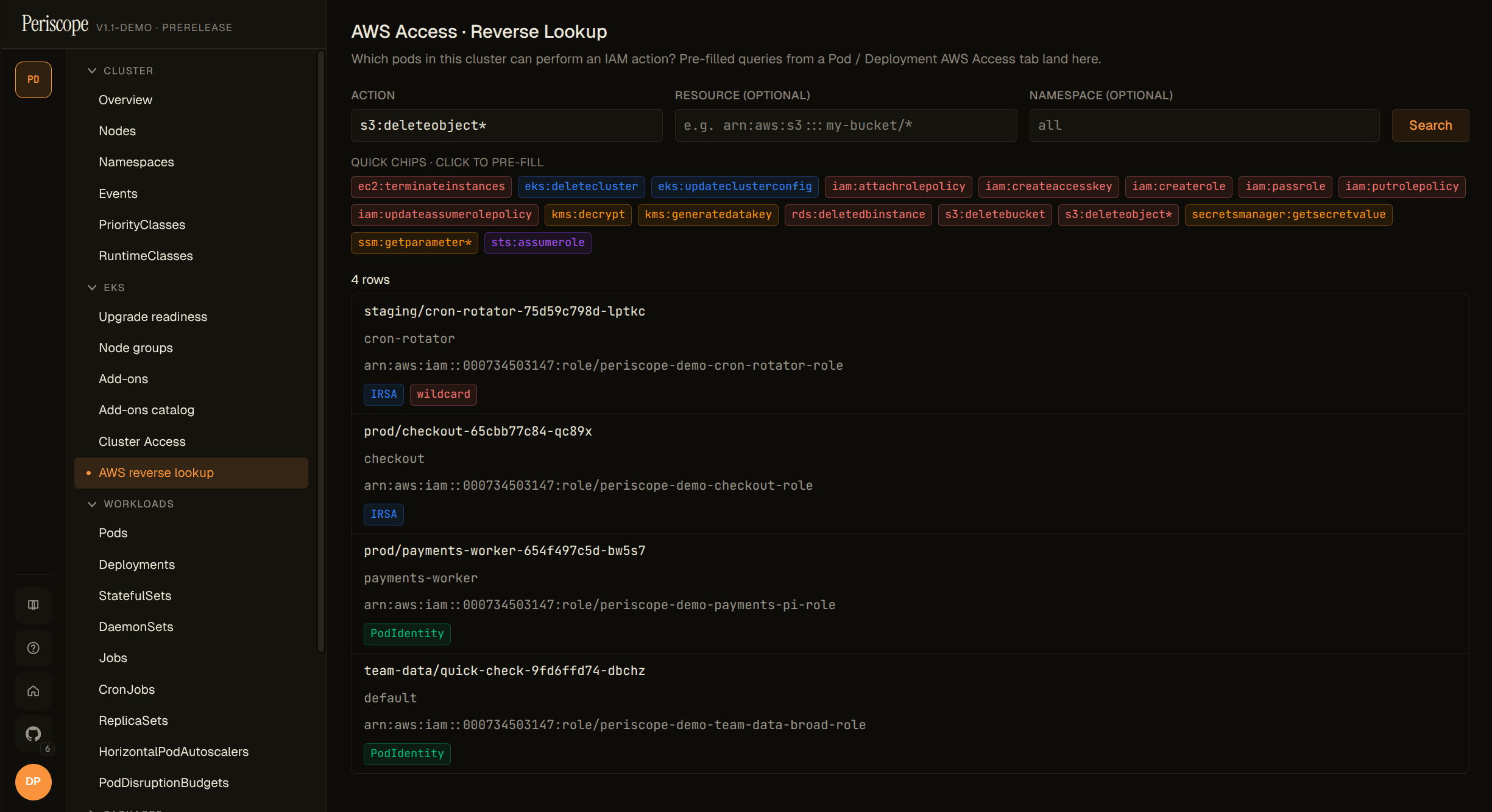
Dual-source SAs emit one row per binding per pod so the result honestly reflects that the same pod has two distinct permission paths.
Wildcard support: both the action and the resource accept IAM glob
patterns (s3:*, arn:aws:s3:::bucket/*). Wildcards are matched
case-insensitively, mirroring IAM's evaluation semantics.
Sensitive-perms catalog
Locked for v1.1. The catalog ships at internal/awseks/iam/sensitive.yaml
and is exposed at:
GET /api/identity/sensitive-catalogCluster-agnostic. Returns the catalog version, every entry's action +
category (privilege-escalation, data, cross-account,
destructive, cluster, wildcard), and a reverseQuery hint the
SPA fires on chip click. The literal * action is classified
wildcard by the matcher (not a YAML entry) so operators cannot
disable the wildcard chip.
Paywall pane (capabilities)
Periscope does not hide AWS Access surfaces from users whose clusters or roles don't yet support them. The tab is always present; when unavailable, it renders a paywall pane with a structured reason and the exact list of missing permissions:
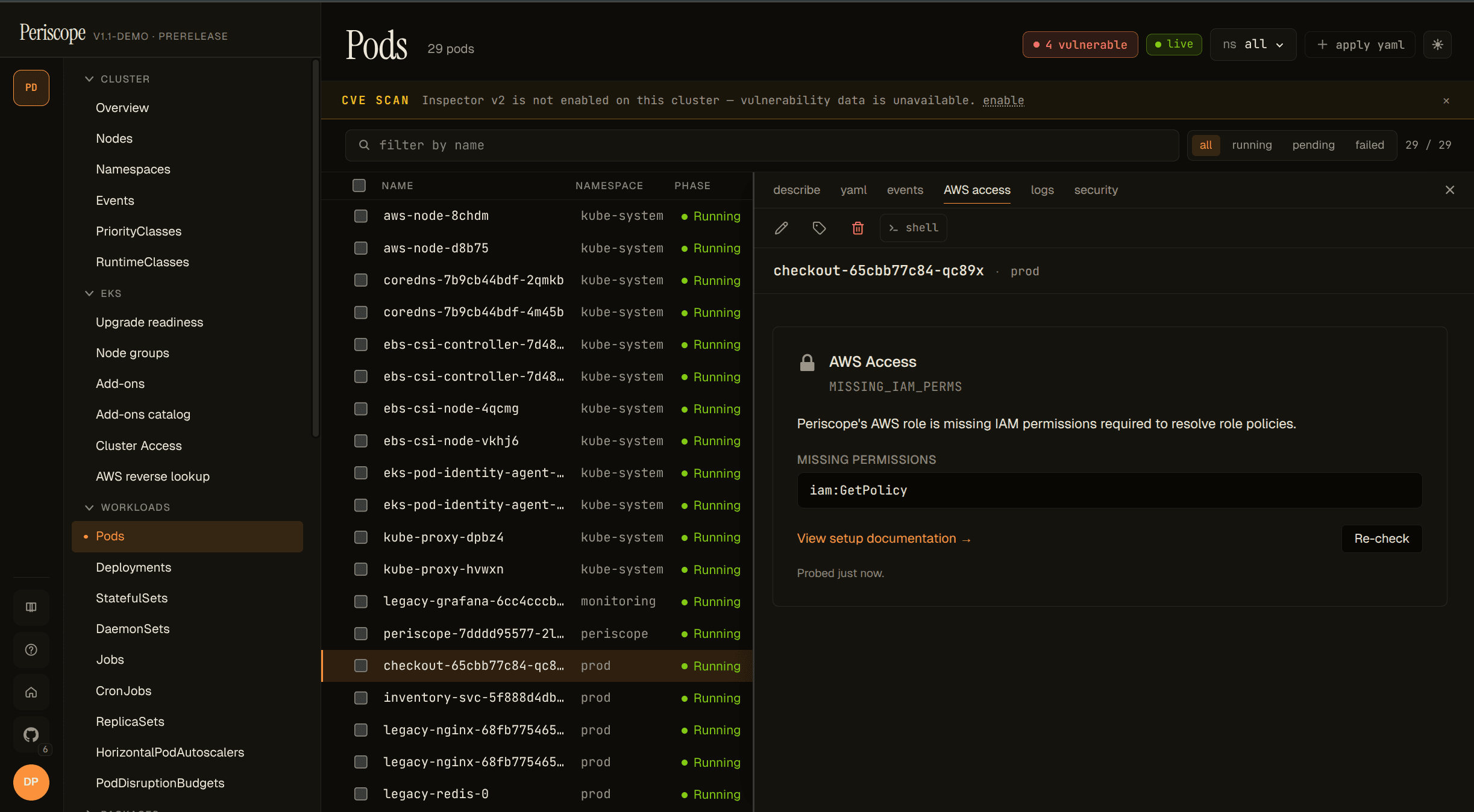
GET /api/clusters/{cluster}/identity/capabilitiesPer-feature response (features.awsAccessTab, features.reverseLookup,
features.sensitiveCatalog), each with available, a reason code
(NOT_EKS, RBAC_DENIED, MISSING_IAM_PERMS,
NO_IDENTITY_CONFIGURED, INFORMER_WARMING, IAM_PROBE_DISABLED),
a human message, an array of missing permissions / RBAC verbs, and a
docs link. Cached server-side for 5 minutes per (cluster, actor);
the locked pane's Re-check button sends Cache-Control: no-cache
to force a fresh probe after a permission grant.
IAM probe configuration
The capabilities probe calls iam:SimulatePrincipalPolicy against
Periscope's own caller identity (resolved once via
sts:GetCallerIdentity and reused across the process lifetime) to
populate the exact Missing[] list for MISSING_IAM_PERMS. The
locked pane then shows the specific permissions the operator needs
to add to periscope-server's IAM role. Controlled by:
PERISCOPE_AWS_ACCESS_IAM_PROBE=true|falseDefault: true. When iam:SimulatePrincipalPolicy itself is denied
to Periscope's role, the capabilities response falls back to
optimistically available: true with a note explaining the
limitation; the first real call surfaces the underlying 403. When
explicitly disabled, the response carries reason: IAM_PROBE_DISABLED with a similar fallback note. Set to false on
locked-down accounts where granting iam:SimulatePrincipalPolicy to
periscope-server is not desirable.
Honest limits (v1.1)
These are explicitly out of scope for v1.1; the SPA flags them clearly so operators don't misread the output:
- Conditions are not evaluated. Statements with a
Conditionclause render with acondition (not evaluated)chip. The matcher only surfaceshasCondition: true. - SCPs and permission boundaries are ignored. Periscope shows what the role's identity-based policies grant, not what an SCP / permission boundary may further restrict.
- Resource-based policies are ignored. S3 bucket policies, KMS key policies, etc. are not consulted.
- No
sts:AssumeRolechain expansion. If a role's policy grantssts:AssumeRole, the chip fires but the downstream role's policies are not pulled in. - NotAction / NotResource statements are not evaluated. They render as a console link, not as evaluated rows. Half-implementing these was deemed dangerous; full support lands in v1.2.
Required IAM + RBAC
Periscope's server role needs the policy reads to compute the IAM side of the response. These are additive to the #178 (identity) read set:
"iam:ListRolePolicies"
"iam:GetRolePolicy"
"iam:ListAttachedRolePolicies"
"iam:GetPolicy"
"iam:GetPolicyVersion"
Required only when PERISCOPE_AWS_ACCESS_IAM_PROBE=true (default).
Resolves the exact missing-permission list shown on the locked
pane; absent grants degrade to an optimistic note rather than a
hard fail:
"iam:SimulatePrincipalPolicy"sts:GetCallerIdentity is implicit (AWS grants it to every
authenticated principal by default) so it does not need to be
listed.
Kubernetes RBAC (cluster-wide reads — the reverse-lookup page iterates across namespaces):
serviceaccounts: get, list
pods: get, list
See docs/setup/cluster-rbac.md for the full RBAC + IAM template.
Audit
Every call to the workload-permissions, reverse-lookup, sensitive-
catalog, and capabilities endpoints emits an audit row with verb
aws_iam_read. Internal SDK fan-outs (each iam:Get* / iam:List*)
also emit aws_iam_read rows with a finer-grained op field — see
internal/audit/event.go's VerbAwsIAMRead docblock for the full op
list.
The four cluster-identity endpoints (#178) continue to emit
aws_identity_read; operator audit-feed filters that previously
captured both surfaces under one verb should now include both.