docssetupdeploy
Install Periscope on Kubernetes — Helm guide
Step-by-step Helm install for Periscope, the open-source Kubernetes dashboard with no AWS keys. Prerequisites, OIDC wiring, Pod Identity for EKS, and verifying the deploy — ~10 minutes for a working install.
The supported deploy artifact is the Helm chart at
deploy/helm/periscope/. This guide
walks through the install, the choices you'll make on the way, and how
to verify the result.
For IdP setup that produces the auth.* values, see
docs/setup/auth0.md or docs/setup/okta.md.
1. Prerequisites
- A Kubernetes cluster (1.27+). EKS preferred — the keyless-auth path uses Pod Identity / IRSA — but any K8s cluster works for the OIDC side.
helm3.x (or 4.x).kubectlconfigured for the target cluster.- For EKS: AWS CLI to set up Pod Identity associations or IAM roles.
- IdP tenant configured per
docs/setup/{auth0,okta}.md.
2. Quickstart
Option A — install from the OCI registry (recommended)
The chart is published to ghcr.io as an OCI artifact and signed with cosign. No helm repo add step needed.
# 1. Write a values file (see section 3 below for the minimum shape)
$EDITOR my-values.yaml

# 2. Apply your OIDC client secret (default secrets.mode=existing)
kubectl create namespace periscope
kubectl -n periscope create secret generic periscope-oidc \
  --from-literal=OIDC_CLIENT_SECRET='<the-secret-from-your-IdP>'

# 3. Install (find the latest version at
#    https://artifacthub.io/packages/helm/periscope/periscope)
helm install periscope \
  oci://ghcr.io/gnana997/charts/periscope \
  --version <VERSION> \
  --namespace periscope \
  --values my-values.yaml

# 4. Reach it
kubectl -n periscope port-forward svc/periscope 8080:8080
open http://localhost:8080/
To verify the chart signature before install:
cosign verify oci://ghcr.io/gnana997/charts/periscope:<VERSION> \
  --certificate-identity-regexp=https://github.com/gnana997/periscope \
  --certificate-oidc-issuer=https://token.actions.githubusercontent.com
Option B — install from a local clone (development)
git clone https://github.com/gnana997/periscope
cd periscope
helm install periscope ./deploy/helm/periscope \
  --namespace periscope \
  --values my-values.yaml
Use this when you're iterating on the chart itself or want to test unreleased changes.
3. Minimum values file
Paste this into my-values.yaml and edit:
auth:
  oidc:
    issuer: https://your-tenant.us.auth0.com/        # or https://your-org.okta.com/oauth2/default
    clientID: <your-client-id>
    redirectURL: https://periscope.your-corp.com/api/auth/callback
    postLogoutRedirect: https://periscope.your-corp.com/api/auth/loggedout
    audience: ""                                      # Auth0 only; "" for Okta
  authorization:
    groupsClaim: https://periscope/groups             # Auth0; "groups" for Okta
    allowedGroups: [periscope-users]

clusters:
  - name: prod-eu-west-1
    backend: eks
    region: eu-west-1
    arn: arn:aws:eks:eu-west-1:222222222222:cluster/prod-eu-west-1

# Pick one: see 5
secrets:
  mode: existing
  existing:
    name: periscope-oidc

# Pick one: see 4
podIdentity:
  enabled: true        # set to false and use the IRSA path instead
# or:
# serviceAccount:
#   annotations:
#     eks.amazonaws.com/role-arn: arn:aws:iam::111111111111:role/periscope-base

ingress:
  enabled: true
  className: alb       # or nginx / etc.
  host: periscope.your-corp.com
  tls:
    enabled: true
    secretName: periscope-tls
4. AWS auth: Pod Identity vs IRSA
Pod Identity (recommended for new EKS). No SA annotation. Run once after the chart is installed:
aws eks create-pod-identity-association \
  --cluster-name <hosting-cluster> \
  --namespace periscope \
  --service-account periscope \
  --role-arn arn:aws:iam::111111111111:role/periscope-base
The role's trust policy:
{
  "Version": "2012-10-17",
  "Statement": [{
    "Effect": "Allow",
    "Principal": { "Service": "pods.eks.amazonaws.com" },
    "Action": ["sts:AssumeRole", "sts:TagSession"]
  }]
}
Set podIdentity.enabled=true in values.
IRSA (fallback / non-EKS / older clusters). Annotate the SA:
serviceAccount:
  annotations:
    eks.amazonaws.com/role-arn: arn:aws:iam::111111111111:role/periscope-base
The role's trust policy uses the cluster's OIDC provider:
{
  "Version": "2012-10-17",
  "Statement": [{
    "Effect": "Allow",
    "Principal": { "Federated": "arn:aws:iam::111111111111:oidc-provider/<oidc-issuer>" },
    "Action": "sts:AssumeRoleWithWebIdentity",
    "Condition": {
      "StringEquals": {
        "<oidc-issuer>:sub": "system:serviceaccount:periscope:periscope",
        "<oidc-issuer>:aud": "sts.amazonaws.com"
      }
    }
  }]
}
Periscope code is identical for both. Pick whichever your platform team already runs.
4.1. AWS API permissions on the role
The trust policy above only says who can assume the role. The permissions policy attached to the role is what determines which AWS APIs Periscope can call. Required for every EKS-backed cluster:
| Action | Resource type | Used by |
|---|---|---|
eks:DescribeCluster | cluster | Resolves the apiserver endpoint and CA on every K8s call (auth path). |
eks:ListInsights, eks:DescribeInsight | cluster | Upgrade Insights surface (/api/clusters/{c}/eks/upgrade-insights*). EKS-only by design; non-EKS clusters return 422. Cached server-side for 1 hour since AWS itself only refreshes daily. |
eks:ListNodegroups | cluster | Managed node group list (GET /api/clusters/{c}/eks/nodegroups). |
eks:DescribeNodegroup | nodegroup | Managed node group detail + AMI drift (GET /api/clusters/{c}/eks/nodegroups/{name}). Per AWS service authorization, this action operates on the nodegroup resource (arn:aws:eks:region:account:nodegroup/cluster-name/nodegroup-name/uuid), not the cluster — scoping it to cluster/* yields AccessDenied even when the nodegroup is inside a covered cluster. |
eks:ListAddons | cluster | Managed add-on list (GET /api/clusters/{c}/eks/addons). |
eks:DescribeAddon | addon | Managed add-on detail (GET /api/clusters/{c}/eks/addons/{name}). Like DescribeNodegroup, AWS scopes this to the addon resource (arn:aws:eks:region:account:addon/cluster-name/addon-name/uuid), not the cluster — must live in its own statement to avoid the same AccessDenied trap. |
eks:DescribeAddonVersions | * | Add-on freshness + catalog browse (GET /api/clusters/{c}/eks/addons/catalog). One unfiltered call per (k8sVersion) drives the catalog page; per-addon filtered calls drive the freshness annotation on /eks/addons. Resource-scoping is not supported by the API; cached server-side for 6 h since AWS publishes new versions roughly weekly. |
eks:DescribeAddonConfiguration | * | AWS-published JSON Schema for an (addon, version) pair, used by the install / upgrade dialogs (GET /api/clusters/{c}/eks/addons/catalog/{name}/configuration?version=X). Resource-scoping is not supported by the API. Cached for 24 h since schemas are immutable per version. |
eks:CreateAddon | cluster | Add-on install (POST /api/clusters/{c}/eks/addons). Returns immediately with status CREATING; AWS provisions over 1-5 minutes and the SPA polls /eks/addons/{name} to watch the flip. |
eks:UpdateAddon | addon | Add-on upgrade / reconfigure (PUT /api/clusters/{c}/eks/addons/{name}). Same addon-ARN scoping gotcha as DescribeAddon — must live in the EKSAddonScoped statement. Returns status UPDATING. |
eks:DeleteAddon | addon | Add-on uninstall (`DELETE /api/clusters/{c}/eks/addons/{name}?preserve=true |
iam:PassRole | specific IAM role ARNs | Conditional. Only required if operators install or upgrade add-ons with the optional serviceAccountRoleArn field (IRSA / Pod Identity). Scope to the exact role ARNs Periscope is allowed to delegate; do NOT grant on Resource: *. Omit the statement entirely if your operators never set serviceAccountRoleArn. |
ssm:GetParameter (scoped to arn:aws:ssm:*::parameter/aws/service/eks/* and arn:aws:ssm:*::parameter/aws/service/bottlerocket/*) | parameter | AMI drift detection — primary "latest AMI" lookup against AWS public parameters. |
ec2:DescribeImages | * | AMI drift detection — fallback used when the SSM lookup fails (denied / not found / throttled). |
Minimum permissions policy:
{
  "Version": "2012-10-17",
  "Statement": [
    {
      "Sid": "EKSClusterScoped",
      "Effect": "Allow",
      "Action": [
        "eks:DescribeCluster",
        "eks:ListInsights",
        "eks:DescribeInsight",
        "eks:ListNodegroups",
        "eks:ListAddons",
        "eks:CreateAddon"
      ],
      "Resource": "arn:aws:eks:*:111111111111:cluster/*"
    },
    {
      "Sid": "EKSNodegroupScoped",
      "Effect": "Allow",
      "Action": "eks:DescribeNodegroup",
      "Resource": "arn:aws:eks:*:111111111111:nodegroup/*/*/*"
    },
    {
      "Sid": "EKSAddonScoped",
      "Effect": "Allow",
      "Action": [
        "eks:DescribeAddon",
        "eks:UpdateAddon",
        "eks:DeleteAddon"
      ],
      "Resource": "arn:aws:eks:*:111111111111:addon/*/*/*"
    },
    {
      "Sid": "EKSAddonCatalog",
      "Effect": "Allow",
      "Action": [
        "eks:DescribeAddonVersions",
        "eks:DescribeAddonConfiguration"
      ],
      "Resource": "*"
    },
    {
      "Sid": "SSMPublicAMIParameters",
      "Effect": "Allow",
      "Action": "ssm:GetParameter",
      "Resource": [
        "arn:aws:ssm:*::parameter/aws/service/eks/*",
        "arn:aws:ssm:*::parameter/aws/service/bottlerocket/*"
      ]
    },
    {
      "Sid": "EC2AMILookup",
      "Effect": "Allow",
      "Action": "ec2:DescribeImages",
      "Resource": "*"
    }
  ]
}
eks:DescribeNodegroup lives in its own statement because AWS scopes it to the nodegroup resource, not the cluster — the wildcard nodegroup/*/*/* matches nodegroup/<cluster>/<nodegroup-name>/<uuid> for any nodegroup in any cluster Periscope manages. Tighten to specific cluster names (nodegroup/prod-eu-west-1/*/*) if you have a small fixed set.
eks:DescribeAddon follows the same pattern: AWS scopes it to the addon resource (arn:aws:eks:*:account:addon/cluster-name/addon-name/uuid), not the cluster, so it must live in its own statement (EKSAddonScoped). Scoping it to cluster/* yields AccessDenied even for addons that belong to a covered cluster. eks:DescribeAddonVersions is a catalog query against AWS-published metadata and the API does not support resource-level ARNs, so it must remain Resource: * (EKSAddonCatalog).
Optional: add-on installs with IAM service account roles
If operators want to install add-ons with the optional serviceAccountRoleArn field (IRSA / Pod Identity), add a fourth statement granting iam:PassRole scoped to the exact role ARNs Periscope is allowed to delegate. Do not grant iam:PassRole on Resource: * — that effectively gives Periscope the ability to assume any role in the account.
{
  "Sid": "AddonPassRole",
  "Effect": "Allow",
  "Action": "iam:PassRole",
  "Resource": [
    "arn:aws:iam::111111111111:role/vpc-cni-addon",
    "arn:aws:iam::111111111111:role/aws-ebs-csi-driver"
  ],
  "Condition": {
    "StringEquals": {
      "iam:PassedToService": "eks.amazonaws.com"
    }
  }
}
Omit this statement entirely if your operators never set serviceAccountRoleArn on installs. The install dialog leaves it blank by default; the field is opt-in per-install.
Tighten the cluster-scoped ARN to specific cluster ARNs once you've decided which clusters Periscope manages. The Insights / node group / add-on / SSM-public / DescribeImages actions are read-only and produce no mutation surface, so they are safe to grant if your registry is small. ec2:DescribeImages and eks:DescribeAddonVersions only support Resource: * because their APIs have no resource-level ARN.
For the full surface map of what each action enables in the UI, see eks-upgrade-readiness.md.
4.5. Single-cluster install (in-cluster backend)
When Periscope is deployed into the same cluster it should manage — the most common single-cluster install (kind, minikube, single-cluster prod) — register that cluster with backend: in-cluster:
# my-values.yaml
clusters:
  - name: in-cluster
    backend: in-cluster
The chart auto-detects this and binds Periscope's ServiceAccount to the impersonator role on the cluster — no separate kubectl apply step. See cluster-rbac.md for the rendered RBAC details and how impersonation flows through.
Skips the AWS / Pod Identity / IRSA path entirely (in-cluster auth uses the SA token mounted by the kubelet). Skip section 4 above when this is your only cluster.
Combining in-cluster with managed eks clusters in the same registry works — each cluster is independent. Common pattern:
clusters:
  - name: periscope-host
    backend: in-cluster
  - name: prod-eu-west-1
    backend: eks
    region: eu-west-1
    arn: arn:aws:eks:eu-west-1:111111111111:cluster/prod-eu-west-1
5. Secret modes
Pick the row that matches how you already manage secrets in the cluster.
existing — default
You apply the K8s Secret out-of-band; the chart references it. Any GitOps tool (ArgoCD ApplicationSet, SealedSecrets, SOPS, etc.) can manage the Secret independently.
secrets:
  mode: existing
  existing:
    name: periscope-oidc
key: OIDC_CLIENT_SECRET # defaultkubectl -n periscope create secret generic periscope-oidc \
--from-literal=OIDC_CLIENT_SECRET='<your client secret>'plain — quick start / demo only
Chart renders a kind: Secret with stringData from your values.
Secret value lives in your values file; never check that file in.
secrets:
  mode: plain
  plain:
    clientSecret: <your client secret>
external — External Secrets Operator
You run External Secrets Operator with
a ClusterSecretStore already pointed at AWS Secrets Manager / SSM /
Vault. Chart renders an ExternalSecret (api external-secrets.io/v1)
that ESO syncs into a K8s Secret; the Deployment reads from there.
secrets:
  mode: external
  external:
    storeName: aws-secretsmanager-prod
    storeKind: ClusterSecretStore         # or SecretStore
    refreshInterval: 1h
    remoteKey: prod/periscope/oidc        # the upstream secret name
    remoteProperty: client_secret         # if the upstream is JSON-shaped; "" otherwise
native — no K8s Secret at all
Periscope's resolver fetches the secret directly at startup using the
pod's Pod Identity / IRSA credentials. There's no K8s Secret artifact
in the cluster. Set auth.oidc.clientSecret to a scheme URL:
secrets:
  mode: native
auth:
  oidc:
    clientSecret: aws-secretsmanager://prod/periscope/oidc#client_secret
    # or: aws-ssm:///prod/periscope/oidc-client-secret
The pod's IAM role needs:
secretsmanager:GetSecretValueon the specific secret ARN, orssm:GetParameter(withWithDecryption=true) pluskms:Decrypton the key
This is the lowest-trust mode — there's no plaintext secret stored in etcd. Rotation = restart in v1; auto-refresh is a v1.x concern.
6. Ingress / TLS
The chart renders a vanilla networking.k8s.io/v1 Ingress when
ingress.enabled=true. Class and annotations are passthrough so it
works with whichever controller your cluster runs (ALB, NGINX, Traefik,
Istio Gateway via ingress-class adapter, …).
ingress:
  enabled: true
  className: alb
  annotations:
    alb.ingress.kubernetes.io/scheme: internal
    alb.ingress.kubernetes.io/target-type: ip
    alb.ingress.kubernetes.io/listen-ports: '[{"HTTPS":443}]'
  host: periscope.your-corp.com
  path: /
  pathType: Prefix
  tls:
    enabled: true
    secretName: periscope-tls   # cert-manager Certificate target, or whatever your cert pipeline produces
The IdP's allowed callback URL must be https://<host>/api/auth/callback
exactly. The redirectURL in your auth values must match.
7. Verify
After helm install:
# Pod is healthy
kubectl -n periscope rollout status deploy/periscope

# /healthz inside the pod
kubectl -n periscope exec deploy/periscope -- wget -qO- http://localhost:8080/healthz
# expects: ok

# /api/auth/whoami requires a session — first hit returns 401, that's correct
kubectl -n periscope port-forward svc/periscope 8080:8080
curl -i http://localhost:8080/api/auth/whoami
# expects: HTTP/1.1 401

# Open the dashboard, click "sign in with okta" (label is generic),
# complete the IdP flow, end up at /. Click your avatar — popover
# should show your email and an `oidc` badge.
open http://localhost:8080/
For EKS, also confirm the AssumeRole hops in CloudTrail:
aws cloudtrail lookup-events \
  --lookup-attributes AttributeKey=EventName,AttributeValue=AssumeRole \
  --max-results 5
# Look for RoleSessionName=periscope/<oidc-sub>
Once you sign in, the landing page is the fleet view — every cluster registered in the clusters[] array, one card per cluster:
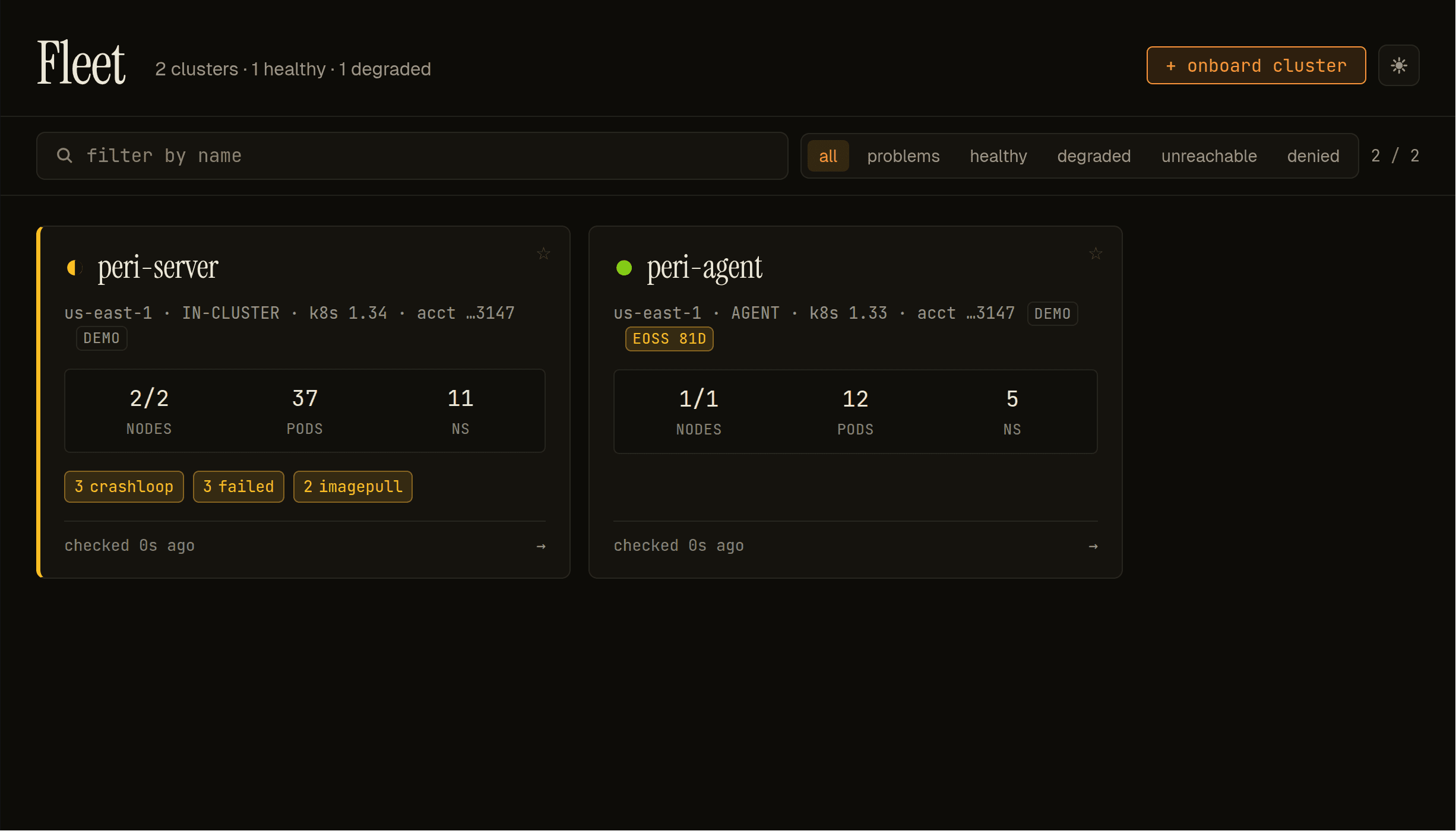
Each card carries the cluster's status glyph (● ◐ ✕ ○ ⌀), region, backend (IN-CLUSTER, EKS, KUBECONFIG, AGENT), K8s version, EoSS countdown chip when standard support ends within 180 days, node / pod / namespace counts, and workload-health hot signals (crashloop / failed / image-pull). Click a card to drill into the cluster overview. The + onboard cluster action in the top-right registers an additional cluster without restart — see agent-onboarding.md for the agent-backed flow.
8. Upgrades
helm upgrade periscope ./deploy/helm/periscope \
  --namespace periscope \
  --values my-values.yaml
Notes:
auth.yamlandclusters.yamlare mounted from ConfigMaps. The Deployment carrieschecksum/authandchecksum/clustersannotations so values changes auto-roll the pods.strategy: Recreate(not RollingUpdate) — the in-memory session store is per-replica; rolling-update overlap would orphan sessions on the outgoing pod. Users see a one-second blip during upgrades.- HA / multi-replica session store is a v1.x concern.
9. Common pitfalls
401 unauthenticatedeverywhere after install. That's the correct unauthenticated state — the SPA shows the LoginScreen at/and the IdP flow takes it from there. If the LoginScreen doesn't appear, check your Ingress is sending requests to the Service (kubectl -n periscope describe ingress periscope).CrashLoopBackOffimmediately on install. Almost always a missing Secret inexistingmode. Checkkubectl -n periscope describe podforsecret … not found.- Login bounces forever. Your IdP's allowed callback URL doesn't
match
auth.oidc.redirectURLexactly (trailing slashes, scheme, port). Both the IdP andauth.yamlmust agree. AssumeRole deniedwhen adding a cluster. The per-cluster role's trust policy doesn't allowperiscope-baseto assume it, or the EKS Access Entry isn't in place. The per-cluster RBAC walkthrough lives indocs/setup/cluster-rbac.md.
10. Feature configuration
The minimum values file in 3 only covers auth, clusters, and secrets. The chart also exposes pod exec, audit, NetworkPolicy, and PDB knobs — each has its own dedicated guide, summarised here.
10.1 Pod exec
Pod exec is on by default for every cluster. Tune the global
defaults under exec: (idle/heartbeat/cap settings) and override
per-cluster under clusters[].exec:. To disable exec on a specific
cluster, set clusters[<i>].exec.enabled: false. There is no global
"off" switch by design.
exec:
  serverIdleSeconds: 600       # 10 min
  maxSessionsPerUser: 5
  probeClustersOnBoot: false   # pre-warm cold clusters

clusters:
  - name: prod
    backend: eks
    arn: arn:aws:eks:us-east-1:111:cluster/prod
    exec:
      serverIdleSeconds: 1800  # 30 min for prod debugging
Full operator guide: docs/setup/pod-exec.md.
10.2 Audit log persistence
Off by default — events go to stdout (one JSON line per privileged
action). Turn on persistence to enable the in-app audit query view
at GET /api/audit:
audit:
  enabled: true
  retentionDays: 30
  maxSizeMB: 1024
  storage:
    type: pvc        # or emptyDir for kind/minikube
    size: 5Gi
Full operator guide: docs/setup/audit.md.
10.3 Helm release browser
The chart deploys a read-only Helm release browser. No values to set
— the SPA shows it under each cluster's "Helm" sidebar group. RBAC
follows the impersonated user (the browser auto-detects whether the
cluster uses the secret or configmap storage driver).
Full guide: docs/setup/helm-releases.md.
10.4 Multi-cluster fleet view
GET /api/fleet aggregates per-cluster status (nodes ready, pods by
phase, hot signals) across every registered cluster. The home page
uses it to render a fleet card grid. The endpoint runs each cluster
under the user's impersonation in parallel; per-cluster failures
become per-card error states without breaking the whole page.
There is no helm config for the fleet endpoint — it's automatic once clusters are registered.
10.5 Real-time list updates (watch streams)
Periscope's resource list pages update in real time via SSE for
registered kinds spanning core, config, workloads, networking,
storage, and cluster-scoped resources. Every registered kind is on by default;
the SPA falls back to polling when the EventSource fails. The
watchStreams: helm block lets operators opt out (e.g. behind a
proxy that mishandles long-lived connections), restrict to a
subset, or use group aliases to subscribe to a whole API surface
at once:
watchStreams:
  # Empty / "all" / "off" / "none" / comma list
  # Per-kind tokens: pods, events, configmaps, deployments, …
  # Group aliases:  core, config, workloads, networking, storage, cluster
  kinds: ""
  perUserLimit: 60    # concurrent SSE streams per OIDC subject
Full operator guide:
docs/setup/watch-streams.md. Contributor /
architecture view (the watchKind[T,S] primitive, how to add a
kind):
docs/architecture/watch-streams.md.
10.6 NetworkPolicy
Off by default. Every cluster has different ingress controller plumbing and IdP egress targets, so a templated default would either be too loose or too tight to use anywhere. Enable when you know your environment:
networkPolicy:
  enabled: true
  ingress:
    fromNamespaces:
      - kubernetes.io/metadata.name: ingress-nginx
Full guide: docs/setup/networkpolicy.md.
10.7 Pod Disruption Budget
On by default with maxUnavailable: 1 (single-replica v1 topology;
the PDB makes the drain semantics explicit in cluster audit). Set
pdb.enabled: false to skip. When HA support lands in v1.x, switch
to minAvailable per replicaCount.