Ask a Kubernetes operator where they go when the kubelet wedges, containerd leaks handles, or an EBS volume won't mount: onto the node, not into a pod. The pod-level view runs out of road, and you need a shell on the actual EC2 host.
Every usual answer rots the same way. An SSH key on every node is a key to rotate, a port to expose, and a credential that says nothing about who used it. A bastion is one more box to patch and a single shared hop. A shared SSM role attached to the dashboard pod makes every session in CloudTrail look identical, and turns one compromised pod into a compromised fleet.
Periscope v1.1.6 takes a different shape. A Node shell button on the node detail page opens a terminal onto the node's EC2 host, in the browser, over AWS Systems Manager. It opens that session with your short-lived AWS credentials, minted from the same OIDC login that authenticated you to the dashboard. No SSH key, no bastion, no inbound ports. The load-bearing property: the Periscope pod has no SSM permissions of its own, so the only thing that can open a session is a live id_token that AWS itself validates, and CloudTrail records it under the human.
This is the sequel to the per-user-impersonation post. That one carried the human's identity into the Kubernetes apiserver. This one carries it into AWS.
What you actually get
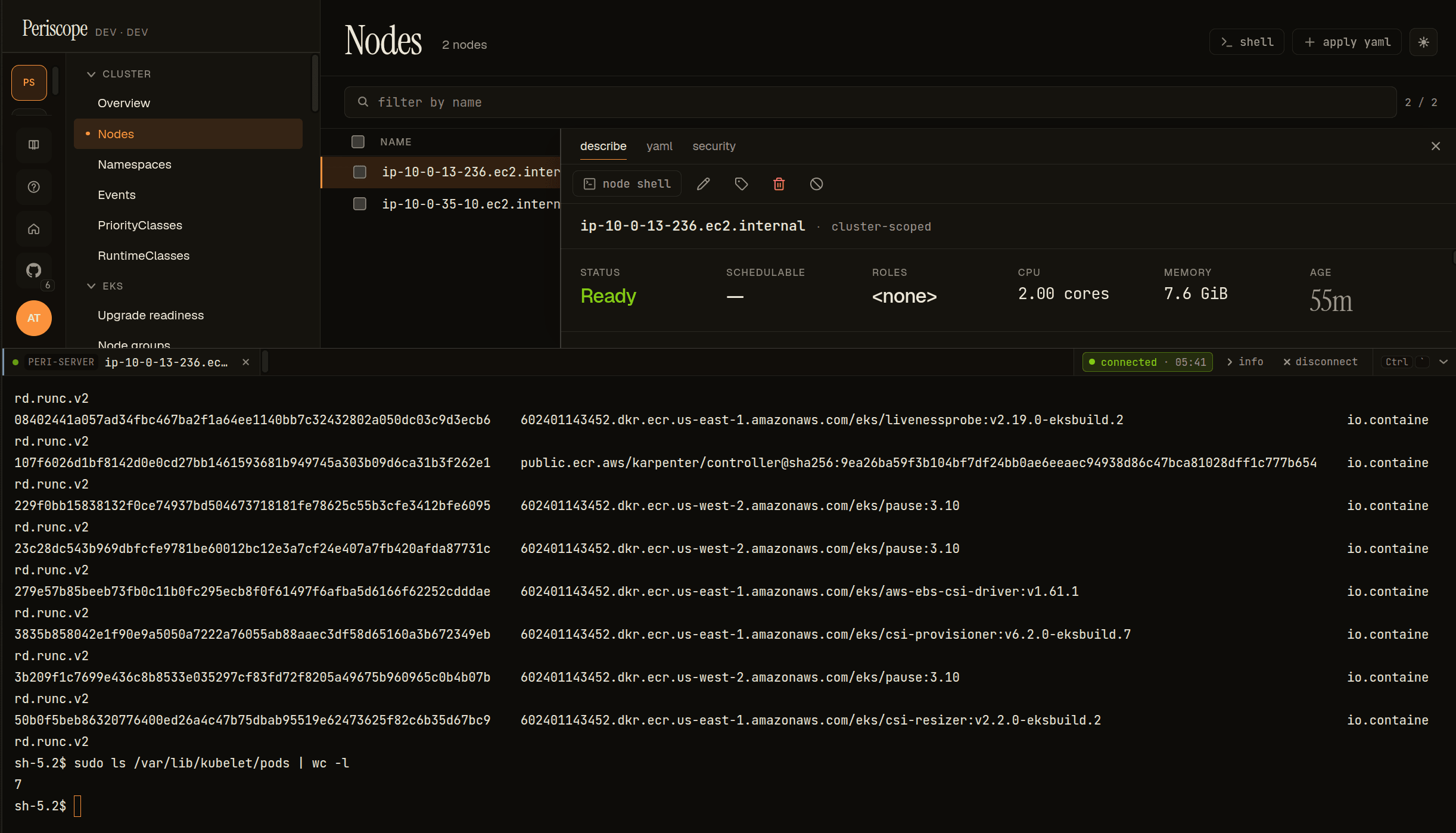
Click Node shell and you land at a sh-5.2$ prompt on the EC2 host, streamed to an xterm.js terminal in the dashboard (that's the banner image above). crictl ps shows the containers actually running on the node. /var/lib/kubelet/pods shows the pod mounts on disk. These are things that only exist on a real kubelet host, never inside a container. From here you can read journald, poke at containerd, inspect a stuck mount: the host-level debugging that pods can't reach.
One detail surprises everybody, so it's worth stating plainly. Inside the shell, whoami returns ssm-user, SSM's generic session account, not your username. That's expected. Attribution doesn't live in the prompt; it lives in the trail. The session id and CloudTrail both carry your OIDC sub, and Periscope's own audit log records the same session id. The shell is generic. The record is yours.
How a keystroke reaches the node
The chain from a browser keystroke to the node's shell composes four things, only one of which we wrote:
[user clicks Node shell]
  → Periscope takes the user's OIDC id_token from their session
  → sts:AssumeRoleWithWebIdentity(role=periscope-node-shell, token=<id_token>)
        AWS validates the token against the IAM OIDC provider and the
        role's TRUST POLICY. Fail here and no session is ever created.
  → ssm:StartSession(target=i-0abc...) with the user's freshly-assumed creds
  → session-manager-plugin  ⇄  MGS data channel  ⇄  the node's SSM agent
  → a WebSocket bridge fans the plugin's stdio to xterm.js in the browser
The deliberate non-goal: we do not reimplement the SSM message-gateway (MGS) binary protocol. session-manager-plugin is AWS's maintained, Apache-2.0 reference client, so production composes it. This is the same discipline as our earlier exec feature, which reused client-go's exec machinery instead of reimplementing the exec wire format. The Periscope server shells out to the plugin, owns its stdio, and bridges that to a WebSocket. The frame protocol stays small: binary frames are terminal bytes in both directions, a {type:"close"} text frame ends the session, and a non-retryable error frame surfaces a clean terminal error instead of a reconnect loop.
The genuinely new code is narrow, and lives in three places worth reading:
internal/awsssm/holdsAssumeWebIdentity(the STS exchange),Open/Terminateover the data channel, the plugin shell-out, the preflight checks, an idle-watch that closes abandoned terminals, and a capped transcript buffer for the audit trail.cmd/periscope/ssm_shell_handler.goupgrades the WebSocket first, then runs the gate and preflight, reporting any failure as that non-retryable error frame, then bridges frames to the plugin's stdio.internal/auth/idtoken.gois the id_token egress seam, which gets its own section below.
Proving the transport before trusting it
None of this touched the product before the transport was proven in isolation. There's a standalone spike in the periscope repo at hack/poc-ssm-data-channel/: isolate the one genuinely new primitive, beat on it, then compose it into the feature.
The spike stubs the auth layer with the laptop's ambient AWS credentials (the default chain: AWS_PROFILE, SSO, env). That leaves exactly one thing under test:
ambient creds → ssm:StartSession → session-manager-plugin → interactive bytesIts Terraform stands up a free-tier t2.micro with the SSM agent preinstalled, and prints a ready-to-paste run hint:
cd hack/poc-ssm-data-channel
go run . --instance-id i-0abc123 --region us-east-1   # interactive shell
go run . --instance-id i-0abc123 --assert             # round-trip an echo token, then exit
Then terraform apply -var enable_oidc=true stands up the real role, and you swap ambient creds for the production model. Drop a real id_token in a file, and the probe prints the token's claims, runs the aud pre-check, calls AssumeRoleWithWebIdentity, and prints the assumed-role ARN: the human the session is attributed to. Run it with a token whose claims don't satisfy the trust policy, and STS refuses before any session opens. That's the security gate, demonstrated end-to-end on real AWS, in about 580 lines you can read in one sitting. The spike's README has the annotated screenshots.
Why this is safer than a shared role
Three independent gates must all pass to open a node shell, and they live in three different systems.
- The IAM trust policy (AWS-side) is the real gate. The role is assumable only by presenting a live id_token that AWS validates against the OIDC provider you registered. Periscope's own pod role has zero SSM permissions, so compromising the pod grants no node access. The pod has nothing to grant.
- Periscope's tier check (app-side) decides whether this user's tier may open a shell (
nodeShell.tiers). - The
nodeShell.enabledHelm flag is the operator kill-switch.
Any one failing denies the shell. And because each session uses a per-user assumed role, CloudTrail records who opened it. A shared bot role makes every session look identical. This makes every session name a human.
Firewalling the id_token
A raw id_token is a bearer credential: anything holding it can act as the user against AWS. So in the codebase it's treated like one. internal/auth/idtoken.go defines IDTokenSource.FreshIDToken as the single sanctioned point where a raw id_token leaves the auth layer. Handlers never reach into the session for it directly. The seam refreshes the token ahead of expiry, collapses a concurrent burst of refreshes into one with a sharded mutex, and returns a typed ErrReauthRequired when the refresh token is spent (the SPA turns that into a clean "sign in again" instead of a mystery 500). Exactly one consumer sits on the other side of that seam: the SSM STS exchange. Firewalling the token to one code path is the difference between "we exchange the id_token for short-lived AWS creds" and "the id_token is floating around the request handlers."
Two trails, one human
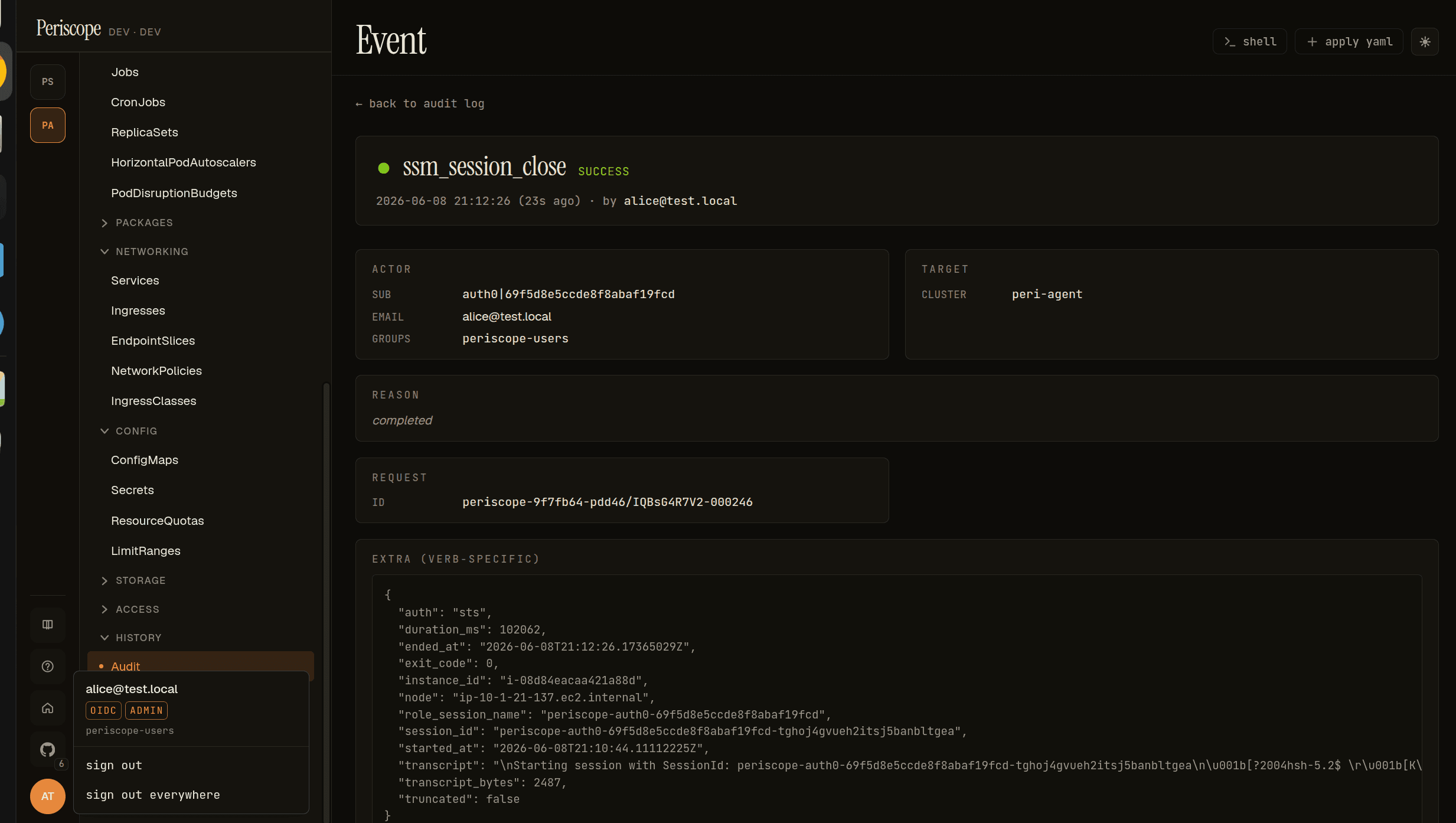
Every session writes two Periscope audit rows, ssm_session_open and ssm_session_close, carrying the assumed-role identity, the instance, the duration, the exit code, and (on close) the captured transcript:
On the AWS side, CloudTrail records each StartSession under the per-user assumed-role session, assumed-role/periscope-node-shell/periscope-<sub>:
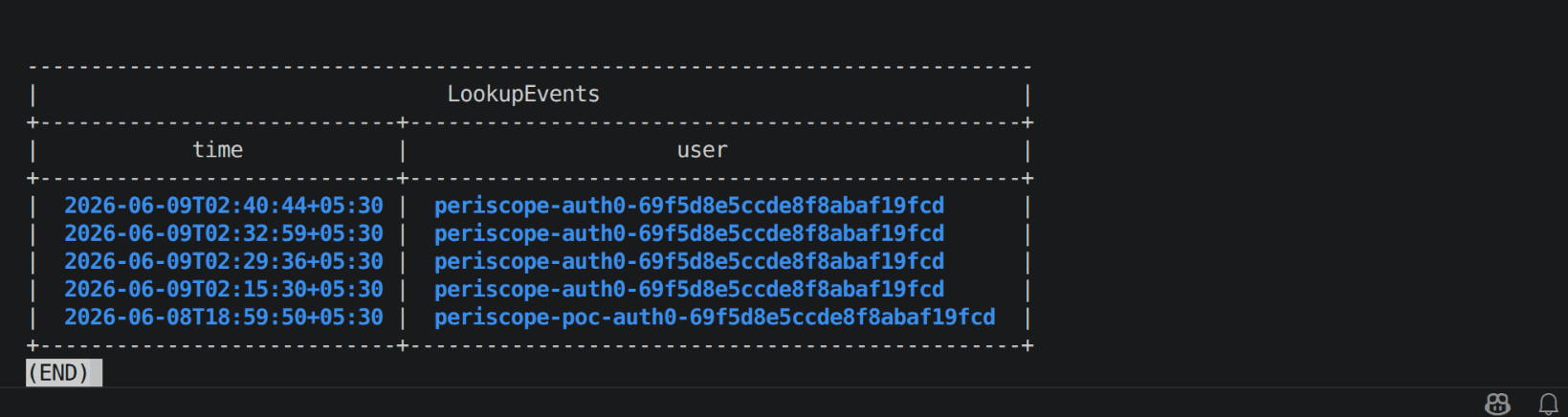
The two join on the role-session-name and session_id. So you can stand Periscope's audit log next to CloudTrail and they correlate, row for row, by the human. It's the same property the cluster-shell audit buys you, now extended to the AWS control plane. The transcript in the close row is the forensic record of what happened inside the shell. It's a record, not a preventive control, and it's capped at transcriptMaxBytes.
Three gotchas that nearly sank it
This is the part worth writing down. All three are real, all three cost time, and all three produce a misleading AccessDenied that points you at the wrong thing.
Don't gate the trust policy on a groups claim
This is the single most common mistake, and it silently does not work. AssumeRoleWithWebIdentity trust policies reliably expose only standard claims (aud, and sub) as condition keys. A custom, namespaced array claim like https://yourapp/groups is not evaluated, so a StringEquals condition on it yields AccessDenied even for a user who is in the group. Gate the trust policy on aud (the OIDC client_id), and do group authorization in Periscope (nodeShell.tiers). That division is correct, not a workaround. AWS authenticates who you are; Periscope decides what your tier may do.
StartSession authorizes the document too, and you can't tag-scope it
StartSession checks two resources in one call: the EC2 instance and the SSM document (SSM-SessionManagerRunShell). It's natural to scope the role to one cluster's nodes with a tag condition:
// WRONG — the condition denies the document
{
  "Effect": "Allow",
  "Action": "ssm:StartSession",
  "Resource": [
    "arn:aws:ec2:<region>:<account>:instance/*",
    "arn:aws:ssm:<region>:<account>:document/SSM-SessionManagerRunShell"
  ],
  "Condition": { "StringEquals": { "ssm:resourceTag/eks:cluster-name": "<cluster>" } }
}
The SSM-SessionManagerRunShell document is an AWS-managed resource. It carries no eks:cluster-name tag, so the condition fails for the document, and the whole call is denied (AccessDenied ... on resource: .../document/SSM-SessionManagerRunShell) even though the instance was fine. The fix is two statements: a tag-conditioned one for instances, an unconditional one for the document.
// RIGHT — split into two statements
{ "Sid": "Instances", "Effect": "Allow", "Action": "ssm:StartSession",
  "Resource": "arn:aws:ec2:<region>:<account>:instance/*",
  "Condition": { "StringEquals": { "ssm:resourceTag/eks:cluster-name": "<cluster>" } } },
{ "Sid": "Document", "Effect": "Allow", "Action": "ssm:StartSession",
  "Resource": "arn:aws:ssm:<region>:<account>:document/SSM-SessionManagerRunShell" }
SSM bypasses the agent tunnel, which is the feature
Periscope reaches some clusters over a WebSocket tunnel (on-prem, no-inbound, customer-managed EKS). You might assume a node shell on those clusters has to ride the tunnel too. It doesn't, and that's the point. The SSM session is opened by the central server, straight to the AWS SSM endpoints, using the user's assumed-role creds. Only the node-to-instance-id lookup goes through the tunnel. So node shell works for agent-backed clusters as long as the node's SSM agent is Online and the server can reach ssm and ssmmessages, with no inbound path to the node. We validated this on a genuinely separate-VPC, agent-tunneled cluster, and the session opened server-side without the tunnel carrying a single terminal byte.
[!NOTE]
The full operator guide (OIDC provider setup, the trust and permission policies with the two-statement split, the Helm values, single- vs multi-account fleets, and a troubleshooting table keyed by the exact AccessDenied strings) lives at docs/setup/node-shell-ssm.
Wiring it up
For a single-account fleet, one role covers every cluster's nodes:
nodeShell:
  enabled: true
  awsRoleArn: "arn:aws:iam::<account>:role/periscope-node-shell"
  oidcAudience: "<client-id>"   # the id_token aud = your OIDC client_id
  region: "<region>"
  tiers: [admin]                # which Periscope tiers may open a shell
  idleSeconds: 600
  transcriptMaxBytes: 1048576
Multi-account is the same shape per cluster: each cluster points at the role in its own account, and the same id_token federates into every account that trusts the issuer (one login, no re-auth), because ssm:StartSession is account-local. The server image bundles session-manager-plugin, so there's no extra binary to ship.
What's next
The fastest way to internalize the transport, without standing up Periscope at all, is to clone hack/poc-ssm-data-channel/, terraform apply the throwaway t2.micro, and run the probe: first with ambient creds, then with enable_oidc=true and a real id_token. Watch STS refuse a bad token before any session opens. That's the whole security model in one command.
The takeaways that survive across implementations:
- Compose AWS's plugin, don't reimplement MGS. The maintained reference client is the right dependency.
- Make the IAM trust policy the gate, not your app. A pod with no SSM permissions can't be tricked into opening a session.
- Gate trust on
audandsub; do group authz in your app. Namespaced array claims aren't trust-policy condition keys. StartSessionneeds the instance and the document. Split the statement if you tag-scope.- Attribution lives in the trail, not the shell.
ssm-userin the prompt, the human in CloudTrail.
The full architecture is in the periscope repo. The design lands issue #105, and the node-shell setup guide is in docs/setup/.
Then the GPU thread picks back up. The MPS misattribution post showed how Kubernetes telemetry loses track of who's using a software-shared GPU. The sibling question is MIG (Multi-Instance GPU) slicing, where one physical GPU is partitioned into hardware-isolated instances: how DCGM reports utilization per MIG slice, and how that MIG topology fits the Periscope data model. I'm currently fighting a GCP MIG setup into a reproducible lab rig. Once it tells the truth, the lab notes follow.
GitHub · Docs · Previous: per-user impersonation in Kubernetes
Periscope is built by @gnana997. The in-browser node shell ships in v1.1.6.