The question
Your cron-rotator pod started 500-ing at 9am. The container logs say:
AccessDenied: User: arn:aws:sts::000000000000:assumed-role/eks-cron-rotator/...
is not authorized to perform: kms:Decrypt on resource: arn:aws:kms:...
Someone updated the eks-cron-rotator role yesterday in a "small cleanup PR" — removed a KMS policy they thought was unused. Easy fix: put it back. But before you do, you'd really like to know two things:
- What else does this role grant? Maybe the policy you're about to re-add is part of a larger problem — and you'd rather know now than after the next page.
- What other workloads use this role? If
cron-rotatorbroke, what didn't, and why? Is apayments-workerpod limping along on the same role you should also be looking at?
If your answer is "let me check kubectl get sa -A -o yaml | grep eks.amazonaws.com/role-arn, then for each matching SA go to the IAM console, look at attached policies, expand them, then cross-reference against every pod in every namespace" — congratulations, you're like most EKS teams. It takes 20 minutes if you're lucky, and you're never quite sure you got all the policies.
Or another flavor of the same question:
- "Did we accidentally give
iam:PassRoleto a deployment that didn't need it?" - "Our intern's namespace can't access SQS, but the default ServiceAccount can. Why?"
- "We migrated from
aws-authto Access Entries six months ago. Is the migration actually done?" - "Someone exfiltrated data from our S3 bucket. The bucket policy is locked down — which pods, in which clusters, have a role that can read it?"
EKS is the only managed Kubernetes where your pods inherit cloud-provider identity through three layers (Kubernetes RBAC, IRSA or Pod Identity, then IAM), where the auth model itself just changed (aws-auth → Access Entries), and where the answers to "who can do what" live across the AWS Console, the IAM API, kubectl, and a ConfigMap nobody wants to touch.
Periscope v1.1 is the release that makes these questions answerable in seconds. Today we're shipping:
- A unified Cluster Access view that reconciles Access Entries with
aws-authin one table, with migration-health at a glance - An AWS Access tab on every Pod / ServiceAccount / Deployment / StatefulSet / DaemonSet — every IAM policy attached to your workload's role, grouped by AWS service, with the dangerous permissions flagged
- A reverse lookup: type an action and a resource ARN, get back every pod in the cluster that can perform it
It's also explicitly not the release that answers "what can this pod effectively do in AWS, after SCPs and permission boundaries and conditions." That answer is harder, and it's what v1.3 is for. We'll get to the limits in a minute. First, the parts that ship.
1. Cluster Access — the aws-auth → Access Entries migration tool EKS forgot to ship
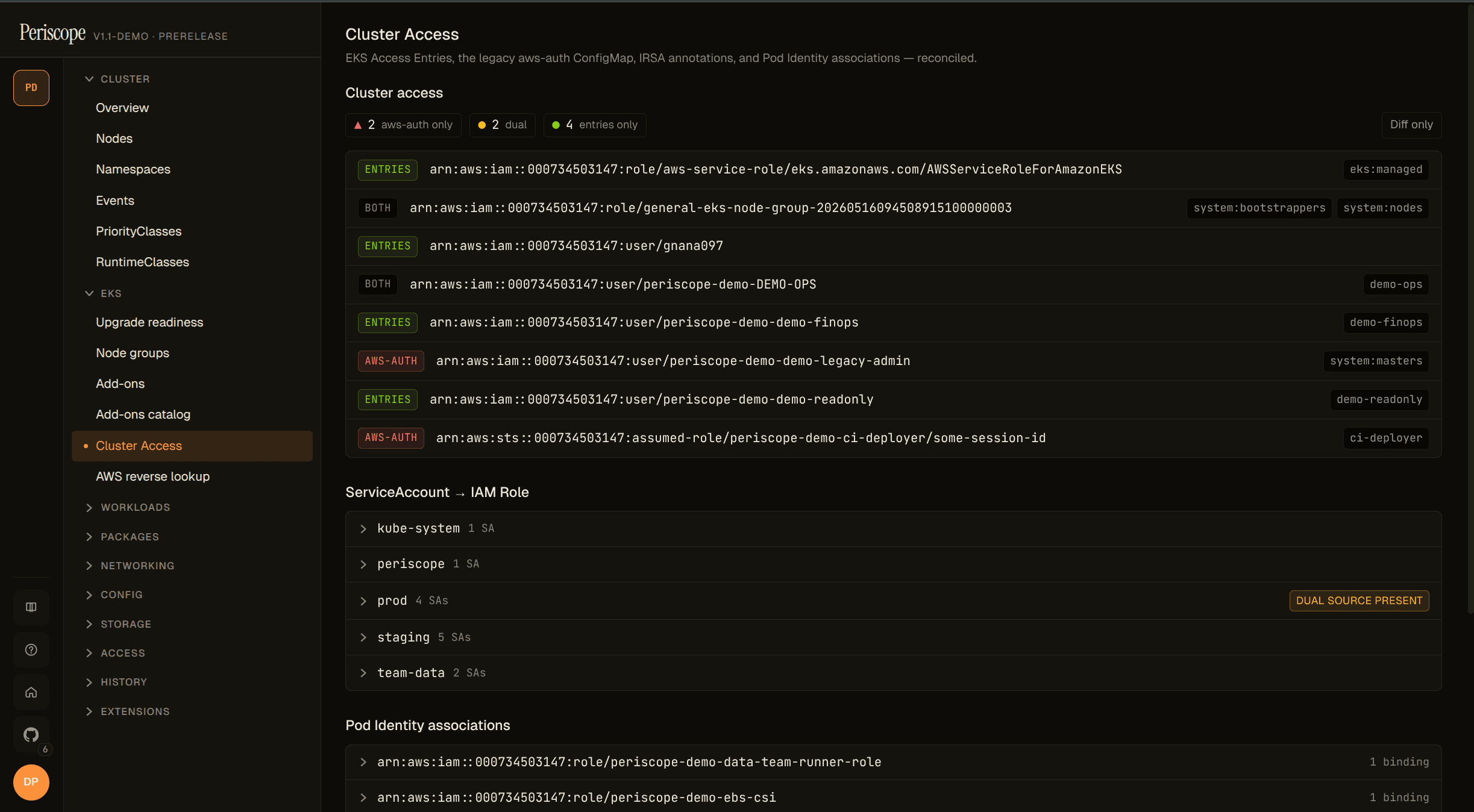
Open any cluster in Periscope and click Cluster Access in the sidebar. You'll see every IAM principal that has access to the cluster — whether it was granted via the modern Access Entries API or the legacy aws-auth ConfigMap or (uncomfortably often) both.
Each row tells you:
- The IAM principal (user, role, or account)
- The source:
Access Entry,aws-auth, orBoth - The Kubernetes group(s) it maps to
- The associated access policies (for entries) —
AmazonEKSClusterAdminPolicy,AmazonEKSAdminPolicy, your custom policies - A type tag:
STANDARD,EC2_LINUX,FARGATE_LINUX, etc.
At the top of the page, a single chip summarizes your migration:
2 aws-auth-only · 2 dual · 4 entries-only
That chip is the answer to a question every team in 2026 is asking and nobody else displays in one place: am I done migrating? If the first number is non-zero, you have aws-auth rows that haven't been moved to Access Entries. If the second number is non-zero, you have duplicates — the same principal granted access twice, which won't break anything but means your migration is incomplete and confusing.
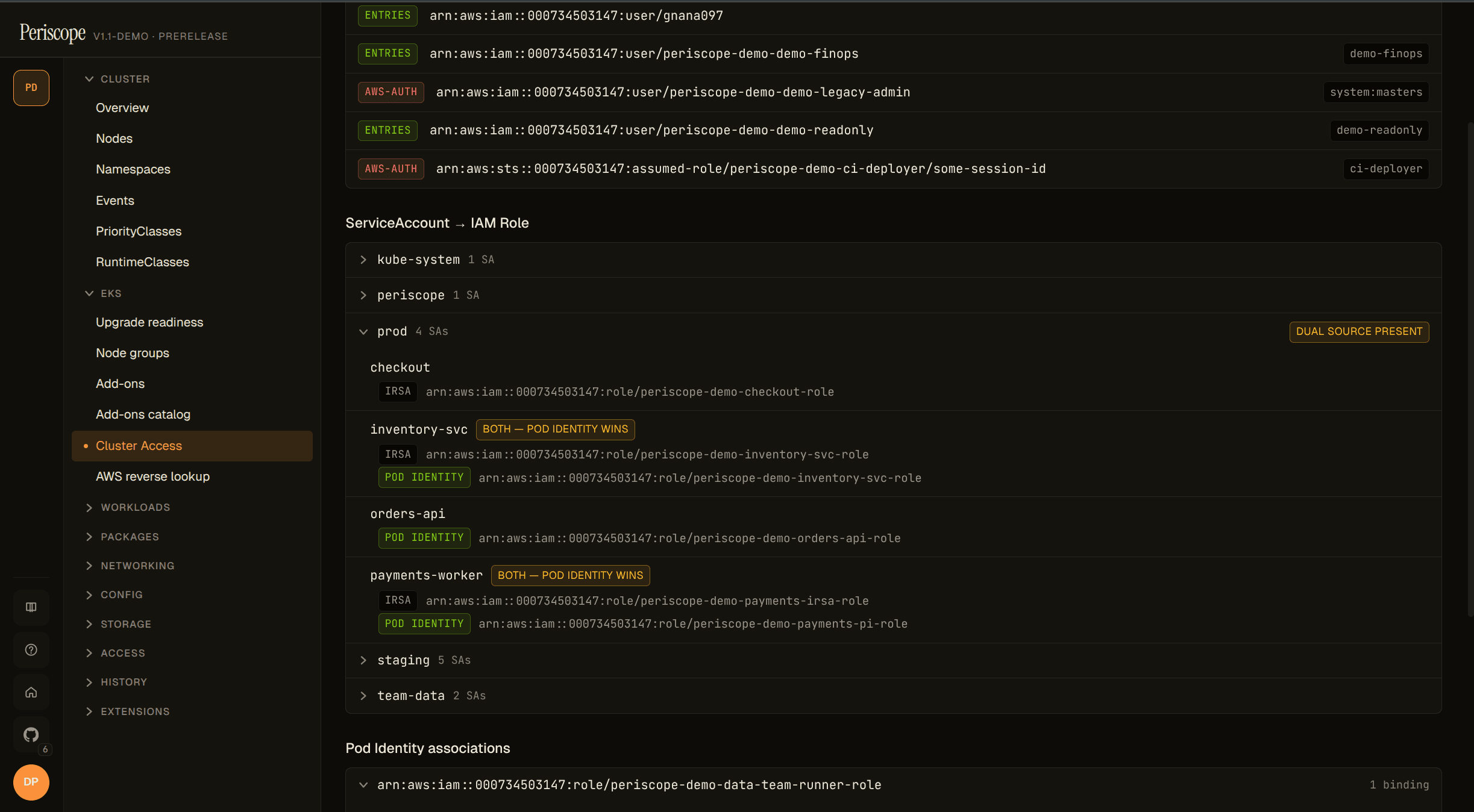
Below the diff table sits a unified SA → IAM Role index: every ServiceAccount in the cluster, the role(s) bound to it across IRSA annotations and Pod Identity associations, and a flag when both mechanisms point at IAM (Pod Identity wins at runtime; the IRSA annotation is shadowed dead config). When iam:GetRole says a bound role doesn't exist, that row goes red with a "role not found" caption — the orphan PI and stale IRSA cases operators care about.
What this view does NOT do (yet):
- It doesn't edit Access Entries. v1.1 is read-only.
- It doesn't generate the
aws eks create-access-entrycommands to migrate rows. That's a future release. - It doesn't resolve "this principal in this K8s group means it can do these verbs on these resources." It tells you the groups; computing effective K8s RBAC is a different feature.
It's a viewer. But it's the viewer EKS shipped without — and the migration-health chip alone is worth opening Periscope for if you're mid-migration.
2. AWS Access tab — every IAM policy your pods inherit, in one place
Click any Pod, ServiceAccount, Deployment, StatefulSet, or DaemonSet in Periscope. There's a new tab: AWS Access.
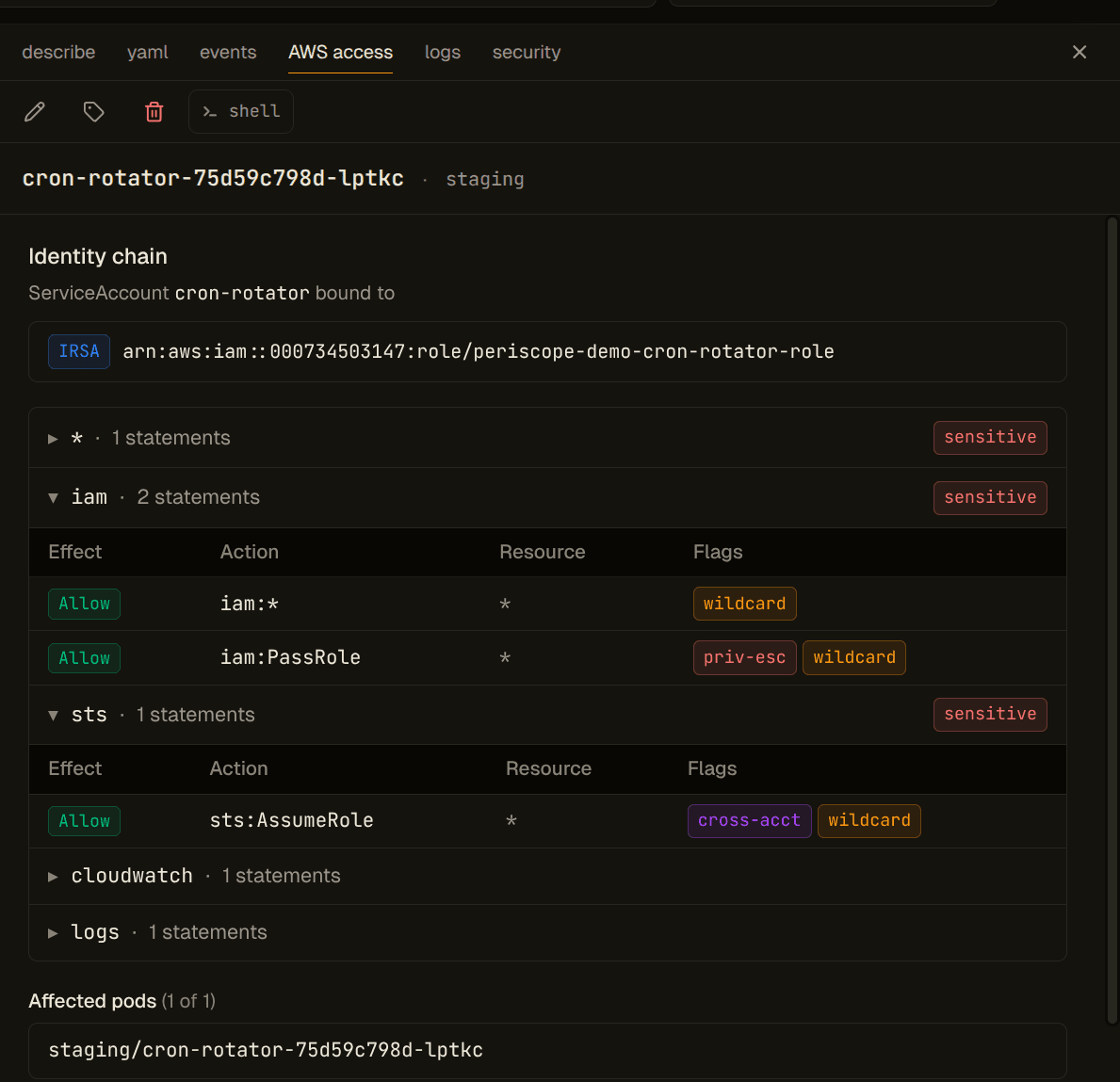
Top of the tab: the identity chain.
Pod  api-7f9c8d6b4-z2k7q
 └─ ServiceAccount  default/api-sa
     └─ Role  arn:aws:iam::123456789012:role/eks-api-prod
         [ Pod Identity ]  [ IRSA shadowed ]
The chain tells you how this pod gets to AWS. The badges tell you which mechanism is live — Pod Identity wins over IRSA at runtime when both are configured, and the dashboard flags that so you can clean up shadowed annotations.
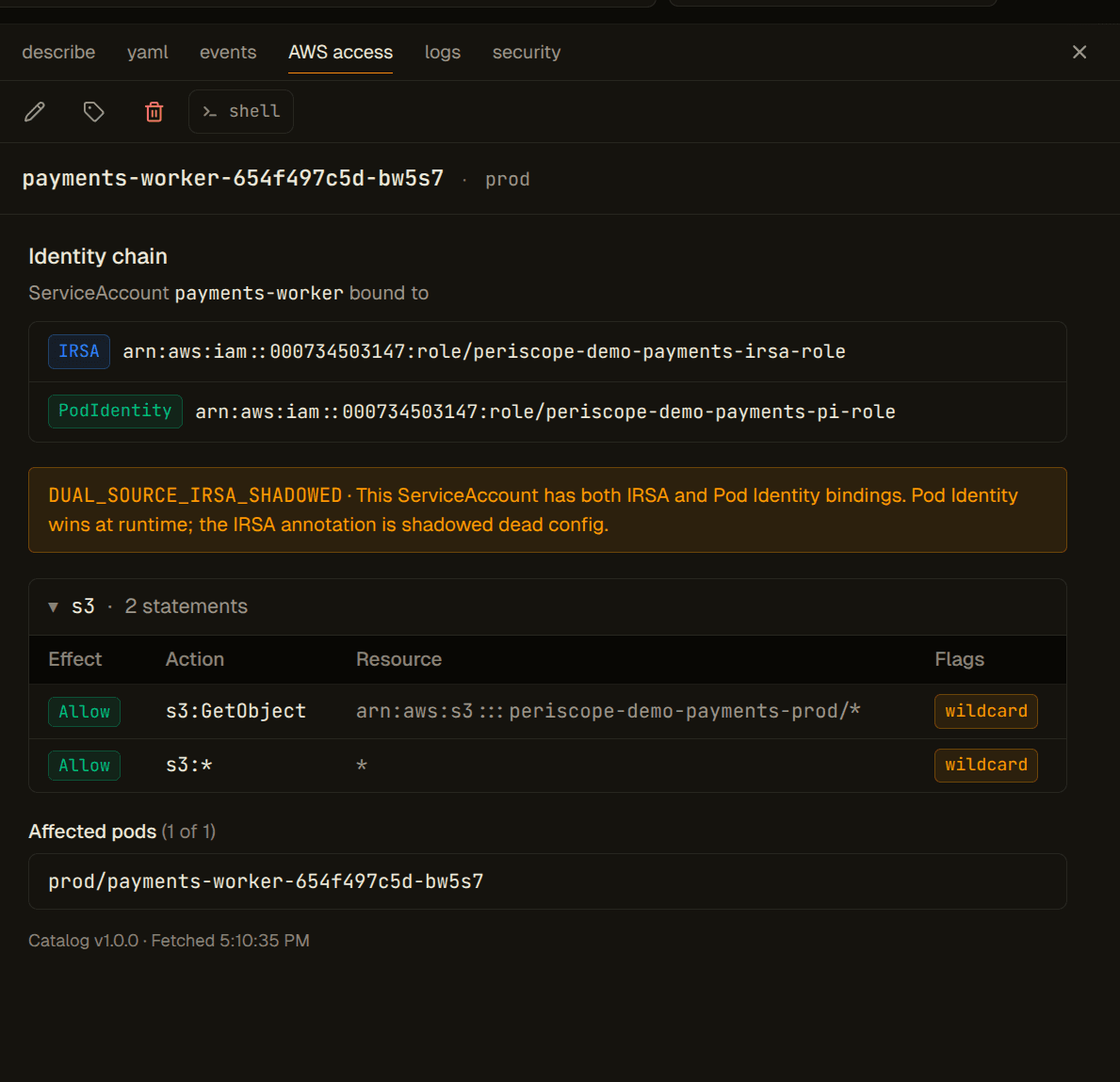
Below the chain: permissions grouped by AWS service. A typical production role touches 20–40 services. Periscope groups them — S3, SecretsManager, KMS, SQS, IAM, EKS, EC2 — and lets you collapse the ones you don't care about. Click any service to see the underlying statements:
S3  (Allow, 4 statements, 1 sensitive)

  Allow  s3:GetObject  on  arn:aws:s3:::company-app-data/*
  Allow  s3:PutObject  on  arn:aws:s3:::company-app-data/*
  Allow  s3:ListBucket on  arn:aws:s3:::company-app-data
  Allow  s3:DeleteObject* on arn:aws:s3:::company-app-data/*    [⚠ destructive]
       ↑ Condition: aws:RequestedRegion = us-east-1  [condition not evaluated]
You see the policy as written — wildcards stay as wildcards, conditions are shown but flagged as not-evaluated. The red chip on s3:DeleteObject* is from Periscope's sensitive-permissions catalog — 18 chip-types we flag for review regardless of context.
The sensitive-permissions catalog
These are the actions that get a red chip wherever they appear:
- Privilege escalation (6):
iam:PassRole,iam:CreateAccessKey,iam:AttachRolePolicy,iam:PutRolePolicy,iam:CreateRole,iam:UpdateAssumeRolePolicy - Data (4):
secretsmanager:GetSecretValue,ssm:GetParameter*,kms:Decrypt,kms:GenerateDataKey - Cross-account (1):
sts:AssumeRole - Destructive (4):
s3:DeleteBucket,s3:DeleteObject*,ec2:TerminateInstances,rds:DeleteDBInstance - Cluster self-modify (2):
eks:UpdateClusterConfig,eks:DeleteCluster - Wildcard (1): any statement with
Action: "*"— special-cased in the matcher rather than a YAML entry
17 actions in the locked YAML (internal/awseks/iam/sensitive.yaml, version 1.0.0) + the literal * fallback = 18 chip-types. The list is opinionated and small on purpose. If you want a longer audit, run the reverse lookup.
What this view does NOT do (yet):
- It doesn't evaluate conditions. If a statement has
Condition: aws:PrincipalTag/team = "platform", we show it as conditional but don't tell you whether the pod's role actually has that tag. - It doesn't evaluate SCPs or permission boundaries. Your AWS organization may deny things that the role's identity policies appear to allow. We surface the identity grants; you'd have to check the org separately.
- It doesn't follow
sts:AssumeRolechains across accounts. The chip flags that the role can assume another role; v1.3 walks the chain. - It doesn't resolve resource-based policies. An S3 bucket may grant your pod access via the bucket policy without the pod's role mentioning the bucket. We see identity-side only.
If you're security-auditing for compliance, treat the tab as the upper bound of what the pod's role grants. The effective surface is smaller (after SCPs, conditions, boundaries) but the inventory is exhaustive on the identity side.
3. Reverse lookup — "find me every pod that can delete an S3 bucket"
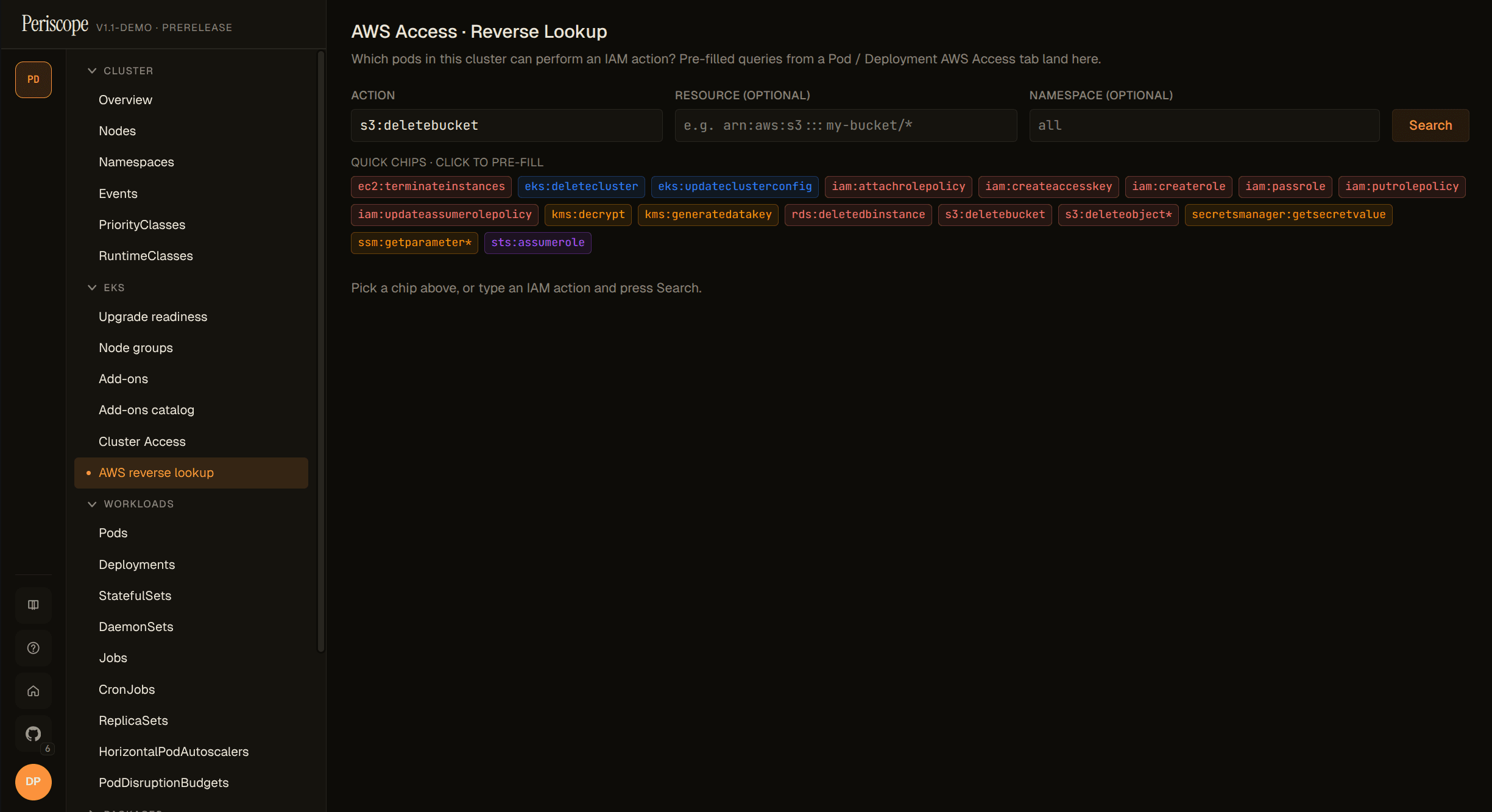
The forward view answers "what can this pod do?" The reverse lookup answers the question you actually get paged for: "which pods can do X?"
Type an action: s3:DeleteBucket. Type a resource (or leave it *): arn:aws:s3:::company-prod-data. Hit search.
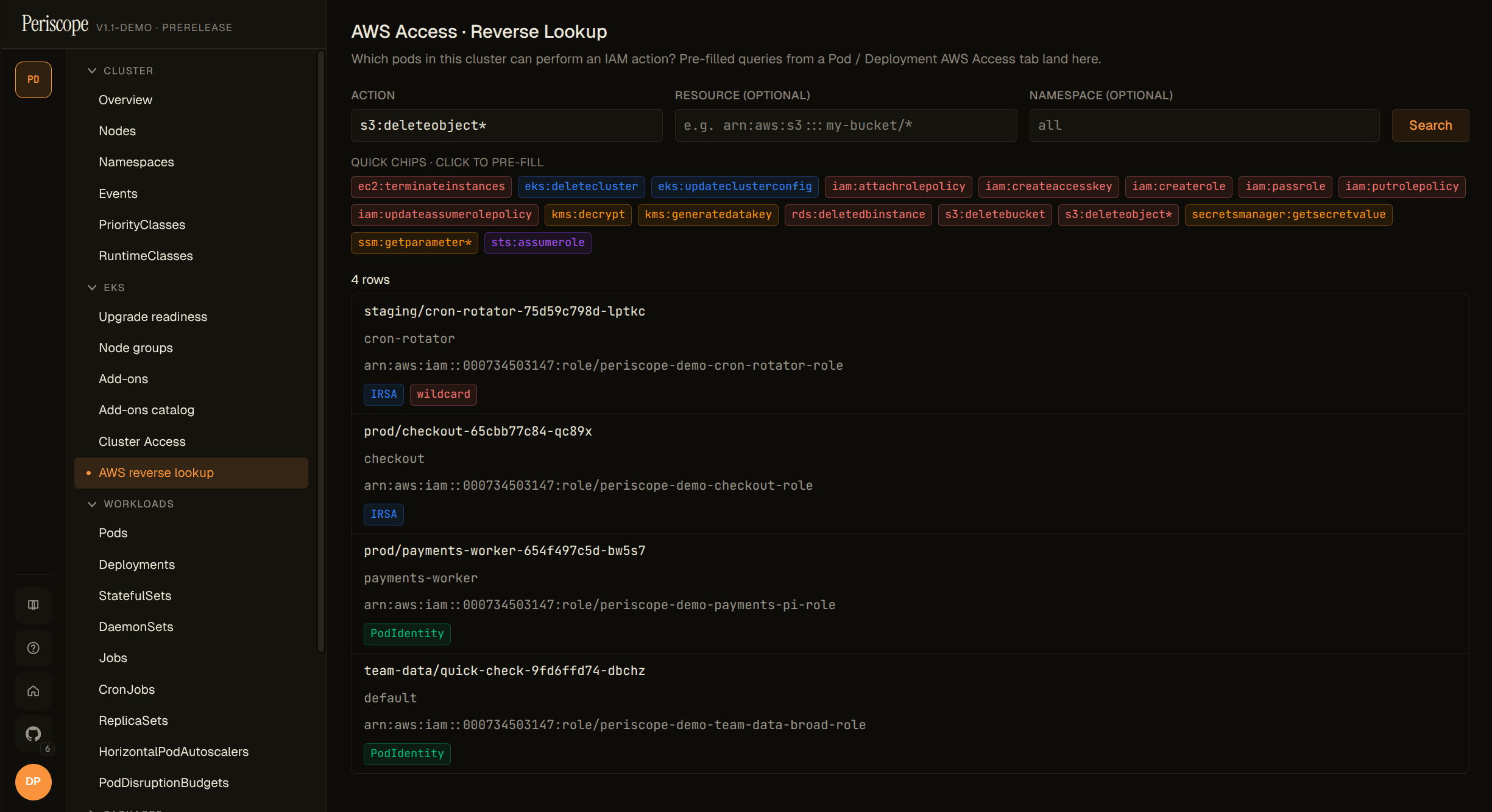
Results come back as a table. One row per matched pod, with binding-source attribution (IRSA / Pod Identity) and a chip for why it matched: an explicit s3:DeleteBucket statement gets a destructive chip; a statement granting s3:* or Action: "*" gets a destructive chip and a wildcard chip — those rows are the ones to investigate first.
The reverse lookup is per-cluster in v1.1. Fleet-wide reverse lookup (across all clusters Periscope is registered with) lands in v1.3 alongside the cross-account work. The reason: doing it cleanly across clusters requires every cluster's IAM index to be warm and queryable in parallel, with sensible partial-result UX when one cluster's AWS reads fail. That's an operational story we want to ship right rather than fast.
When you don't have the IAM grant yet
The AWS Access surfaces need IAM read permissions on the role Periscope itself runs as. The first time you open one without those grants, you get a locked-feature pane instead of a 403 storm:
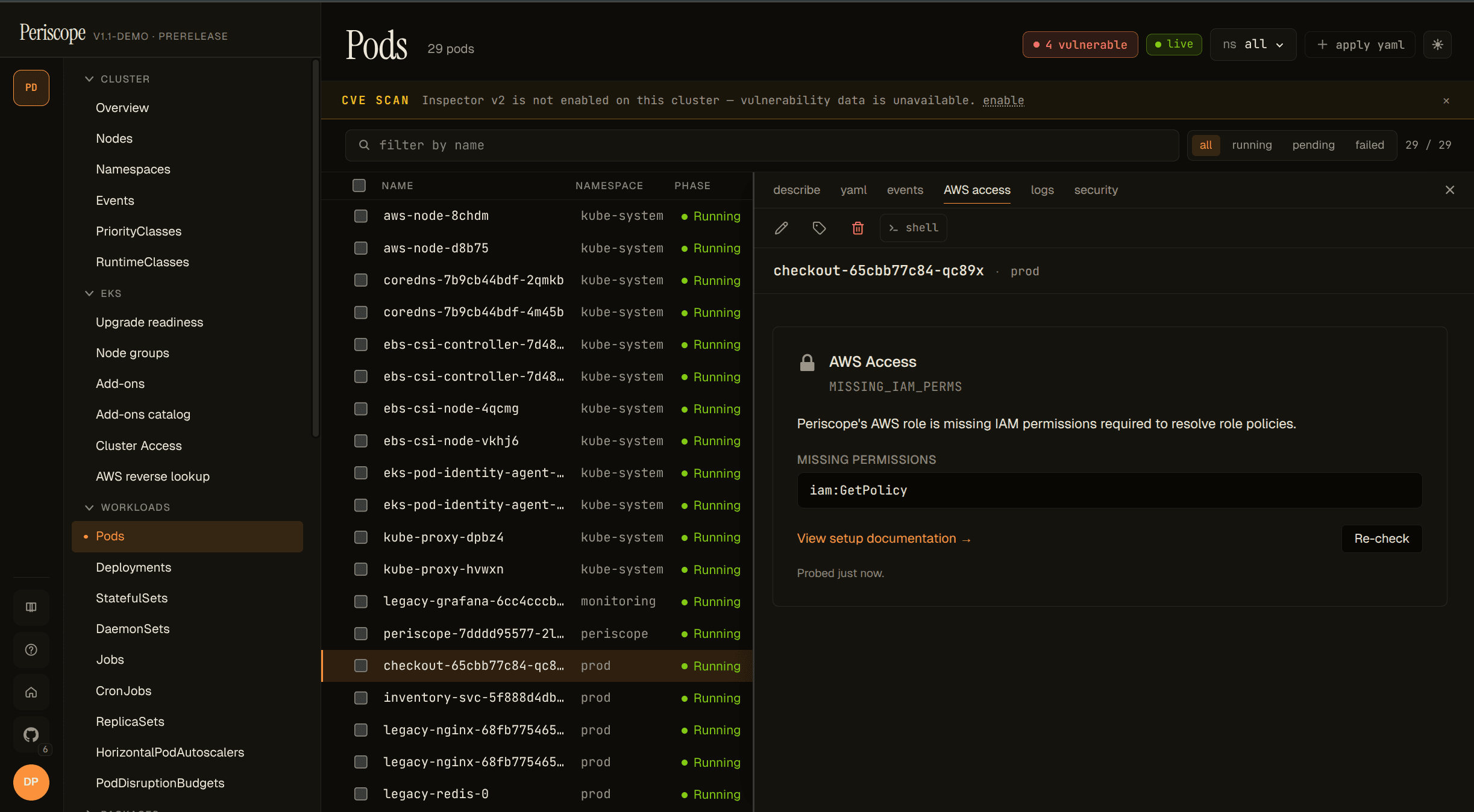
The pane carries a stable reason code (one of NOT_EKS / RBAC_DENIED / MISSING_IAM_PERMS / NO_IDENTITY_CONFIGURED / INFORMER_WARMING / IAM_PROBE_DISABLED), the exact missing IAM actions, and a link to the docs that show the IAM block to paste. The probe uses iam:SimulatePrincipalPolicy so we can tell you precisely what's denied, not "something is wrong, check the docs."
If you'd rather not grant iam:SimulatePrincipalPolicy itself, set PERISCOPE_AWS_ACCESS_IAM_PROBE=false and the response falls back to optimistic available: true with a one-line note — the first real call surfaces any missing perm as the operator's existing 403 error chip.
What v1.1 is honestly not
I've been calling these out as we went, but worth collecting in one place. v1.1 does not:
- Evaluate IAM conditions (
aws:RequestTag,aws:SourceVpc,aws:PrincipalTag, etc.) - Evaluate Service Control Policies or permission boundaries
- Walk
sts:AssumeRolechains across accounts - Resolve resource-based policies (bucket policies, KMS key policies, etc.)
- Run reverse lookups across multiple clusters in one query
- React to IAM changes in real time (we cache AWS reads for 5 minutes and offer a refresh button)
- Validate OIDC trust policies (the "IRSA configured but the OIDC provider is broken" case)
These are real limits. We don't claim "effective AWS access" for v1.1 because we don't compute it. We claim inventory of identity-policy grants, which is what the engine actually does.
What's coming next
The deferred items above aren't just "we'll get to it" — they're paced across the next two minor releases.
v1.3 is the effective access release:
- Conditions evaluated for common keys (
aws:RequestTag,aws:PrincipalTag,aws:SourceVpc,aws:SourceArn). Reverse lookup gains a "matches unconditionally" filter. - SCPs and permission boundaries applied. The forward view gets a "policy grants X, SCP denies X, effective: denied" delineation.
- Cross-account
sts:AssumeRolechain walking, with per-target-account credentials and a recursion guard. - Fleet-wide reverse lookup across every registered cluster, with proper partial-result UX.
- CloudTrail-driven cache invalidation so policy changes show up in seconds, not minutes.
Plus the AWS compliance lens — CloudTrail pod-correlation + cluster-wide kube-apiserver audit ingestion ("every action by every identity, one feed") — and the related-resources graph that gives every detail pane a Related tab.
v1.2 lands first with a different focus: GPU + AI workload visibility (Pod ↔ GPU map, Idle GPU finder, DCGM reconciler), in-browser cluster shell with single-row audit, SSM-into-EKS-nodes with per-user impersonation, and Helm private OCI auth. The full release roadmap with theme bands is on the roadmap page.
v1.4 wraps the arc with an agent-native chat surface and an MCP-style tool registry over the wire shapes shipped in v1.1–v1.3.
If you want to be notified when these land, watch the GitHub repo or subscribe to the changelog feed.
Try it
Periscope is open source under Apache-2.0. Install the chart as an OCI artifact:
helm install periscope \
  oci://ghcr.io/gnana997/charts/periscope \
  --version 1.1.0 \
  --namespace periscope --create-namespace
The image lives at ghcr.io/gnana997/periscope:v1.1.0; chart and image are both signed via cosign keyless with SBOM and intoto attestations attached to the GitHub Release.
The AWS Access features need IAM read permissions for the role Periscope runs as — see the AWS Access guide for the operator walkthrough, and cluster-rbac for the IAM block you can paste into your IaC.
If you'd rather see the surface light up on a throwaway cluster before integrating, the periscope-demo-eks-antipatterns repo provisions a small EKS cluster wired up with all 12 of the IAM antipatterns the SPA detects (broad wildcards, dual-source SAs, orphan Pod Identity, stale IRSA annotations, broad OIDC trust, default-SA blind spot) plus four vulnerable container images for the Security tab. Costs ~$2 to spin up and tear down in a single capture session.
GitHub · Docs · Demo cluster repo
Periscope is built by @gnana997. v1.1.0 shipped on 2026-05-16.